Codecast in the cloud
Every cloud feature, end to end: a host in your own AWS account that starts from your uncommitted work, carries your agent config and logins, mirrors its edits back to your laptop, takes whole batches of running sessions mid-flight, and sleeps when nothing is happening.
Most cloud agent products give you a fresh clone of main in somebody else's sandbox. Your uncommitted change is not there, your .env.local is not there, your agent instructions and your logins are not there, and the agent spends its first ten minutes rebuilding a world you already had. Codecast went the other way. A cloud host is a machine in your own AWS account that codecast sets up to look like your laptop, and a session sent there starts from the folder you are standing in.
This post covers all of it: the host itself, what travels when a session starts, how the host is made to feel like home, how pushes are authorized, the live mirror of an agent's edits, moving running sessions between machines, the laptop capabilities a host can borrow, cloud Macs with iOS simulators, sleep and wake, what happens when something breaks, and the other companies' clouds codecast also reads from. Every command here is in the CLI today, and the limits are at the end, stated plainly.
One idea runs through the whole design: the laptop is the source of truth, and the host is a pair of hands. Files and logins go from the laptop to the host over SSH. When the host needs something only the laptop has, such as a site's login or a file outside the repository, it asks through codecast, and the laptop does the work. Codecast's servers carry commands and short-lived tokens, never your source.
A host is an EC2 instance you own
A host is Ubuntu 24.04 on any instance type, or macOS on an AWS dedicated host. You pay AWS directly, at AWS prices. cast hosts create linux launches one with sensible defaults (a t3.medium with an encrypted 80 GiB disk in us-west-2), and cast hosts add <instance-id> --provision adopts one you already run. In the web app, Settings, Devices, Add a cloud machine asks a few questions and builds that command for you to paste on the laptop; nothing is provisioned from a browser, because the AWS credentials and the SSH key live on your machine.
Provisioning installs what a session needs and nothing exotic: tmux, git, a virtual display with Chrome on it, bun, the codecast CLI, your agent CLIs at the same versions as your laptop, and a codecast-daemon service that runs unattended. From then on the host shows up next to your laptops. Here is the codecast team's own list this afternoon, one Linux host and one Mac:
$ cast remote hosts
this device: macOS - MacBook-Pro-182  (76e7d3d6801fca2b)
  i-084309c56a91e15ff  [email protected]  aws running  [default]
  i-021a32d2d254c07d3  [email protected]  aws running  [default]
cast hosts ls is the fuller picture: whether each host is awake, which sessions run there, every worktree on it, whether it can push, which tools are missing, and what it costs. Fifty-one sessions on a t3.medium for about four cents an hour is the number that made us stop running long jobs on laptops.
$ cast hosts ls
i-084309c56a91e15ff  aws · us-west-2
  state      awake  203.0.113.24
  device     Linux - ip-172-31-40-243 — online  28d80e225ed21f45
  sessions   51
    jx72k01  codecast                       line                               active
    jx79p8f  cloud-5646a5  origin/main@641432e UI polish audit                    active
    …
  worktrees
    codecast  cloud-4213bb  ready  main-4213bb@07a081b, uncommitted changes
    codecast  cloud-5646a5  ready  codecast/cloud-5646a5@eccc7c6, uncommitted changes
    codecast  cloud-54e335  ready  codecast/cloud-54e335@5831cb2, uncommitted changes  no session (orphan)
    codecast  shared-checkout  main@fb2fe9d, uncommitted changes  main checkout, free
    …
  git        device-key: push access to [email protected]:codecast-sh/codecast.git, checked 1d ago
  tools      7 ok, 0 installed, 4 missing, 0 unsupported, 3 MCP servers disabled (codex: node_repl, codex: paper, claude: ios-simulator)
  setup      in step: nothing declared beyond the tools step (applied 2026-10-06T05:33:54Z)
  cost       awake: about $0.0416/hour running, about $6.40/month disk

i-021a32d2d254c07d3  aws · us-east-2
  state      awake  203.0.113.80
  device     macOS - Mac-mini — online  0c621d6e4176bed7
  sessions   12
  …
  cost       Mac dedicated host billing continues while the instance is stopped; 24-hour minimum allocation.
Two rows are worth a second look. orphan marks a worktree whose session ended; a disk sweep on the host releases those once they are clean, with no stash and no unpushed commits, and keeps anything else with a logged reason. And the tools line names three MCP servers that were switched off on the host because they cannot run on Linux (one is a macOS app, one drives an iOS simulator), so an agent there gets a clear absence instead of a server that crashes on start.
A session starts from your screen, not from main
Starting work on the host is the flag you would expect. In the web composer it is a toggle labeled run in the cloud, with start from set to my checkout or origin/main. From a terminal or from another agent:
$ cast spawn --cloud "port the v1 routes to the new router"
$ cast spawn --cloud --from origin-main "audit the public API docs"
$ cast spawn --cloud --shared "run the data migration"
$ cast fork --cloud "try it with a queue" "try it with a cron"
What happens next is the part that took the longest to get right. The laptop takes one snapshot of your folder: a commit built through a temporary git index with every file in it, ignored ones included, so your own index and branch never move. That snapshot is pushed to the host, the host's own cast ws creates a worktree for each task with its own ports and its own dependency install, and the worktree is then reset so your uncommitted edits show up as uncommitted again. A tree hash comparison proves the host's folder matches yours before the agent starts. Any agent works: Claude Code, Codex, Cursor, Gemini, opencode, pi or Grok.
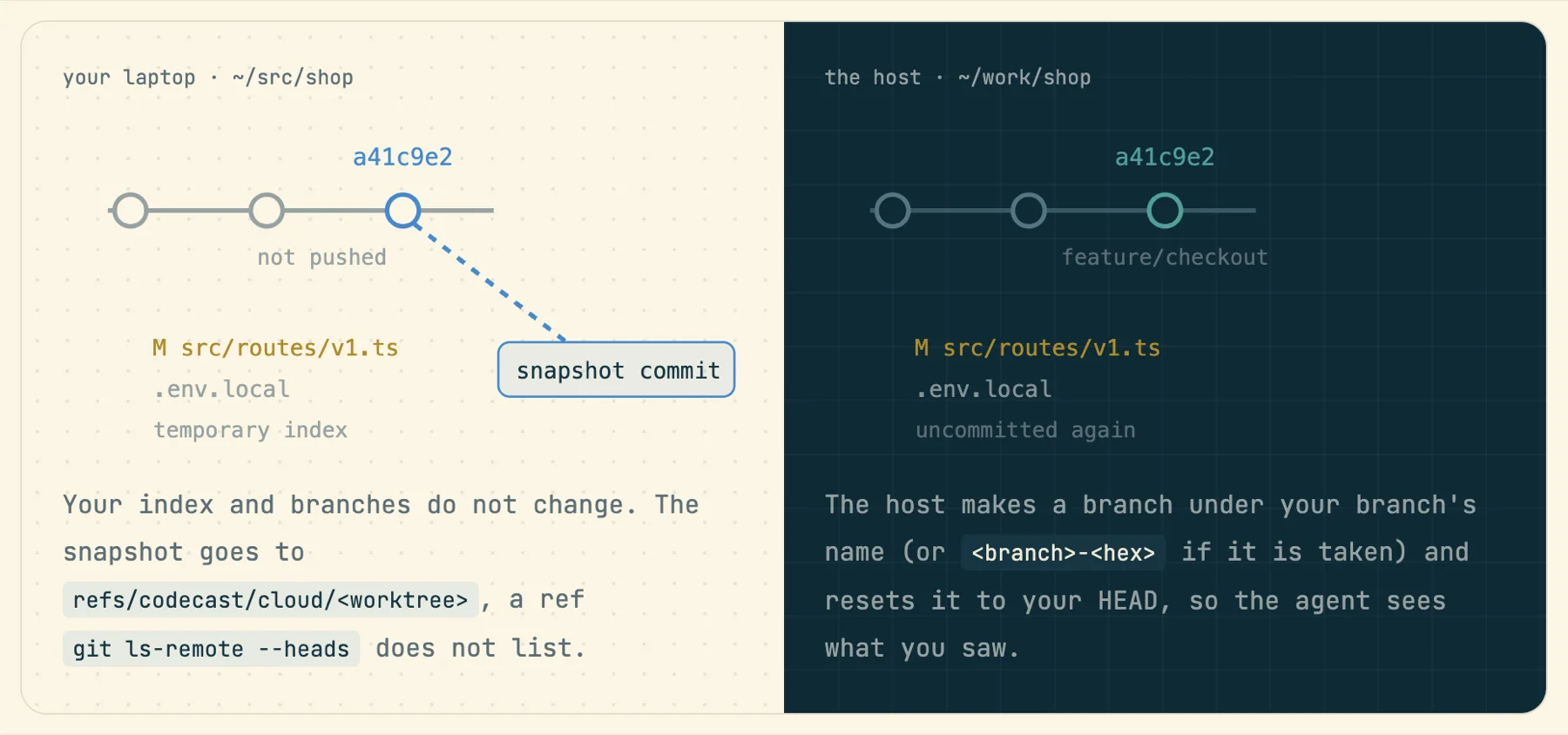
Not everything should travel. Dependency folders are rebuilt on the host, because a node_modules built on a Mac is wrong on Linux anyway. Big untracked media and binaries stay home. Each file left behind is listed under the reason it stayed, so you can see the decision rather than discover it.
- →your branch and unpushed commits
- →uncommitted edits, staged or not
- →untracked files
- →gitignored files: .env.local and friends
- →tracked files of any size
- node_modules, .venv, dist, target, Pods…rebuilt
- an untracked video or audio filemedia
- an untracked native binary ≥ 256 KBbinary
- an untracked file over 100 MBlarge
- untracked files past 1 GB, largest firsttotal
- sockets, pid files, database journalslive
- a repository nested inside this onerepo
A fan-out of five tasks takes one snapshot and makes five worktrees, so five agents start from the same instant of your work. --shared is the exception: one task, in the host's main checkout instead of a worktree, for jobs like a migration that must run where everything else is. It refuses a dirty checkout or one a live session holds, rather than trampling either. If any step fails, the session fails loudly. It falls back to origin/main only when your folder is not a git repository at all, and says so.
The host is set up like your laptop
An agent is only as good as its context, and most of the context lives outside the repository: ~/.claude, your CLAUDE.md, the skills and hooks you wrote, the shell setup your hooks assume, the logins for the CLIs your agents call. Before any session starts, and again whenever the host wakes for one, the laptop brings the host into step, in this order:
- ✓diskrefuses to start with under 1 GiB free
- ✓castbrought to the laptop's version
- ✓[host] setuppackages, services, run commands; skipped when in step
- ✓loginsClaude only while its token is live; never refreshed on the host
- ✓toolsagent CLIs, node, bun, gh, uv at your versions, no sudo
- ✓gita credential helper that asks for one token per push
- ✓home mirror~/.claude, ~/.codex, CLAUDE.md, shell rc, memory
The home mirror carries agent folders (.claude, .codex, .cursor and the rest), instruction files, your shell rc files and the files they source, small scripts from ~/.local/bin, and your Claude project memory. Laptop paths are rewritten to host paths on the way. It is checked every minute and only sends when something changed. Memories an agent writes on the host are merged back into the laptop before the next push, so what a cloud session learns is not stranded there. Credentials, transcripts, caches, .ssh, keychains and browser profiles are on a denylist and never travel.
Logins go one way, from the laptop to the host, and never back. The Claude credential is the delicate one: refreshing it would rotate the laptop's refresh token and log you out at home, so it is sent only while its access token is still live, and the host is never allowed to refresh it. It is sent again shortly after the laptop's token renews. Your ANTHROPIC_API_KEY deliberately stays home, because its presence would move every Claude on the host off your subscription and onto metered API billing.
Tools are installed without sudo, into your user's home: agent CLIs at your laptop's versions, a recent Node, bun, gh, uv, and any helper command your hooks or skills name. What the repository itself needs goes in one committed file:
# .codecast/workspace.toml (committed, read by every host)
[host]
packages = ["postgresql", "redis-server"]
services = ["postgresql", "redis-server"]
run = ["./scripts/seed-dev-db.sh"]

# this repository's own file says only:
[host]
simulators = ["iOS"]
The [host] table runs before any worktree exists, and it is skipped when the host is already in step, so a warm host pays one SSH round trip for it. A personal ~/.codecast/host.toml merges in for the things that are yours rather than the repository's, like your shell. Every login shell on a host also sees CODECAST_CLOUD=1, so a hook can tell where it is running.
Pushing from a host without leaving a key on it
A machine that runs agents unattended should not hold a long-lived GitHub token. So git on the host asks for credentials every time it needs them, through cast git-credential, and codecast answers with a GitHub App installation token for that one repository. For a team installation it first checks that you are allowed to push. The token expires within the hour and is handed to git in memory, never written to disk.
Two fallbacks exist for setups the App cannot cover. Each host has its own ed25519 device key, which cast hosts key --grant adds to GitHub through your gh login. And cast hosts forward-agent, strictly opt-in, exposes your laptop's ssh-agent to the host over one held connection, for when the host must use exactly the keys you have.
The agent's edits, on your laptop, as they happen
A session on a host is only half useful if its work is stuck there. Pick Sync with MacBook-Pro in the session's machine menu, or run cast remote sync <session>, and codecast keeps a copy of the session's folder on your laptop, both ways, a few seconds behind. Open it in your editor, run the tests locally, or fix a line yourself and let the agent see it.
Each tick snapshots both sides and compares them with the last tree they agreed on. If only one side changed, its changes land on the other. If both changed, git does a three-way merge in memory without touching either folder; the clean files land, and a file changed on both sides is held as it is on each side while everything else keeps flowing. Only files that actually changed are written, so your editor and your dev server do not see a storm of rewrites.
A held file never gets conflict markers written into it. You pick a side, from the menu (Keep the laptop's, Keep the cloud's) or with cast sync keep laptop|cloud. When the agent goes quiet, the sync pauses and only reads the laptop's copy every 15 seconds; a laptop edit is sent only if the host is already awake, so a forgotten sync never keeps a billed machine running. --watch-only makes it one way, from cloud to laptop, and if you then edit the copy anyway it stops and asks what you meant.
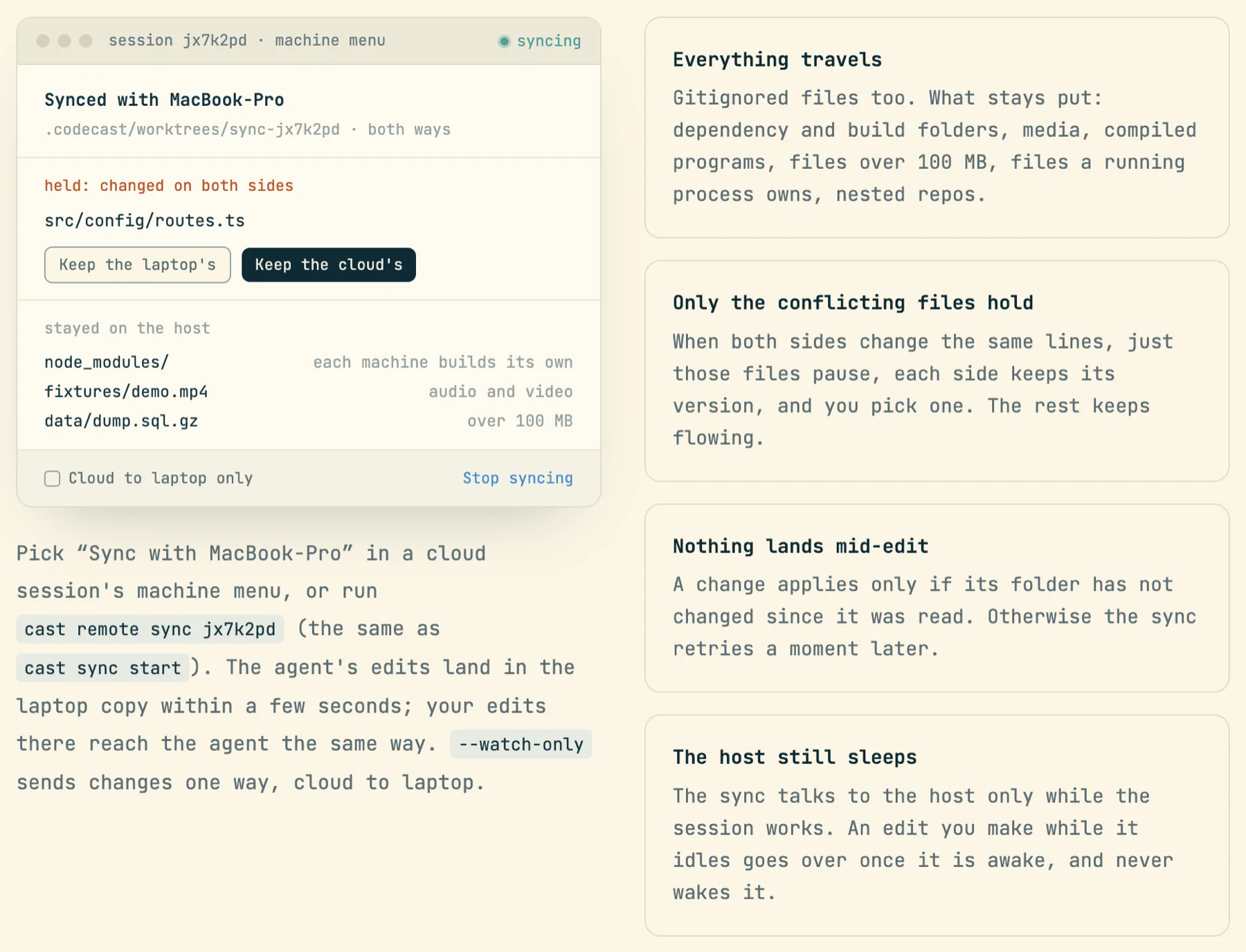
The verbs work from either machine: cast sync status, diff, pull and push, even without a running sync. From the host, cast sync pull ~/data/export.csv fetches a file from outside the repository, up to 2 GB, and --ref fetches a branch only the laptop has. One rule keeps the two mirrors from fighting: every file has exactly one carrier. Folder sync carries the working folder; the home mirror carries your agent config.
Moving twenty sessions before you close the lid
The most common reason to want a host is the moment you need your laptop back: a flight, a meeting, a machine pinned at full load. cast migrate moves running Claude Code sessions between a laptop and a host as one batch, in either direction, and the session continues on the other side with its transcript, its working tree and its place in your inbox.
$ cast migrate start --to linux --label rollout --dry-run
$ cast migrate start --to linux --label rollout
$ cast migrate start --to macbook --from linux
Each row goes through the same steps. New turns are blocked first, so steady traffic cannot keep a session busy forever; anything you send it meanwhile is held and delivered on the other side. A session in the middle of a turn gets to finish it, up to --wait minutes (ten by default). One stopped at a permission prompt moves at once and asks again on the destination. Then the agent is stopped, the work is transferred, ownership flips in one transaction, and the session resumes.
Going out, the transfer reuses the spawn snapshot, plus the gitignored files and the transcript with its paths rewritten. Coming home, the host's work is applied to your checkout as uncommitted changes with a three-way merge. If it does not apply cleanly, the row fails with the reason and nothing in your folder changes. Here is our own history from the past few days, failures included:
$ cast migrate ls
mg-03p71vdf  → Linux - ip-172-31-40-243 (cloud)  done      1/1 done  41h ago
mg-k28o8e34  → macOS - MacBook-Pro-182  done      1/1 done  3d ago
mg-f7qy8sqs  → macOS - Mac-mini (cloud)  done      1/1 done  3d ago
mg-x0ocus1i  → macOS - MacBook-Pro-182  done      3/3 done  3d ago
mg-st7mdwnx  → macOS - MacBook-Pro-182  partial   5/8 done, 3 failed  3d ago
mg-lnu1wdnm  → macOS - Mac-mini (cloud)  done      2/2 done  3d ago
mg-2uvjb2z1  → Linux - ip-172-31-40-243 (cloud)  partial   1/2 done, 1 failed  3d ago
…
The partial batches are the honest part. Their failed rows read handoff refused: the host checkout is in use by session jx70vhm and CONFLICT: the host's changes do not apply to this folder as it is now; nothing was changed here. In both cases the session kept running where it was. When a move succeeds, the agent is told, so it does not go looking for a dev server it left behind:
[codecast] This session just moved to a different machine. It now runs on
Linux - ip-172-31-40-243 in /home/ubuntu/work/codecast (previously
macOS - MacBook-Pro-182). Processes, ports, and any files outside the working
tree from the previous machine are not here.
There are three other ways in. The machine chip in a session's header lists every machine you can use and moves the session with one click; a sleeping host reads asleep, wakes on move. Run here on a laptop brings a cloud session home without ever interrupting a running turn. And when your laptop is under sustained pressure (memory, CPU, or load at three times its core count for a minute or more), the Resources page offers to offload sessions and spread them for you, for you to review and confirm.
Borrowing the laptop from the cloud
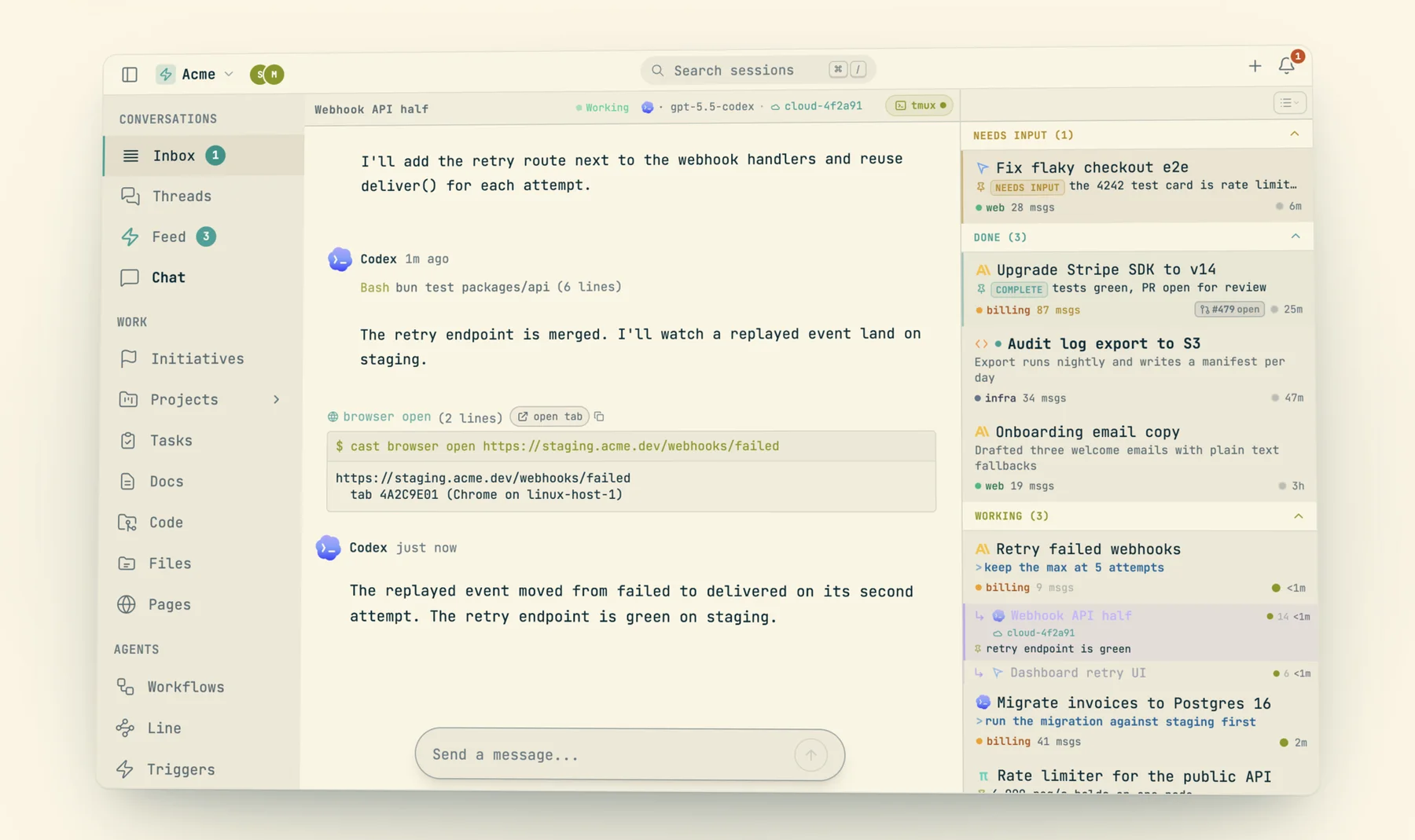
Some things only exist on your laptop, and some work needs a screen. The host has its own Chrome on a virtual display, so cast browser on a host drives that Chrome and never yours. When an agent there needs to be signed in somewhere, the laptop decrypts its own cookies for that one site and injects them into the host's browser over an SSH tunnel. Google is refused outright, requests are rate limited, and a request never wakes a host on its own.
$ cast browser sync linear.app       # one site's login, from your laptop's Chrome
$ cast hosts vnc                     # the host's whole screen, inside codecast
$ cast hosts reach ~/notes           # a laptop folder, mounted on the host, no copy
$ cast computer get-app-state --app gedit   # native apps on the host, over AT-SPI
cast hosts vnc opens the host's whole screen inside codecast, with mouse and keyboard, for anything outside the agent's tab. The stream reaches your browser through the laptop, one SSH channel per connection, and closes ten minutes after the last viewer leaves. cast computer, which drives native apps through their accessibility tree, works on Linux hosts too, over AT-SPI on the virtual display.
cast hosts reach ~/notes is the strangest of these and our favorite. It mounts a folder from your laptop on the host at the same path, with no copy. The laptop serves it through an sftp-server locked in a macOS sandbox that cannot touch the network, run programs, or read any file outside that folder, and the host mounts it over the SSH connection the laptop already holds. The host never connects to your laptop. Your home folder and anything holding keys are refused. When the laptop sleeps, the mount drops and leaves a note in its place.
Underneath all of these is one small relay. The host writes a request to codecast, the laptop daemon picks it up and does the work over SSH, and the host reads the outcome. There is no inbound port on your laptop and no relay server holding your data. When both machines are on the same Tailscale network, the laptop dials the host's tailnet address instead of its public one.
Cloud Macs and iOS simulators
A Mac host is for work that needs Xcode. Add simulators = ["iOS"] to the [host] table and setup copies your laptop's Xcode to the host, downloads the iOS runtime without an Apple ID, and installs the tools cast sim drives. After that an agent on the Mac host runs cast sim acquire, installs its build, taps through it and screenshots it into the thread, exactly as it would on your laptop, from a pool of three simulators that are reaped when nobody holds them. The first Xcode copy is slow, close to an hour for us; it happens once.
It sleeps when nothing is happening
A host that runs all night for nothing is the fastest way to stop trusting the feature, so a Linux host watches for real work and stops itself without it. A timer checks every two minutes. Real work means an SSH session, someone watching the screen, an agent mid-turn, a headless claude -p or codex exec, a live process under an agent, or CPU moving in one. An agent idling at a prompt is not work. After twenty idle minutes (configurable, or zero to disable) the host powers off, and a stopped instance costs only its disk.
Waking is automatic in the common case. Work queued for a stopped host, a message or a trigger, marks it for waking, and the next heartbeat from a laptop that manages it starts the instance and waits for SSH. For a deliberately quiet job, such as a long download with no CPU, cast hosts keepalive 30 on the host takes a lease that holds it awake for thirty minutes. The host's panel in Settings shows all of it: Awake, Waking, Going to sleep or Asleep, how long until it sleeps, and buttons to wake it, put it to sleep, re-apply setup, or save an image to start new hosts from.
When something breaks
Machines fail in boring ways, and most of the work here went into making the failures boring too. Every daemon, on a host or a laptop, runs a watchdog that looks for sessions whose agent process died mid-work. It restarts them with a note explaining what happened, at most three times in six hours per session, and never one you stopped yourself. Each host reports its readiness (mirror, logins, tools, setup) on its heartbeat, and the laptop collects a cost and state report every fifteen minutes, so the panel tells you which logins were held back and why before an agent finds out the hard way. A migration row that stops reporting for thirty minutes is failed by the server, and the session stays where it was.
The other clouds
Your host is not the only cloud your agents run in. Codecast also reads, and mostly drives, the cloud agents other companies run, so they land in the same inbox and the same search as everything else. Cursor Cloud agents appear as sessions once you add a Cursor key; you can launch one from the composer with run in Cursor Cloud, and your messages become its follow-ups. Codex Cloud tasks sync from your own codex login when you turn it on, with up to four attempts per task, a draft pull request, or the result applied to your checkout. Claude Code sessions you started on the web are mirrored with their full transcripts, and you can reply to them from codecast.
| Whose machine | Starts from | Launch from codecast | Follow-ups | Moves to your laptop | |
|---|---|---|---|---|---|
| Your cloud host | Yours, in your AWS account | Your checkout as it is, or origin/main | Yes, any agent | Yes | Claude Code sessions, both ways |
| Cursor Cloud | Cursor's | The branch as it is on GitHub | Yes | Yes | No |
| Codex Cloud | OpenAI's | The repository on GitHub | Yes, 1 to 4 attempts | Draft PR, apply locally | No |
| Claude Code on the web | Anthropic's | A session you started on claude.ai | No, mirrored only | Yes | No |
The difference is the starting point. A vendor's cloud starts from what is on GitHub. Your host starts from what is on your screen, which is why we built it.
What it needs, and where it stops
- Waking a sleeping host needs a laptop online. Queued work marks the host for waking, and the next laptop heartbeat starts it. A server-side waker exists, but it is enabled per host by the operator, not from the app.
- Only Linux hosts stop themselves. A Mac host stays up, and AWS bills its dedicated host for at least 24 hours either way.
- Only Claude Code sessions move. Any agent can be started on a host, but migrating a running session between machines works for Claude Code only, and never directly from one host to another.
- Most tool logins travel when they exist. Claude, Codex, Gemini and a few others only travel while their tokens are live. Logins for gh, aws, npm and similar CLIs travel whenever the file is present. Your Anthropic API key and Google logins never do.
- Opening a pull request from a host may need a gh login. The per-push token is for fetching and pushing. Most hosts already have a gh login copied from the laptop; if not, run gh auth login there.
- [host] packages and services are Ubuntu-only. On a Mac host, only run commands and simulators apply.
Codecast is where your team sees, steers, and remembers every coding agent session, on any agent and any machine, including the ones you rent.
The terminal captures are genuine output from the codecast team's laptop and its two hosts on 2026-10-07, with the hosts' public IP addresses replaced by documentation addresses and long lists trimmed where marked. The spawn, migrate and borrow blocks show commands, not their output. The 60 second wake was measured on 2026-09-05 and is written up in the CLI's cloud workspaces doc. The figures are drawn from the code's own constants (tick rates, timeouts, idle minutes); the migration batch and the sync timeline are schematic. The three screenshots come from the field manual's cloud chapter.