Pull requests that wake the session that opened them
Every pull request in codecast carries its checks, its review threads and the sessions that made it. The session that opened it stays on as its shepherd, and a red check, a request for changes or a conflict wakes that session with a briefing. It fixes, pushes, answers each thread and resolves it. The review and the merge stay yours.
One page per pull request, kept in step with GitHub
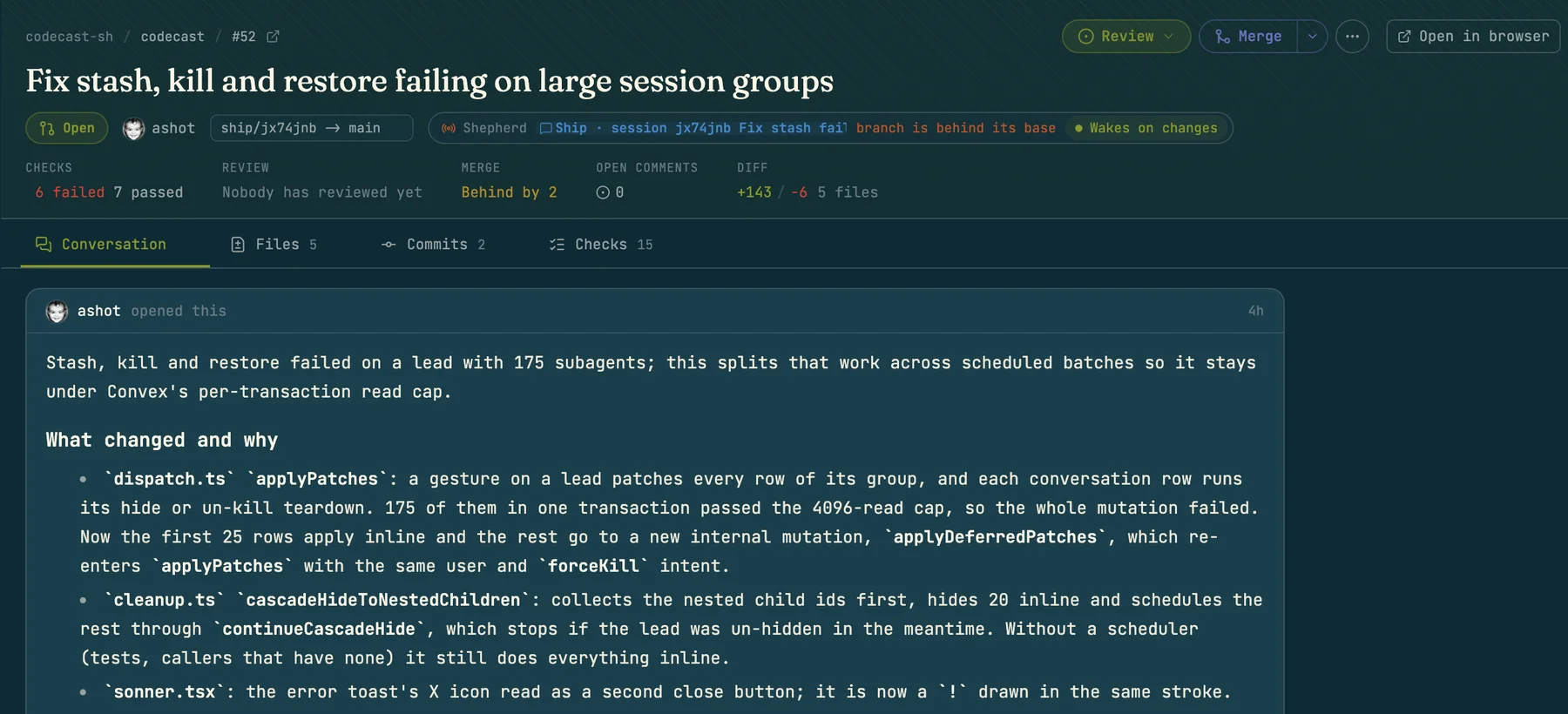
Open a pull request from a conversation, a task, a plan or a repository's page. The header shows its state, author and branches, the Shepherd line, and Checks, Review, Merge, Open comments and Diff at a glance, over the Conversation, Files, Commits and Checks tabs.
Codecast keeps the page current from GitHub's webhooks and sends every act taken here back to GitHub. The page, an agent and a script all go through one server layer, so nothing one of them can do is missing from another.
The inbound webhook is its only writer. Nothing you do here writes the row; GitHub answers every act with a webhook, and that webhook updates it, so the row always matches GitHub.
The sessions behind each pull request
When an agent wrote the change, its reasoning lives in the session transcript. So the pull request carries links to the conversations that made it: the shepherd in the header, the other sessions and tasks beside it, and a session on every commit. A reviewer is one click from what the agent was trying to do.
- 9b04e1dfix(retry): clamp the delay after jitter
- 3f2a91cfix(retry): count the attempt before the cap check
- a7c0e52feat(retry): exponential backoff for webhook deliveries
Going the other way, search finds every session behind a pull request, and blame names the session that wrote each line.
When GitHub reports the pull request opened, codecast links the sessions that worked on its head branch, and picks the most recent one in that repository as the shepherd candidate. The candidate does not wake until you turn it on.
A Claude Code hook adds Codecast-Session: <link> to each git commit an agent runs, only for sessions your team can see. The trailer comes from the session itself, so codecast trusts it over any link it infers. Off with cast config session_trailer false or git config codecast.sessionTrailer false.
A task id like ct-4102 in the title, the body or the branch name links the task, and the shepherd's briefing lists it under linked work.
Send held notes as one review
Hold a note on each line that needs one, from the Files view. Held notes are yours alone and are drawn dashed. When you finish, they leave together as one GitHub review under your account, and if a session owns the pull request the whole review reaches it as one message the moment GitHub accepts it. Pick a verdict below.
2 notes not sent yet. Only you can see them until you finish your review.
- 1In Files, hover a line and press +. Start a review holds the note; Post now sends it straight to GitHub.
- 2A bar at the bottom counts the notes not sent yet. Only you can see them.
- 3Click Review or press r. Finish your review lists your notes, takes a summary and a verdict, and Submit review sends them.
A request for changes needs a summary. A verdict always goes out under your GitHub account, so it needs your account connected.
What wakes the shepherd session and what it reads
The Shepherd line in the header names the session that owns the pull request. Agents that open one through codecast take the role themselves; on a pull request without one, click Assign a shepherd session and pick a session, and switch it between Wakes on changes and Paused on the same line. Only something the agent can act on wakes it, and each wake hands the session a briefing rebuilt from where the pull request stands now.
Busy sessions are not interrupted. If the shepherd is mid-run, the wake retries every 20 seconds, up to 5 times, and collects the reasons as they pile up.
The most urgent reason leads. When several reasons wait, the briefing opens with the most urgent:
# Shepherding acme/api PR #214: Retry webhook deliveries with backoff

https://github.com/acme/api/pull/214
webhook-retry into main at 9b04e1d
State: changes_requested
Woken because a reviewer asked for changes.
Also since the last wake: a reviewer left a comment on the code.

## Unresolved review comments
- omar on src/retry.ts:42: Jitter can push the delay past the cap.
- omar on src/retry.ts:88: Log the attempt number so a stuck delivery is findable.

## Reviews
- omar changes_requested: Two notes, then good to go.

Review decision: changes_requested.

## Linked work
- ct-4102 Retry failed webhook deliveries

## Your job
You own this pull request until it merges. Deal with everything outstanding above, in one pass: fix the failing checks, answer the review comments, and push to the same branch. When you have addressed a reviewer's point, say so on GitHub in reply to their comment (`gh` or `cast pr comment`) so the thread shows the resolution rather than going quiet. Being behind alone is not a reason to rebase or push. Update the branch only for a verified merge blocker or an explicit request; resolve real conflicts. Do not merge the pull request unless a human asked you to. Keep `cast state` current so the card says where the PR actually stands.
Ask an agent to open a pull request and see it to the merge
The agent that opens the pull request also shepherds it: commits, a description that links the session, the Shepherd line, and a session that sleeps between events instead of polling.
- 01Check
Runs the checks the repository defines and fixes what they find. Leaves out changes that belong to other sessions.
- 02Commit
Topical commits with short messages that say what changed and why. Unrelated work goes in separate commits.
- 03Open
The description: the goal, what changed and why, how it was verified, what to read first, and a link to the session.
- 04Shepherd
Takes the Shepherd line, then rests: “Shepherding PR #n; wakes on review, checks and merge”.
- 05↻ repeatsOn each wake
Fix or answer each thread, push, resolve the settled ones. A thread it disagreed with gets a reply and stays open. On a red check it reads the failing log, fixes and pushes.
- 06Merged
Marks the task done and the session done. If it is approved and green but nobody asked it to merge, it says the merge is yours and waits.
Ask in plain words (“open a pull request for this and look after it until it merges”), or type /cast-ship when the work is done. It takes the work from a finished change to a shepherded pull request and stays with it until the merge.
/cast-ship feedback skips committing and opening. It works the open threads on the current pull request once and reports which were fixed, answered, or left open and why.
Public repositories get a public page
A public GitHub repository connected to codecast gets a public page at /r/owner/repo: its files, commits, pull requests and the sessions behind them, readable by someone who has never signed in.
A session shows up there by title, with its transcript, only after its owner shares it with Anyone. Every other session is named as somebody's session on a date, with no link.
Codecast's own repository is one: codecast.sh/r/codecast-sh/codecast
Which GitHub account each act uses
Comments go out under the codecast GitHub app, a review verdict only under your own GitHub account, and the rest under yours when it is connected, with the app as the fallback.
- Verdicts go out as you. It goes out under the GitHub account of the person the agent runs as. Without a connected account codecast stops and says so; there is no fallback to the app.
- GitHub refusals come back unchanged. It refuses an approval of your own pull request, and a merge on a branch that is behind, conflicted or blocked. The refusal comes back verbatim.
- Held notes stay private. Nobody else sees them, nothing reaches GitHub, and no session wakes until you send the review.
- The agent does not merge. The briefing forbids it unless a human asked. Approved and green, it tells you the merge is yours.
- Review text is fenced and capped. Each note and the summary are capped at 3,000 characters inside a delimiter that names their source. A batch over 12,000 drops whole notes and says how many.
The cast pr commands for scripts and agents
Every act on the page has a cast pr verb, which is how the shepherd works. You can use the same verbs from a terminal or a script. The read verbs, as they print:
Open pull requests across your teams, newest change first. The second column after the state is the shepherd's state, the last two are the session and the age. Filters: --repo, --state, --mine, --shepherded, -n.
$ cast pr ls --shepherded
#214  open   ci_red             Retry webhook deliveries with backoff  webhook-retry → main   5 green 1 red      wanted           jx7c6zk  4m
#211  open   changes_requested  Move rate limits into the gateway      gateway-limits → main  6 green            changes, 2 open  jx7d2pa  1h
#209  open   ci_pending         Stream large exports to R2             export-stream → main   4 green 2 running  wanted           jx7m3rb  2h
#207  open   ready              Typed config loader                    config-types → main    6 green            approved         jx7k0qe  3h
#203  draft  review_pending     Drop the legacy auth header            auth-header → main     6 green                             jx7p9wd  5h
Every verb takes the same reference: a number, owner/repo#123, a GitHub or codecast URL, or nothing. Nothing means the pull request this session is bound to, and failing that the one for the branch you are standing on. Every read takes --json.
- cast pr ls [--repo] [--state] [--mine] [--shepherded] [-n]
- Pull requests across your teams, newest change first
- cast pr show [ref]
- State, checks, reviews, links, the shepherd, last events
- cast pr threads [ref] [--all]
- Review threads with short ids and file:line
- cast pr events [ref] [-n]
- The timeline: pushes, reviews, checks, merges
- cast pr watch [ref] [--all] [--json]
- One line per change, silent until something moves
- cast pr open [ref] [--print]
- The codecast page for it
- cast pr comment [ref] "text"
- On the conversation now; with --file and --line, on the diff
- cast pr comment --hold --file f --line n
- Hold a note in your review instead
- cast pr notes [ref] [--discard]
- The notes you hold, or throw them away
- cast pr review --approve|--request-changes|--comment [-b]
- Send every held note as one review, as you
- cast pr shepherd on [ref] [--for <session>]
- Bind a session until the merge
- cast pr shepherd off | status
- Release it, or report who holds it
- cast pr comment --reply <thread> "text"
- Answer a thread by short id or file:line
- cast pr resolve | unresolve <thread>
- Settle a thread, or reopen it
- cast pr merge [--squash|--merge|--rebase] [--delete-branch]
- Merge on GitHub; squash by default
- cast pr close | reopen
- Close without merging, or reopen
- cast pr draft [--ready]
- Back to draft, or ready for review
- cast pr reviewers --add | --remove <login...>
- Ask for a review, or withdraw the ask
- cast pr edit [-t] [-b]
- Change the title or the description
Limits and common questions
Which hosts?
GitHub only. Pull requests arrive through the codecast GitHub app, so the repository needs it installed. Installing it on a repository backfills the pull requests already open there.
Does the shepherd turn itself on?
No. A shepherd candidate is picked when the pull request opens, but it stays paused until you switch the header's “Paused” toggle to “Wakes on changes”, an agent takes it on (as /cast-ship does), or someone turns it on from the command line.
Will it rebase every time main moves?
No. Falling behind is recorded but does not wake it, and the briefing says being behind alone is not a reason to rebase. A real conflict does wake it.
What if the session is busy?
The wake retries every 20 seconds, up to 5 times, and the reasons pile into one briefing. A review delivered as a message is best effort; a session that cannot take it never fails a review GitHub already holds, and the CLI says it was not delivered.
Can my review approve my own PR?
No. GitHub refuses that by rule, and codecast passes the refusal through. A request for changes and a comment-only review both need a body.
Who sees my held notes?
Only you, until you send the review. Every read path hides other people's pending notes.
Anything capped?
The Commits view reads through GitHub's pull request commits endpoint, which stops at 250. A briefing lists up to 12 failing checks, 25 unresolved comments and 15 reviews.
Get started with pull requests
Install codecast, connect GitHub under Settings, Integrations, and switch on Pull requests in Agent features. The next pull request an agent opens arrives with its sessions attached. Turn on its shepherd and that session handles failed checks, review comments and conflicts until you merge.
curl -fsSL codecast.sh/install | shbrew install codecast-sh/tap/codecast or npm install -g @codecast-sh/cli