Publish your agent's work at a link that stays current
When an agent makes a report, a dashboard or a mockup, it publishes it as a page at codecast.sh/a/<slug> and the page opens right in the conversation. Each revision lands at the same link. Old versions stay viewable, diffable and restorable, and reader comments go back to the session that made the page when you send them.
Churn rose from 3.1% to 4.4% between July and September. Most of the increase sits in accounts under 90 days old.
Accounts that never connected a second repo churned at twice the rate.
Churn rose from 3.1% to 4.4% between July and September. Most of the increase sits in accounts under 90 days old.
Accounts that never connected a second repo churned at twice the rate.
Churn rose from 3.1% to 4.4% between July and September. Most of the increase sits in accounts under 90 days old.
Accounts that never connected a second repo churned at twice the rate.
Published pages in the conversation
In a codecast conversation, the agent puts a published link on its own line and the live page renders in the thread, so you review the deliverable without leaving the session that made it.
The draft is up. It folds the four plans into two and moves the seat math into one table:
It replaces the numbers in the header. The mobile layout before and after:
- A page the agent puts on its own lineThe live page, framed in the thread. Its bar has Pin a note, Copy link, Expand, Open beside your work and Open in a new tab; drag the bottom edge to resize.
- The same, with a captionThe same frame, with the agent's caption under it.
- A page named inside a sentenceA small pill with the page's title.
- A single pictureThe image inline, captioned. Agents send screenshots this way.
A note you pin on a framed page goes out with your next message to the agent, quoted along with the spot on the page it points at.
For agents and scripts: cast image uploads one picture (PNG, JPEG, GIF, WebP, AVIF or BMP) and prints a stable link plus the markdown to paste, so nobody is handed a local path their browser cannot open.
Pages attach to the task they back
When the publishing session is working on a task, the page attaches to that task as evidence, stamped with the stage the task was at. Whoever opens the task finds the report, the screenshot page or the dashboard that backs the claim. An agent can name a different task or a plan instead.
All your pages in the sidebar
Pages in the sidebar lists what you published, then your team's, each card showing its gates, views and open comments. A card's menu has Open, Copy link, Manage, Edit and Delete.
Version history, diffs and restore
Each publish is a numbered version. The link always serves the newest. The version chip in the page's bar opens its history, where every older version has its own address, a line-by-line diff against the current one, and a restore option.
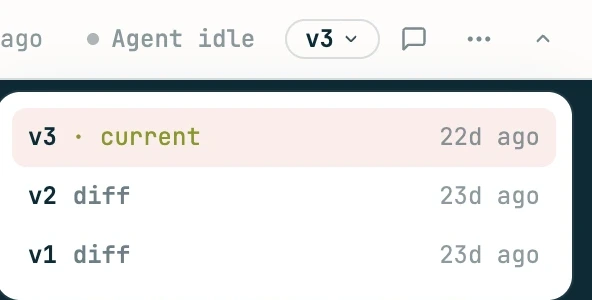
A rollback never rewrites history. It publishes the old content as the next version, so the version you rolled away from is still there if you change your mind. Agents do the same from a terminal with cast publish rollback, and start a separate page from the same file with --new.
Who can read a page, for how long, and who can edit it
Open Manage sharing from the page's ⋯ menu (or Manage on its card in Pages) to set a password, an email gate, an expiry, comments, the session link and who can edit. A change leaves the content and version alone and only changes who gets in. An agent can set the same gates when it publishes; each one's flag is beside its name.
- Unlisted
- Pages have unguessable links, are never listed anywhere, and tell search engines not to index them.
- Sandboxed
- Every page and bundle file is served under a sandbox policy. A script on a published page runs, but can't act with your codecast sign-in.
- No leaking tokens
- Gate tokens ride in the page's query string, so pages send no referrer. A link on your page can't carry them away.
- Revocation bound
- Add a password, set an expiry or delete a page, and caches stop serving the old answer within six minutes. Copies a reader already saved can't be recalled by anyone.
HTML files, markdown files and folders
The agent publishes whatever it already wrote. Each page is tied to the file or folder it came from, so publishing the same one again updates the same page.
- Published as written, with scripts, charts and forms working.
- The title comes from the
<title>tag, else the filename. - The page runs in a browser sandbox with no access to your codecast sign-in, so a script on it can't act as you.
- Renders as a reading page, so a write-up needs no HTML.
- The title comes from the first heading.
- Diffs between versions compare the markdown source, so a changed sentence reads as one changed line.
index.htmlis the entry, or the folder's only.htmlfile. Relative paths keep working.- Dotfiles,
node_modulesand sourcemaps stay behind. - Up to 24 MB of files. Video and audio upload to media hosting instead, up to 2 GB each, and don't count toward that.
--title overrides the title; --title - reads it from stdin.--no-thumb skips it.cast image, which is built for single pictures.Watch the page update while the agent writes it
Ask the agent to keep the page live while it works and it republishes on every save. Open the link with ?live=1 and your tab reloads itself on each new version, so you can review the draft at the same URL you will send.
$ cast publish proposal.md --watch
✓ Pricing page proposal  v1 → published
  https://codecast.sh/a/Pq7wLx2RnB4s

watching proposal.md — Ctrl+C to stop
live view: https://codecast.sh/a/Pq7wLx2RnB4s?live=1
  14:05:40  v2 → updated  14:05:52  unchanged (v2)  14:09:03  v3 → updated
Two plans instead of four. Teams pay per seat; solo use stays free.
Saves are batched. Changes settle for 400 ms before a publish, and a save that lands mid-publish queues one more. The CLI watches the folder, so editors that save by replacing the file are caught too.
Unchanged saves make no version. The server hashes the content. A save that changes nothing comes back as unchanged and the version number holds.
Gates are set once. Access set on the first publish applies to the page; the live loop republishes content only. Change gates later in Manage sharing.
Folders are watched too. Watching a bundle is recursive: edit any stylesheet, script or chart inside it and the page republishes.
Video and audio in a published folder
Video and audio inside a published folder upload to media hosting and keep their relative paths, so <video src="demo.mp4"> plays without changes. A video with controls becomes the cast player, and several clips can play back to back as chapters of one film.
<cast-player title="Fixing the coupon bug"> <cast-chapter src="c01.mp4" title="Setup" duration="40.6"> <cast-chapter src="c02.mp4" title="The failing run" duration="72.2"> <cast-chapter src="c03.mp4" title="The fix" duration="55.0"> <cast-chapter src="c04.mp4" title="Verified" duration="31.4"></cast-player>
Files up to 2 GB each, in .mp4, .webm, .mov, .m4v, .mp3, .m4a, .ogg and .wav. They don't count toward the page's 24 MB, and a --watch loop doesn't upload an unchanged file twice.
Style the player from the page's CSS with --cast-accent, --cast-font, --cast-aspect and friends. Script it with play(), seek() and goTo(). Add data-native to keep the browser's own player; autoplay and looping clips stay native on their own.
cast publish video prints the full guide.
Command reference for scripts and agents
Agents learn these from their instructions; you only need them to script it yourself. Everything the page's own menus do is also a command, so an agent never needs the browser to manage a page. A <target> is a slug or the local path published, and every command takes --json.
cast publish <file.html | file.md | dir/>Publish, or update the page this path already has--watchStay on the file or folder and republish on every change--title <t> | --title -Override the title; - reads it from stdin--newA fresh URL even if this path was published before--task <ct-N> | --plan <pl-N>Attach as evidence (default: the session's active task)--openOpen the published URL in the browser--no-thumbSkip the headless Chrome thumbnail--jsonThe raw JSON responseLimits and edge cases
What it will not do, and what to expect at the edges.
How big can a page be?
8 MB for a single html file, and 24 MB for a folder's files together. Video and audio don't count; each can be up to 2 GB. Over the cap, the CLI names the five biggest files so you know what to trim.
What can I publish?
An .html file, a .md file, or a folder with an index.html (or exactly one .html file). Other single files are refused. Images go through cast image, which takes raster formats only: SVG is excluded because it can carry script.
Is an unlisted link private?
No. Anyone holding the link can open it unless you add a gate. Links are long and random and never indexed, so nobody finds one by searching. For anything sensitive, add a password or an expiry.
Can I take a page back after sharing it?
You can close the link (Delete in Pages, an expiry, a new password) and caches stop serving it within six minutes. You can't recall a copy a reader already saved.
Can scripts on my page use storage or cookies?
Scripts run, forms submit and popups open, but the page runs sandboxed in its own opaque origin. It has no access to codecast sign-in, and browser storage tied to an origin, like cookies and localStorage, is unavailable to it.
Do comments always reach the agent?
Only when the page was published from a codecast session, and only when the owner sends them. Comments on a page published outside a session stay on the page. If the session can't be reached, comments are kept as unsent and Send all retries later.
Do readers get notified of a new version?
No. A reader with ?live=1 on the link reloads on each new version; everyone else sees the newest version the next time they open the link. Old versions stay reachable at ?v=N.
What does a live-updating page not do?
The live loop doesn't change gates after the first publish, and it captures the thumbnail only once. The thumbnail needs Chrome on the machine; without it, the publish goes ahead with no thumbnail.
Get started with publishing
Install codecast, then ask your agent to publish what it made. Agents running under codecast already know the command, so the next report one writes can be a link you send.
curl -fsSL codecast.sh/install | shbrew install codecast-sh/tap/codecast or npm install -g @codecast-sh/cliAgents verify UI, read behind sign-ins and reproduce bugs in a background tab of the Chrome you already use, with every screenshot and console error landing in the conversation.
The session that opened a PR owns it until merge: it wakes for reviews, fixes failing checks and answers threads, and every line traces back to the conversation behind it.
Agents queue the choices that need a person, with the evidence attached, and keep working while you clear the queue in one sitting.
Schedule follow-ups, standing monitors and event reactions that wake a session or spawn a fresh one, and report only when a person needs to read it.
The story behind the feature, with real captures: A URL for everything your agent makes.
Reader comments, and which ones reach the agent
Anyone with the link can pin a comment to a sentence. Comments collect on the page as a discussion. Only the page's owner can send them into the session that published it, where the agent reads them, revises the file and publishes the next version to the same link.
Most of the increase sits in accounts under 90 days old. Accounts that never connected a second repo churned at twice the rate.1
The comment remembers the passage it was left on and the version it was read at. A teammate signed in to codecast comments as themselves; anyone else types a name.
From the owner link, Send all delivers every unsent comment as one message. Your own comments can go straight to the session, or post to the page without sending.
Reader text is labeled as untrusted feedback, and the agent is told not to treat it as instructions. A comment that tries to fake the fence has its marker stripped before delivery.
The Discussion panel opens from the comment icon in the page's bar. Pin on page leaves a note on a spot; General note is about the whole page.
Turn the discussion off with Comments in Manage sharing. Comments are rate limited per page, so a link that leaks can't be used to flood a session.
For agents and scripts:
cast publish commentslists open comments and resolves them.