Run and steer other agents from one conversation
Hand a piece to a worker on any backend and get woken when it settles. Branch a conversation to try two approaches at once. Move a session to another agent mid-thread without losing a line. Every one of them is a real session you can read, message and steer.
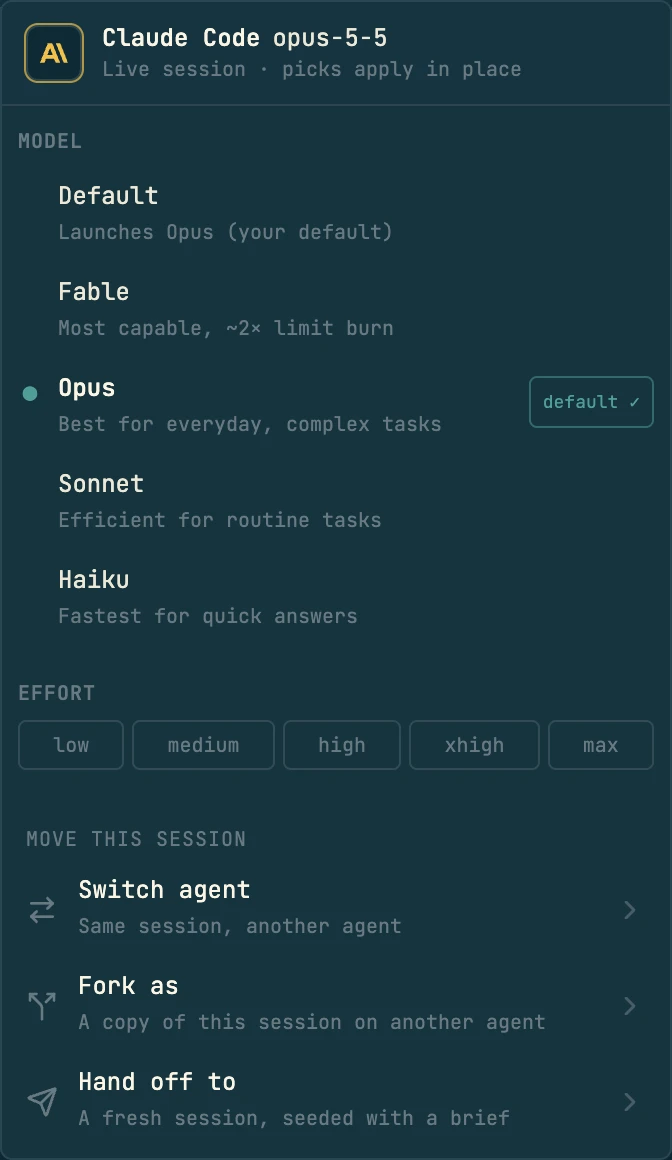
Most of it starts with a sentence to your agent: “hand the tests to a Codex worker”, “fork this three ways”. The rest is in the app: Fork from here on any message, and Switch agent, Fork as and Hand off to in the model menu at the top of every conversation.
Six ways to start another agent, and how to choose by who reads the result
The choice comes down to who owns the result; parallelism, a fresh context, a different model or a worktree don't change it. Work you delegate and report on is a worker. A thread a person will steer on their own is a fork or a plain spawn. Your agents follow the same rule, because it is written into the instructions codecast installs, so asking in plain words picks the right one.
cast spawn --subagent -- "<task>"- Starts with
- None. The brief you write is all it knows, so make it self-contained.
- Shows up
- Nested under your session. It stays out of the inbox and out of top-level lists.
- Hears back
- You. Your session is woken when the worker finishes, blocks, stops or waits on a permission.
Workers take a piece of the task and report back when they settle
Ask your agent to delegate a piece, and it starts a worker: a fresh session under yours, on whichever backend suits the job, knowing only the brief it was given. In the inbox a worker sits under its parent as a Subagent row instead of a card of its own. When it finishes, blocks, stops or waits on a permission, your session gets a message saying so, and the parent conversation shows one report row per worker.
An agent fans out three workers in one call. Each brief is split on a line holding only ---.
$ cast spawn --subagent -- - - - <<'EOF'
Write a load test that reproduces the retry pileup.
Acceptance: fails on main, passes with the fix.
---
Audit every caller of enqueue(). File and line for each.
---
Draft the backoff section of docs/webhooks.md.
EOF
See which sessions wait on you, and ask one what it concluded
Every session has a work state, and the state says who acts next. The inbox shows it on every row, so you can tell at a glance which sessions wait on you and which are still working. To learn what a long session concluded, press A in it and ask: Ask this session answers from its transcript and cites the messages, instead of you reading all of it.
An agent that started workers watches them without polling. Nothing prints until a state changes.
$ cast spawn --subagent --agent codex -- \
    "load test the retry path" "fuzz the parser"
✓ spawned 2 sessions in ~/src/api — nested under jx7r3tq as subagent rows:
  jx7aa21  load test the retry path
  jx7aa22  fuzz the parser

$ cast sessions jx7aa21 jx7aa22 -w --json
# prints nothing until a state changes
{"event":"transition","id":"jx7aa21","to":"done",…}
{"event":"transition","id":"jx7aa22","to":"needs_input",…}

$ cast read jx7aa22 --ask "what is it blocked on?"
It needs a corpus path. The brief named none (line 4).

$ cast send jx7aa22 "use testdata/fuzz, then stop at 10 minutes"
✓ sent to jx7aa22 from jx7r3tq
cast read <id> --ask, before they message them.Forks branch a conversation, history included
Right-click a message and choose Fork from here to branch the conversation at that point, or pick Fork as in the model menu to branch onto another agent. Each branch keeps everything up to the fork point and heads off as its own live session in the inbox, marked Fork. Ask your agent to fork several ways and this thread takes the first direction and keeps going, so you never stop to pick.
What an agent runs when you ask it to fork several ways.
$ cast fork "use Redis" "use Postgres" "keep it in-memory"
# this thread takes Redis; two branches

$ cast fork --all-branches "use Redis" "use Postgres"
# two branches; this thread stays out

$ cast fork --at 42 "what if we cache" "what if we don't"
# branch from message 42
Switch a session to another agent or model
Open the model menu at the top of the conversation and pick Switch agent. The conversation and its id stay; who is answering changes, and a now using divider lands in the thread where it did. The same menu changes the model and effort in place. Use it for a second opinion from a different model, or when one backend is better at the next step.
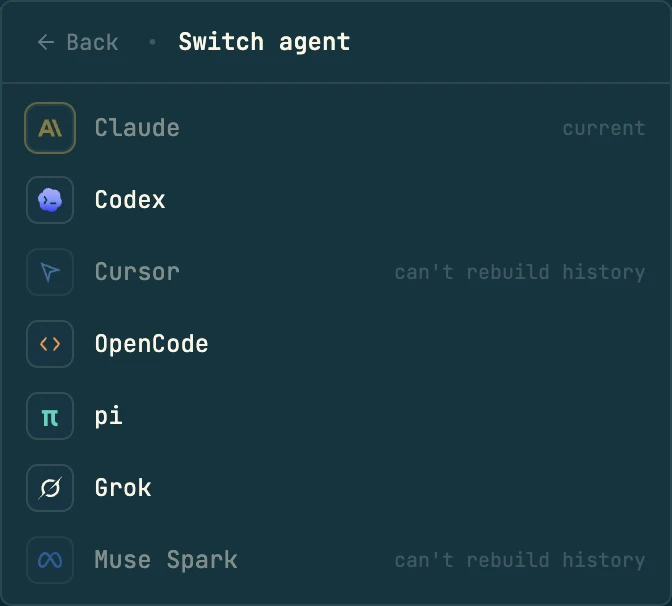
$ cast switch --agent codex
$ cast switch --model opus
$ cast switch --agent claude --model sonnet
$ cast switch --agent codex --fork
# a new session instead
Hand off to a new session that starts from a brief
A long thread gets heavy. Hand off to in the model menu has the server write a brief of this session, starts a new one from it on the agent you pick, in the same directory, links the two, binds the new one to the same task or plan, and pins this one done.
$ cast handoff --to gemini -m "finish the tests first"
$ cast handoff --model sonnet
# same agent, another model
$ cast handoff --to codex --dry-run
# print the composed prompt, start nothing
--dry-run prints the brief without starting anything.Get one answer inside a script with exec
This one is CLI-only on purpose. cast exec is print mode for every harness codecast launches. It runs a prompt, prints the result and exits. The process is the session, so stdout is the answer, the exit code is the agent's, and nothing lands in the inbox. The same flags map onto each client's own headless form.
$ git diff --cached | cast exec --agent codex --effort high "review this diff; list real bugs only"
1. retry.ts:48 compares ms to seconds, so the cap never applies.

$ cast exec --output-format json --json-schema schema.json "classify these failures" < ci.log
{"flaky":3,"real":1,"infra":0}

$ cast exec -j 4 "audit auth" "audit billing" "audit uploads" "audit search"
# four runs, at most four at once

$ cast exec --chain review-then-fix "the retry cap ignores config"
# each named step's output feeds the next
-j 4 runs each prompt as its own run, at most four at once.--chain <name> runs saved agent definitions in order; each step's output feeds the next.--output-format json for machine output; --json-schema constrains the final answer (claude, grok).--timeout 10m kills a long run. --dry-run prints the resolved command without running it.Send messages between sessions
Agents message each other. A message arrives in the other session as a new turn marked Message from and the sender, so you see in both threads who said what. It reaches any session you can see, your own or a teammate's shared one. If the target is offline the message queues until its machine comes back.
An agent sends with cast send. A stale session is held unless it adds --wake.
$ cast send jx7q0ve "can you rebase onto main?"
Not sent. jx7q0ve has not run for 3h, so its prompt cache has expired. Your message would make it rebuild its whole context (about 412k tokens, 41% of its context window) before it reads a word, and sessions idle this long rarely have anything to add. To learn what it did, read it instead: cast read jx7q0ve, cast diff jx7q0ve. If it has to act on this and nobody else can, send again with --wake.
Worktrees and labels for parallel workers
Several agents in one checkout step on each other. Ask for workers in their own worktrees and each gets a git worktree with gitignored files like .env copied, the project's setup commands run and its own ports. Labels file sessions under a name, and they show as chips above the session list. Agents and the CLI create worktrees; the repo view's Worktrees tab lists them, with Compare to see one's changes.
$ cast spawn --subagent --isolated "refactor the store" "rewrite the router"
$ cast ws acquire fix-auth-bug
$ cd "$(cast ws path fix-auth-bug)"
$ cast spawn --subagent --label rollout "task A" "task B"
$ cast sessions --label rollout -w --json
For scripts and agents
Your agents run these when you ask in plain words, and they work from any shell. Every command takes --help with examples. Multi-line text goes through - and a heredoc, never "$(cat file)".
cast spawn --subagent -- "<task>"Worker under this session; reports back when it settlescast spawn --subagent --agent codexWorker on another backend (--model, --effort, --as)cast spawn --subagent --isolatedOne git worktree per workercast spawn "<task>"Independent inbox thread, for when a person asked for onecast fork "<a>" "<b>"This thread takes a; b becomes a branch with the historycast fork --all-branches | --at <n> | --tipKeep this thread out; pick the fork pointcast switch --agent <a> --model <m>Same session, another agent or modelcast handoff --to <agent> [-m <text>]Brief, new linked session, this one pinned donecast exec [--agent a] "<prompt>"Run, print, exit; no inbox card (-j, --chain, --json-schema)cast send <id> "<text>"Message a session as a new turn (--wake for stale ones)cast read <id> [range] | --askRead a transcript, or ask it a question with citationscast sessions <id>… -w --jsonStream state changes for a set or a --labelcast label set <name> [id]File a session under a personal labelcast ws acquire | path | ls | destroyManage isolated worktrees with env, setup and portsLimits and common questions
Does a worker see my conversation?
No. Spawned sessions start with no shared history. The brief is everything it knows, so write it like a ticket for someone who was not there. If it needs the history, fork instead.
Do the backends need to be installed?
Yes. codecast launches the agent CLIs you already have and are signed in to. It does not ship Codex, Cursor, Gemini or the rest.
Can I fork a session that is not mine?
Yes, any session you can see: open it and use Fork from here. Branches are always new sessions; the original is untouched.
Will workers edit the same files?
They can, if they share a checkout. Ask for a worktree each for parallel edits, and merge the results yourself.
Does a switch keep tool history?
The conversation and its id stay. A provider switch starts the other agent's process, which continues from the thread rather than from the first agent's internal state.
Is there a cap on workers?
Not from codecast. Your machine, your agent accounts' usage limits and your attention are the real limits. Each worker is a full agent session.
Related features
Get started with workers
Install codecast, then ask your agent to hand a piece of its task to a Codex worker. It already knows how, and the worker shows up under its session.
curl -fsSL codecast.sh/install | shbrew install codecast-sh/tap/codecast or npm install -g @codecast-sh/cli