Run sessions on your own cloud host, started from your laptop
Switch on run in the cloud when you start a session, and it runs on your own host from the checkout you are in, uncommitted work included. It arrives with your agent config, logins and CLIs. Its edits mirror back to your laptop as they happen, and whole batches of sessions move between the two without losing a message.
uncommitted
 M src/routes/v1.ts
?? .env.local (ignored)
new session › port the v1 routes
● run in the cloud · start from my checkout
snapshot a41c9e2 + 1 change → refs/codecast/cloud/…
● jx7k2pd running on shop-host
- src/
- routes/
- v1.ts
- v2/
- index.ts
- orders.ts
- test/
- v2.test.ts
- .env.local
- ✓woke the host stopped → running
- ✓fetched ~/src/shop kept its HEAD
- ✓copied .env.local setup.copy
- ✓agent logins pushed claude, codex
- ✓worktree port-v1-routes made on the host
- ✓branch feature/checkout reset to a41c9e2, v1.ts uncommitted again
Your hosts sit in Settings, under Devices
Each cloud host has a card in the Machines list there: whether it is awake, what it costs, and whether it carries your setup, logins and tools, with the buttons that fix what is off.
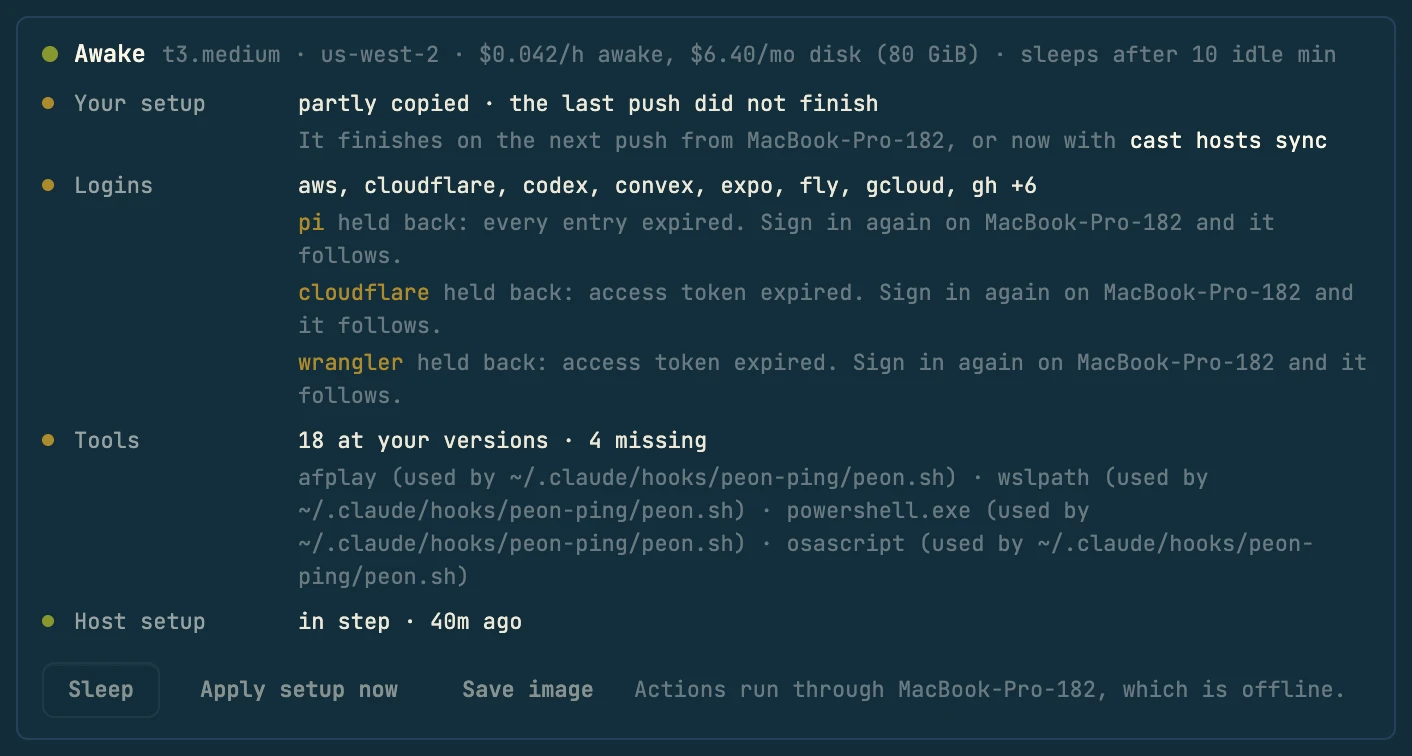
Wake and Sleep boot the host or stop it costing compute. Apply setup now installs the packages and services your repo declares, and Save image snapshots the machine so the next one starts ready. Your laptop carries each one out, so it needs to be online.
A host also shows up wherever you pick a machine: the machine pill in a new session, the machine menu in a session's header, and Migration in the same settings group.
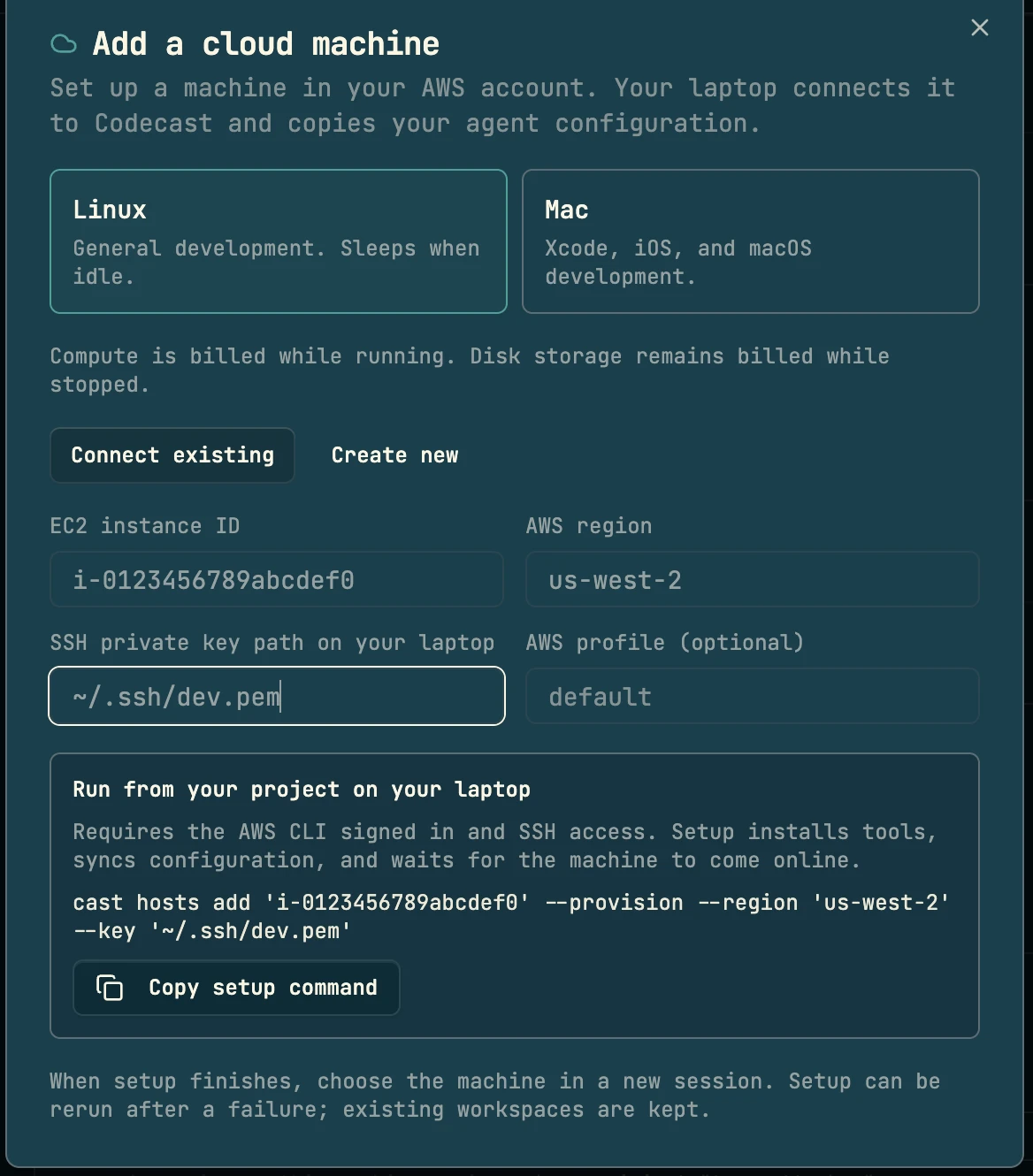
Choose Linux or Mac, then connect an EC2 instance you already run or create a new one. The dialog builds the setup command and Copy setup command puts it on your clipboard. You run it once in a terminal on your laptop, because setup uses your AWS sign-in and SSH key; that one step has no button today.
A cloud session starts from your current checkout
Your branch, your unpushed commits and your uncommitted, untracked and gitignored files all travel. Dependency and build folders are rebuilt on the host. The laptop takes the snapshot with a temporary index, so nothing in your checkout moves.
Your index and branches do not change. The snapshot goes to refs/codecast/cloud/<worktree>, a ref git ls-remote --heads does not list.
The host makes a branch under your branch's name (or <branch>-<hex> if it is taken) and resets it to your HEAD, so the agent sees what you saw.
- 1Wake
The host boots if it is stopped. Preparation waits up to 3 minutes for Linux, 25 for a Mac.
- 2Fetch
The repo is cloned on the host where it sits on your laptop (
~/src/shopthere too) if missing, fetched if present. A fetch only: the host checkout keeps its own HEAD and work. - 3Copy secrets
Files under
setup.copyin.codecast/workspace.tomlgo by rsync, one snapshot per worktree. - 4Worktree
The host makes its own worktree per task. Dependencies install there and ports are probed on the machine that binds them.
- 5Start
The session row is created pointing at that worktree and routed to the host. Prep runs over SSH from your laptop, which needs to be online; none of it passes through codecast's servers.
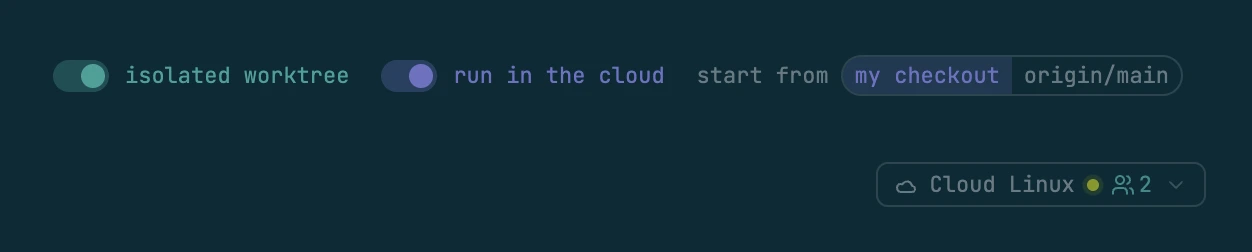
In the app, switch on run in the cloud in a new session, beside the folder you picked. start from chooses my checkout (your branch and uncommitted work, as above) or origin/main for a clean start. The session's header shows the host it runs on, and “preparing cloud host” until it is ready.
One worktree per session. Parallel agents on the host never share a working tree. Switch off isolated worktree to run in the host's main checkout instead: that always starts from origin/main on a new codecast/cloud-<hex> branch, and is refused when the checkout is dirty (the files are listed) or another live session holds it (that session is named).
A laptop daemon that is online runs the preparation, wherever you started the session from. With none online, the session waits for one.
$ cast spawn --cloud "port the v1 routes" "write the migration"
$ cast spawn --cloud --from origin-main "audit the build"
$ cast spawn --cloud --shared "run the migration"
$ cast fork --cloud "try the queue approach" "try the cron approach"
cast fork --cloud branches a conversation onto the host: each branch gets its own host worktree while your direction stays here.What the host gets from your laptop, and what it never gets
Before a session starts, the host gets your agent config, shell, logins and CLIs. Each kind travels its own way, and the table says where each one stops.
- Instructions and agent config.claude, .codex, .gemini, .grok, .opencode, .agents, repo instruction files, git preferences, your codecast switchesHome mirror, written atomically with mode 0600. Rescans a minute after each pass; bytes re-verified every 30 minutes.Credentials, transcripts, databases, caches, media, native binaries. Never wakes a sleeping host.
- Shell.bashrc, .zshrc, fish config, .inputrc, .tmux.conf and every file they sourceHome mirror, with laptop paths rewritten to the host's. A login shell there also gets CODECAST_CLOUD=1.Exports travel as written, keys included, so keep secrets out of rc files you do not want on the host.
- Agent loginsClaude, Codex, Grok, Gemini, opencode, pi, provider keysOne bundle over SSH stdin. Each file ships only while its token is live.Never through codecast's servers. ANTHROPIC_API_KEY never travels. A bundle for a different user is refused whole.
- Tool loginsgh, cf and wrangler, Convex, AWS, gcloud, Vercel, Railway, Fly, Netlify, Supabase, Stripe, Expo, kubeconfig, npm, .netrcLogin bundle over SSH stdin, macOS config paths mapped to Linux ones.An OAuth login that rotates on refresh ships only while its access token is live.
- CLIsclaude, codex, gemini, grok, opencode, pi, plus vercel, railway, cf, supabase, stripe, fly, aws, gcloud, kubectl if your shell has themInstalled when missing, at your laptop's versions and local to the user, while a session is prepared, at setup, and when you press Wake in Settings, Devices. A wake for queued work only checks them.No sudo, no system packages: those go in the [host] table. What is missing shows on the host's Tools row.
- Agent memoryMemories a cloud session wrote or editedBoth ways: the laptop brings host memories home before it sends the merged set back.MEMORY.md only gains index lines the laptop does not have yet.
- Browser loginsOne site's cookies, on requestOn the host, cast browser sync <site> asks your online laptop to inject them over an SSH forward.Google is never carried. A request no laptop picks up expires in 5 minutes.
cast hosts sync --dry-run previews the mirror, cast hosts tools installs missing tools now, and cast config cloud_mirror_enabled false turns the mirror off. A running agent keeps the instructions it read at startup.Read, run and test the agent's edits on your laptop
A synced cloud session keeps a copy of its folder on your laptop, both ways, a few seconds behind. Open it in your editor, run the tests locally, or fix a line yourself and let the agent see it.
- node_modules/each machine builds its own
- fixtures/demo.mp4audio and video
- data/dump.sql.gzover 100 MB
Open the machine menu in a cloud session's header and pick Sync with MacBook-Pro, under “Keep a copy on a laptop, in step”. The agent's edits land in the laptop copy within a few seconds; your edits there reach the agent the same way. A sync chip in the header then shows what is held and what stayed put; Cloud to laptop only sends changes one way. From a terminal, cast remote sync jx7k2pd does the same.
Gitignored files travel too. Dependency and build folders, media, compiled programs, files over 100 MB, files a running process owns and nested repos stay put.
When both sides change the same lines, just those files pause, each side keeps its version, and you pick one. The rest keeps flowing.
A change applies only if its folder has not changed since it was read. Otherwise the sync retries a moment later.
The sync talks to the host only while the session works. An edit you make while it idles goes over once it is awake, and never wakes it.
# the same verbs, carried out by your laptop
$ cast sync status
$ cast sync pull .env.local ~/data/export.csv
$ cast sync pull --ref feature-x
  → laptop/feature-x
$ cast sync diff src/app.ts
$ cast sync push
When something is missing on the host, the agent there asks for it. cast sync pull fetches named files, including ones that stayed home or live outside the repo, and --ref brings a branch only your laptop has.
Tune a repo in .codecast/workspace.toml: [sync] always = ["fixtures/big.bin"] travels where a default would skip it, never = ["data/local.db"] stays on its own machine.
Move sessions between laptop and host in batches
Settings, Migration moves sessions between laptop and host as one batch: pick a destination, tick the sessions, press Move. A session in the middle of a turn finishes it first, and messages sent while it moves are held and delivered on the other side.
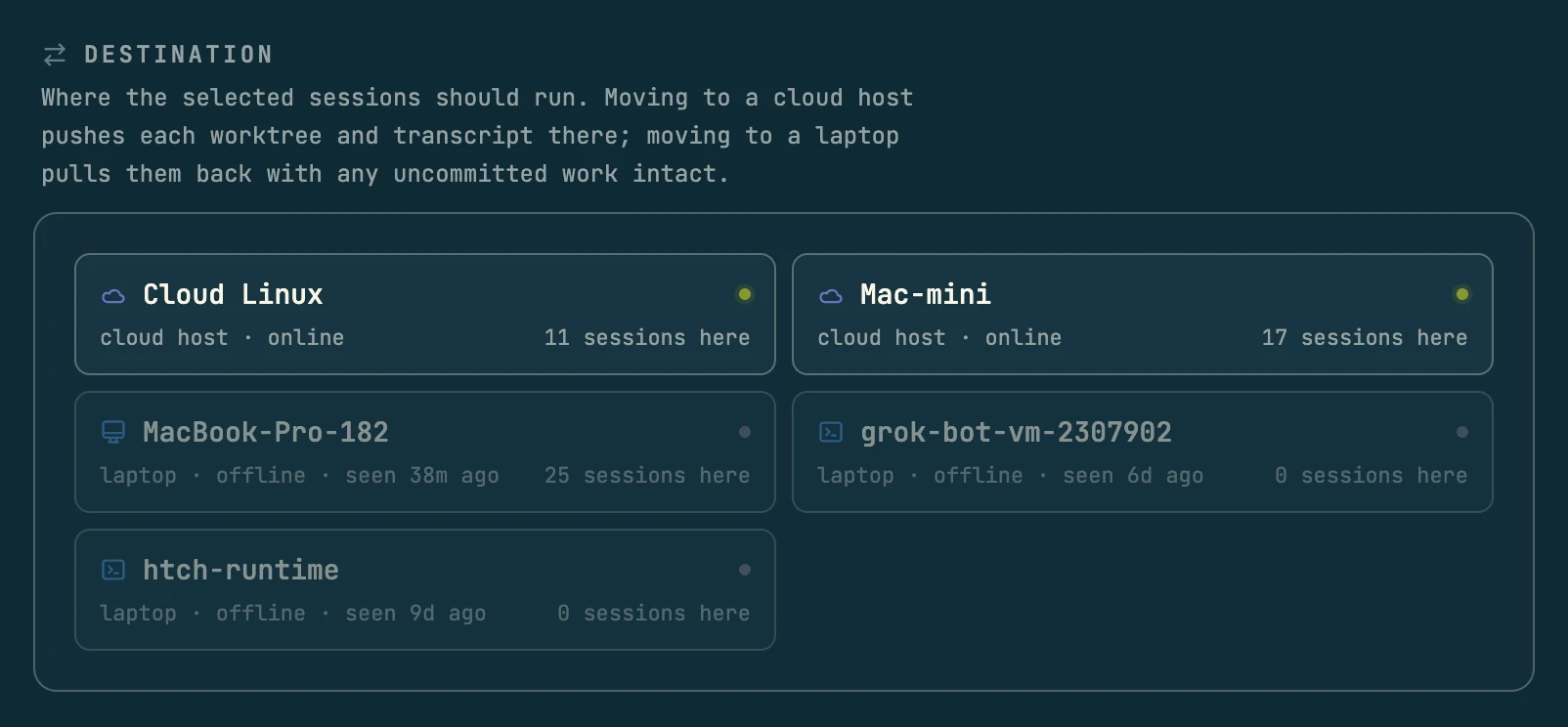
Pick a destination, then tick sessions in the list below it, filtered by title, project or the machine they are on now. Sessions mid-turn sets how long a busy session may finish its turn, and Move starts the batch.
Every batch then shows under Migrations with live progress, one row per session, each narrating its own step. A failed row keeps its session where it was.
For one session, use the machine menu in its header and pick Move to the host, or right-click sessions in the inbox and choose Move to machine.
- port the v1 routes
- write the migration
- fix the flaky auth test
- nightly backfill
- triage the inbox
No daemon delivers into it. Messages sent now wait and are delivered when it resumes.
A mid-turn session finishes its turn, up to --wait minutes (10 by default).
The owner stops the agent so the transcript on disk is final.
Worktree by git over SSH, gitignored files, the transcript with paths rewritten.
Owner and path move in one write; the destination resumes, the old owner lets go.
Every ownership flip writes that divider into the thread, and the agent is told which machine it is on now. Messages you sent during the move were held by the fence and arrive on the destination.
$ cast migrate start --to shop-host --label rollout --dry-run
  would move  jx7k2pd   port the v1 routes  (MacBook-Pro → shop-host)
  skip       jx7q0aa   review the diff: only Claude Code sessions can be transferred
dry run: 1 would move to shop-host, 1 skipped
$ cast migrate start --to shop-host --label rollout --wait 20
--from, --project, --all and short ids select too. cast remote move and cast remote back move one session; going back is a fast forward that never overwrites local work.Declare the packages and services a repo needs on the host
A database, a service, a seed script: the [host] table in .codecast/workspace.toml holds it, and every host applies it before any worktree exists.
[setup]
copy = [".env.local"]   # rsynced into each worktree

[host]
packages = ["postgresql", "redis-server"]   # apt
services = ["redis-server", "postgresql"]   # systemd
run = ["sudo -u postgres createuser -s ubuntu || true"]

[sync]
never = ["data/local.db"]
~/.codecast/host.toml, same shape. Each run step must be safe to run twice.It converges on every wake. The spec is applied once per change, before any worktree is made, so a brand new host and an edited spec end up in the same place. A failing step is reported with its output and retried next wake. It never blocks a session.
Save a ready host as an image. Save image on the host's card captures it; the next host you create then starts with packages, tools, checkout and mirrored home already there. The clone gives itself a new machine id and signs in as itself on first boot.
Scripts can tell where they are. Hooks and scripts see $CODECAST_CLOUD set to 1 on a host. Apply it by hand with Apply setup now on the host's card in Settings, Devices, which also shows whether the host is in step.
Browsing and sign-ins on the host
Agents on the host verify UI and read behind sign-ins in the host's own Chrome, borrowing logins from your laptop one site at a time.
$ cast browser open https://dashboard.stripe.com
# a sign-in wall: borrow the laptop's login
$ cast browser sync dashboard.stripe.com
$ cast browser read
The browser watch beside the conversation streams the agent's tab with its cursor and clicks drawn on top. Press Take the wheel to sign into an OAuth page the agent cannot pass. For a popup, a file picker or a Chrome dialog, the screen button in the watch's toolbar opens the host's whole display in the pane, with mouse, keyboard and clipboard.
The agent drives the host's own Chrome on a virtual display. There is no Chrome of yours there, so when it meets a sign-in it asks your online laptop to carry that one site's cookies in over an SSH forward (cast browser sync <site>, waiting 150 seconds by default). Google logins are never carried.
These views reach the host through the laptop that manages it, over the SSH connection it already holds. An idle listener closes after 10 minutes, so an open tab does not keep a host awake.
When a host sleeps and wakes
A host costs money while it runs, so it looks for real work before it stops and wakes when work is queued for it.
A provisioned Linux host stops itself after 20 idle minutes; its card says “sleeps after N idle min”. cast hosts provision --idle <minutes> changes it; 0 disables.
Waiting work, open turns, recent subagent activity, live task processes, detached tmux work, CPU. Unreadable evidence keeps it awake. An idle prompt does not.
cast hosts keepalive 30 on the host holds it up for 1 to 1440 minutes. A shorter lease never cancels a longer one.
Work queued for a sleeping host is picked up by your laptop daemon, which boots it. The session resumes from the worktree and transcript on the host's disk. Wake and Sleep on the host's card in Settings, Devices do it by hand.
AWS Macs run on dedicated hosts: 24 hour minimum allocation, and stopping the instance does not end the charges. Mac auto-stop is off.
Commands for scripts and agents
Everything above also has a command, which is what agents run and what you script. Registering a host is only a command today, built for you by Add a cloud machine. cast <command> --help has the full flags.
cast spawn --cloud "<task>" …One worktree per task, from this checkout--from origin-mainStart clean instead--sharedThe host's main checkout, one taskcast fork --cloud "<dir>" …Branches on the host, yours stays here
cast remote sync <session>Keep its folder in step with a laptop copycast sync status | pull | push | diffFrom the host: what differs, fetch, sendcast remote move | back <session>One live session there, or homecast migrate start --to <device> …Many sessions as one batch--dry-run --wait <min>Plan only; how long a turn may finishcast migrate ls | show | cancel | retryBatches, row by row
cast remote hostsConfigured hosts and this device's idcast hosts lsState, sessions, worktrees, git access, costcast hosts create linux | macLaunch an EC2 instance and set it upcast hosts add <instance-id> --provisionRegister one you already runcast hosts wake | sleep [id]Boot it, or stop it costing moneycast hosts setup | image [id]Apply [host]; save a ready hostcast hosts tools [id]Check and install the CLIs and runtimes the host needscast hosts sync --dry-runWhat the config mirror would sendcast hosts vnc [id]The whole screen, in codecast
cast browser sync <site>Borrow one site's login from your laptopcast hosts keepalive <minutes>Stay awake for a quiet jobcast ws acquire <name>The worktree a cloud task runs in; the host runs it for you
Requirements and limits
What a host needs, what it costs, and what it cannot do yet.
Where can a host run?
On AWS: Ubuntu 24.04 or macOS EC2 instances, new or ones you already run. Settings, Devices, Add a cloud machine builds the setup command (cast hosts create or cast hosts add), and running it needs AWS credentials and an SSH key on the laptop.
What does it cost?
Whatever AWS charges you; the host is yours. Linux hosts stop themselves when idle and then cost only their disk. A Mac sits on a dedicated host with a 24 hour minimum, billed while stopped.
Which sessions can migrate?
Claude Code sessions with a transcript. Other agents, subagents (they move with their parent), ended or killed sessions are skipped with the reason. Moving straight from one cloud host to another is not supported.
Does my laptop need to be on?
For starting and moving work, yes: preparation and transfers run from a laptop daemon over SSH, and the machine holding a session's files must be online to move it. A running session keeps going with the lid closed. Waking a host for a trigger with every laptop closed needs the backend operator to allowlist it.
Can the host open pull requests?
It pushes with a one-hour GitHub App token scoped to one repo and contents write, so fetch and push work. Calls that need more, like opening a PR, answer 403 unless you log in with gh auth login on the host or grant the device key.
What if a mid-turn session never finishes?
After the wait you chose under Sessions mid-turn in Migration (--wait from the CLI, 10 minutes by default), the turn is interrupted and the row says so. A session stopped at a permission prompt moves at once, and the prompt asks again on the destination. A runner that dies leaves a fence the server lifts after 30 minutes.
Delegate to workers on any backend, branch a conversation into parallel directions, or move a session to another agent without losing a line of history.
Agents verify UI, read behind sign-ins and reproduce bugs in a background tab of the Chrome you already use, with every screenshot and console error landing in the conversation.
Schedule follow-ups, standing monitors and event reactions that wake a session or spawn a fresh one, and report only when a person needs to read it.
Agents read any macOS window as an accessibility tree and act on it by name, in the background, without taking your screen, your mouse or your keyboard.
Install codecast, then add a host
Codecast runs on your laptop first. When you are ready for a host, open Settings, Devices, Add a cloud machine. It builds the one command that sets the host up, and you run it on your laptop.
curl -fsSL codecast.sh/install | shbrew install codecast-sh/tap/codecast or npm install -g @codecast-sh/cli$ cast hosts add i-0123456789abcdef0 --provision \
--region us-west-2 --key ~/.ssh/dev.pem