Every line of code, linked to the conversation that wrote it
Codecast keeps every session your team runs, from any agent on any machine. Search it by the file, commit or pull request it touched. Ask one session a question and get an answer that cites its messages. Open a file with blame set to Sessions and every line names the session that wrote it. Your agents read the same record before they start.
- Blame: Sessionsa line of a file to the session that wrote it
- Ask this sessiona session to its answer, with the messages cited
- Searcha file, commit or pull request to its sessions
Search sessions by the files, commits and pull requests they touched
Every session records what it touched: the files it edited, the commits it made, the pull requests it is linked to, the repository it ran in, who ran it, and when. The Search page turns each of those into an operator you type into the box: file:, commit:, pr:, label:, author:, repo:, after:, before:.
Open it from anywhere with CtrlK then Ctrl↵. With no text, an operator lists the matching sessions, newest matching change first. With text, it narrows where the text is searched. The URL keeps the whole query, so a narrowed view is a link you can send.
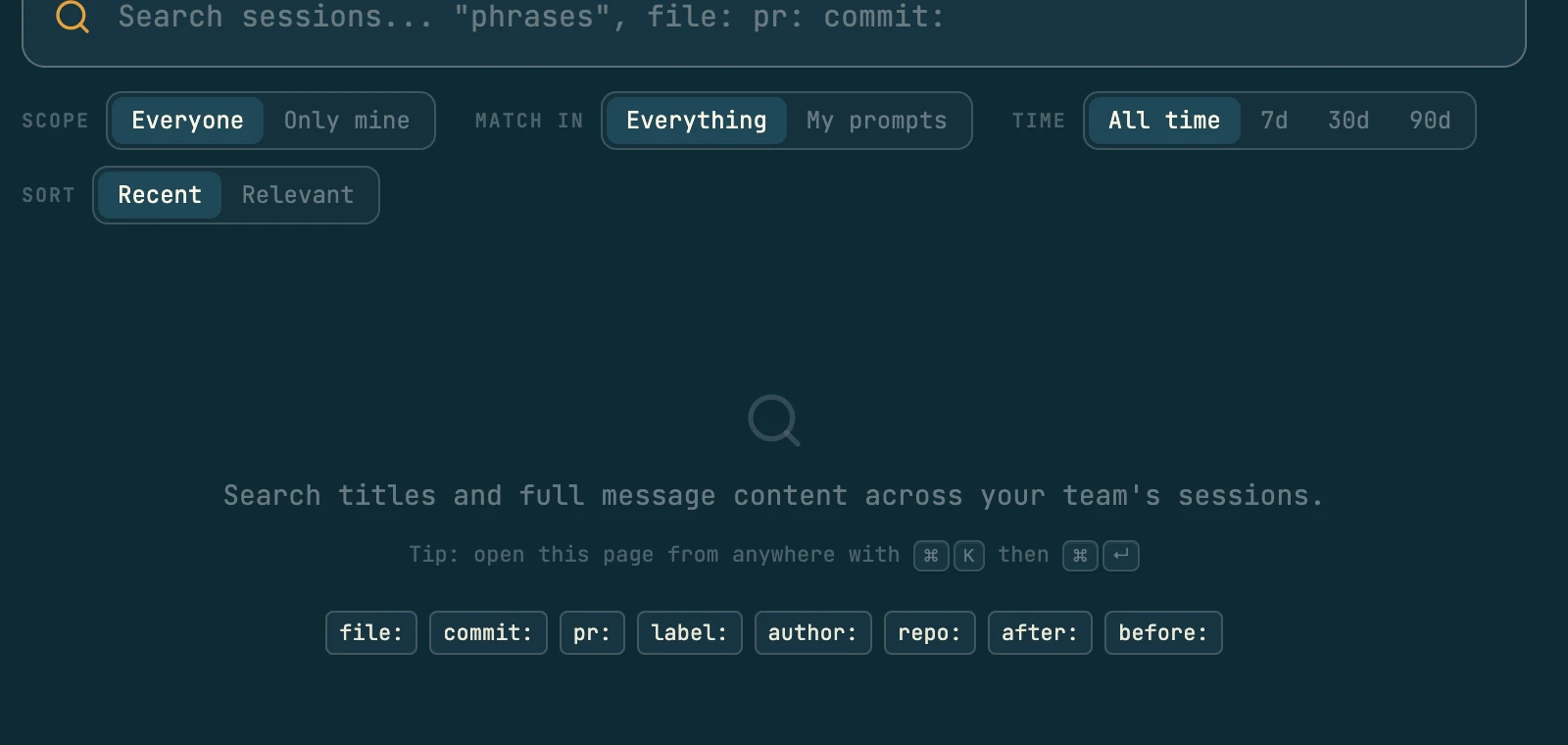
Your agents run the same query with cast search before they start a task. Pick an operator to see what it returns.
file: sessions that edited a file or folder
$ cast search file:src/webhooks/retry.ts
<SEARCHRESULTS>
Found 3 sessions matching the filters

── Add jitter to webhook backoff ─────────────
jx7m41c | ○ done | Oct 1 | 96 msgs | ~/src/payments

── Retry cap for failed webhooks ─────────────
jx7k2qa | ○ done | Sep 18 | 214 msgs | ~/src/payments

── Stripe webhook ingest ─────────────────────
jx7f9de | ○ done | Aug 30 | 388 msgs | ~/src/payments

To explore:
  cast read <id> <line>:<line>   # read message range
  cast diff <id>                 # files a session changed
</SEARCHRESULTS>
Ask one session a question and get an answer with citations
A long session is a lot to page through. Press A in any session, or Ask in its search bar, and Ask this session opens beside it. It answers one question from that one session, leads with the direct answer, and backs each point with message pills that jump to the line.
It reads forward past the first relevant passage. People change their minds and agents try things that fail, so when a later message revised the answer, you get the later one, with the earlier one named as history.
cast read <id> --ask, before they message them, and ask their own session past its compactions.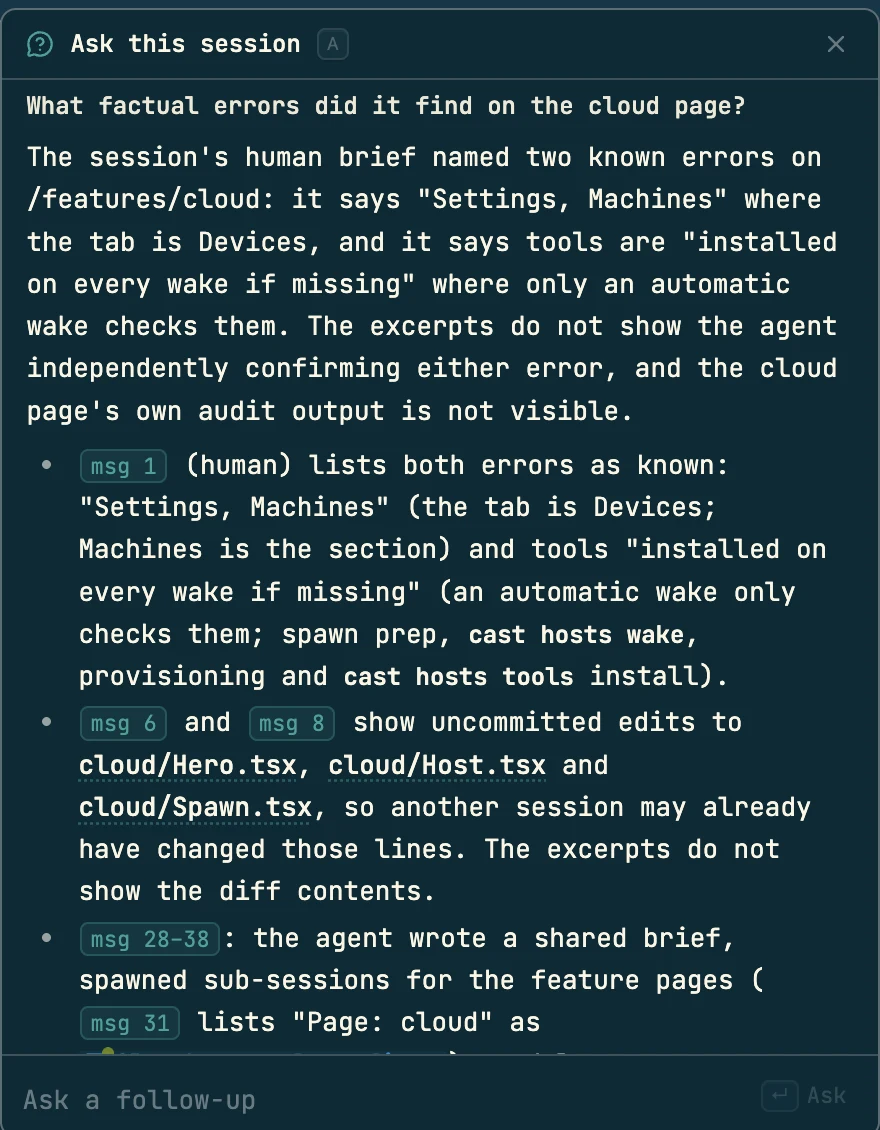
The same question from a script or an agent, with the cost of the answer printed under it.
$ cast read jx7k2qa --ask "what retry cap did we settle on?"
── Retry cap for failed webhooks ─────────────────
   jx7k2qa | 214 lines | what retry cap did we settle on?

Five attempts. The session first capped retries at 3 (msg 88), then raised the cap to 5 after a load test (msg 139–141).
- msg 88: sam asks for 3, since Stripe already retries for three days and ours only has to cover our own outages.- msg 139: the load test shows a deploy keeps the queue down for longer than three attempts cover.- msg 141: MAX_ATTEMPTS becomes 5. The cap of 3 is history.
read: cast read jx7k2qa 88  cast read jx7k2qa 139:141
claude-haiku-5-5 · read 214 lines, 35 matched, showed 214 · 41.2k in / 298 out, $0.004 · 8.9s
Find earlier sessions before an agent starts a task
This part is for your agents, and it has no screen in the app. Most rediscovery happens in the first ten minutes of a task, when an agent reads the code cold. cast context is the step before that: describe the work, name a file, or pass --auto to read your branch name and changed files, and it returns the sessions that already worked on it and the files they touched.
cast ask goes the other way, from a question to the history. It expands the question into search terms, reads the top sessions (three by default, -n for more) and returns the passages that answer it, each with its session and message range.
$ cast context --auto   # on branch webhook-retry-jitter
<CONTEXT query="webhook retry jitter">
Found 3 relevant sessions

## Most Relevant
[jx7m41c] ○ done | 3d ago - "Add jitter to webhook backoff"
  Files: src/webhooks/retry.ts, src/webhooks/retry.test.ts
[jx7k2qa] ○ done | 16d ago - "Retry cap for failed webhooks"
  Files: src/webhooks/retry.ts, docs/webhooks.md

## Related Files
- src/webhooks/retry.ts (3 sessions)
- src/queue/worker.ts (2 sessions)
</CONTEXT>
$ cast ask "why do we verify signatures before parsing?"
<ANSWER query="why do we verify signatures before parsing?">
Stripe signs the raw request body. Parsing and re-serializing the JSON changes the bytes, so the check has to run first.
Sources:
- [jx7f9de] msg 45-47: Stripe webhook ingest
</ANSWER>
Blame that names the session behind each line
When agents write the code, git blame names whoever committed it, which tells you nothing about why. Open a file in codecast's repo view and set Blame to Sessions (b): each line is marked with the session that wrote it, a strip above the file reads how much of it traces to sessions (“84% by 3 sessions”), and a click opens the conversation.
In your terminal and editor, cast blame is a drop-in for git blame: same output, with the session's id and title in the author column. Lines no session wrote keep their git author.
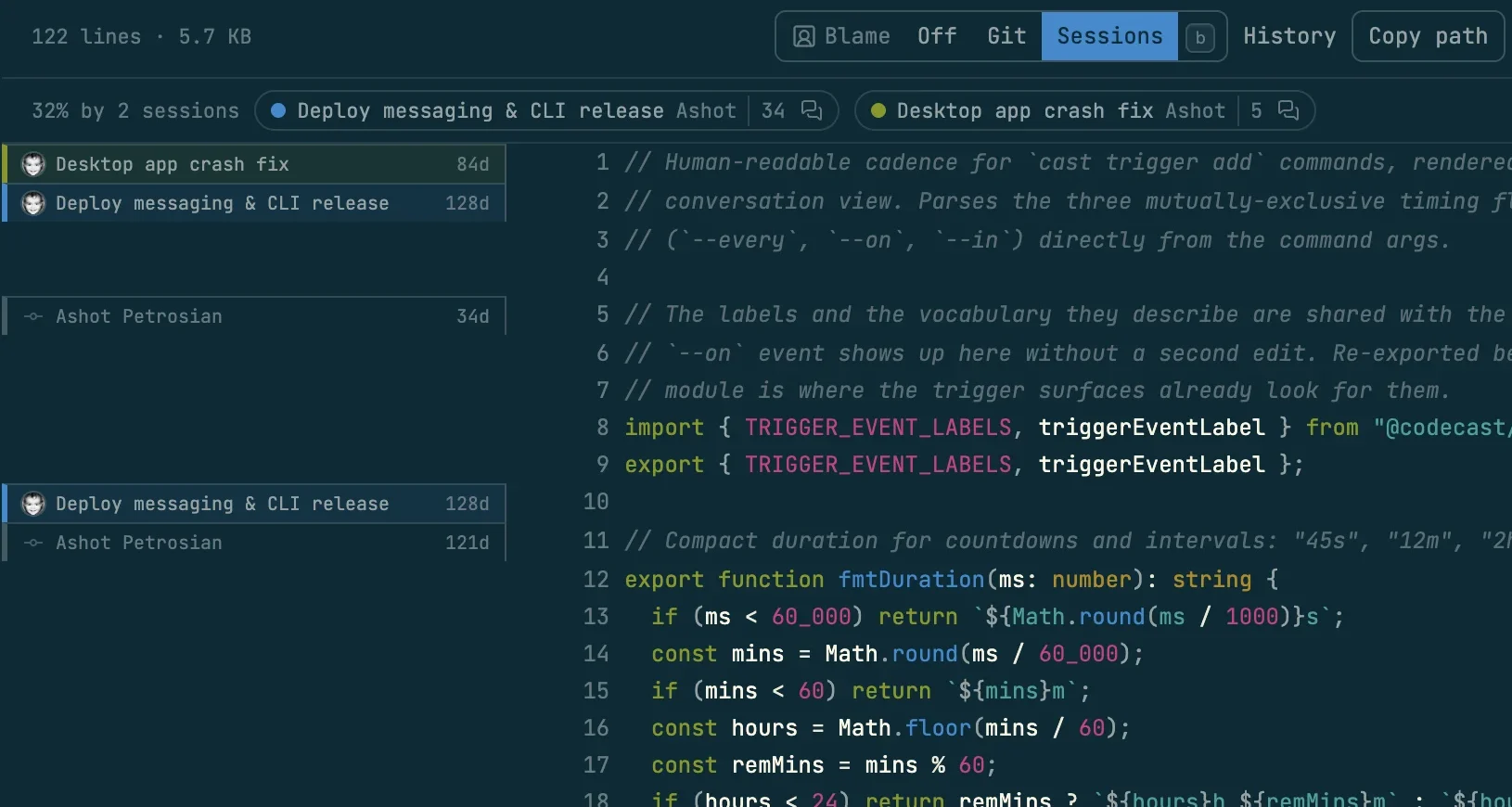
The same answer in a terminal, in git blame's own format.
$ cast blame -L 3,9 src/webhooks/retry.ts
a91f03e2c (jx7f9de lee  Stripe webhook ingest         2026-08-30 11:20:04 -0400 3) import { queue } from "../queue";
a91f03e2c (jx7f9de lee  Stripe webhook ingest         2026-08-30 11:20:04 -0400 4) import type { WebhookEvent } from "./types";
4b1c9e2a1 (jx7k2qa sam  Retry cap for failed webhooks 2026-09-18 14:02:11 -0400 5) export const MAX_ATTEMPTS = 5;
4b1c9e2a1 (jx7k2qa sam  Retry cap for failed webhooks 2026-09-18 14:02:11 -0400 6) export const BASE_DELAY_MS = 2_000;
c07d5b1f8 (jx7m41c maya Add jitter to webhook backoff 2026-10-01 09:41:37 -0400 7) export function nextDelay(attempt: number) {
c07d5b1f8 (jx7m41c maya Add jitter to webhook backoff 2026-10-01 09:41:37 -0400 8)   const jitter = Math.random() * 0.3;
e5520aa31 (Dana Okafor                                2026-10-02 16:05:12 -0400 9)   return BASE_DELAY_MS * 2 ** attempt * (1 + jitter);
git commit the agent runs. It never fails a commit.git config codecast.sessionTrailer false in a repo, or cast config session_trailer false.4b1c9e2a1… 5 5 2 author Sam Rivera summary Cap webhook retries at 5 codecast-session jx7k2qa codecast-conversation jx7k2qa8m3v0d1y6h4t9rbc2wqe5fn7s codecast-title Retry cap for failed webhooks codecast-author sam codecast-url https://codecast.sh/conversation/jx7k2qa…
$ cast blame --log src/webhooks/retry.ts
Sessions that shaped retry.ts (52/58 lines)

  jx7m41c  maya  c07d5b1f8  12 lines
  jx7k2qa  sam   4b1c9e2a1   9 lines
  jx7f9de  lee   a91f03e2c  31 lines
cast blame --install-fugitiveinstalls a shim so vim-fugitive's:Gblameshows sessions.cast blame --log --quickfixfeeds a quickfix list: Enter opens the conversation, O opens the file at that session's commit.cast blame --open src/webhooks/retry.ts:5resolves the line to its session and opens the conversation in your browser.
What a session changed
A session's state only tells you who is paying attention to it now. Before you credit a change to a session, or message it about its work, read the evidence.
In a session, Show git diff in the overflow menu (d) opens its changes beside the conversation. Agents check the same evidence from the CLI before they credit or message a session: cast diff lists the files it changed, the commits it made and the tools it used, and cast summary gives its goal, approach, outcome and files. cast diff --today and --week roll up every session from the day or the week.
$ cast diff jx7k2qa
<DIFF session="jx7k2qa" …>
Duration: 2h 14m
Messages: 214

## Files Changed (3)
 M src/webhooks/retry.ts       +18 -4
 M src/webhooks/retry.test.ts  +41
 M docs/webhooks.md            +6 -2

## Commits (2)
[4b1c9e2] Cap webhook retries at 5
[19ad7c0] Load test for retry cap
</DIFF>
$ cast summary jx7k2qa
<SUMMARY session="jx7k2qa">
# Retry cap for failed webhooks

## Goal
Stop failed webhooks retrying forever.

## Outcome
Cap of 5 attempts, backed by a
load test.

## Files Changed
- src/webhooks/retry.ts (+18 -4)
…
A log of team decisions and their reasons
The decisions log records a conclusion with its reason, tags and project, so nobody has to find the right session to learn it. Each entry names the session that settled it, so the next reader can open the whole argument.
The log lives in the CLI today, with no screen in the app: agents record a decision when a session settles one, and read the log before relitigating a choice the team already made. Ask your agent what was decided about something and it reads it for you.
$ cast decisions add "Webhook retries cap at 5 attempts" \
    --reason "Stripe retries for 3 days; ours covers our own
    outages. A deploy outlasts 3 attempts (load test, jx7k2qa)." \
--tags webhooks,reliabilityHow agents learn to use memory
Everything above works for you in the app, and your agents get it only if they know to use it. The installer asks one question, Enable agent memory?, defaulting to yes, and writes a ## Memory section into the instruction file of each agent on the machine: ~/.claude/CLAUDE.md, ~/.codex/AGENTS.md, a Cursor rule, and so on.
The section is a command reference with one instruction: search past conversations liberally, when starting a task, when debugging, and when the user refers to earlier work. Nothing runs on its own; the agent decides when to call it. When codecast updates and the section's text changed, it is rewritten in place.
--- Agent Memory ---
Lets your agents search and learn from past conversations.
Adds cast commands to your agent config so they can recall prior work.

? Enable agent memory? (Y/n) Y

Memory enabled. Added to:
  ~/.claude/CLAUDE.md
  ~/.codex/AGENTS.md
cast search "file:src/auth.ts"
cast read <id> --ask "<question>"
cast context "implement auth"
cast blame <file>
Recent team sessions at the start of every new session
Turn on cast stable team and every new session starts with a snapshot of the team's recent sessions in this project.
<stable-context mode="team">
This gives you bigger-picture visibility on what has been and
is being worked on by the team.

── Add jitter to webhook backoff ──────────────
   jx7m41c | ● working | just now | 96 msgs | ~/src/payments

── Refund webhooks ────────────────────────────
   jx7r0pd | ○ done | 2h ago | 151 msgs | ~/src/payments
…
</stable-context>
-g for every project. A CLI setting, like the rest of this section.cast stable off stops it.Injected at session start for Claude Code, Codex, Cursor and OpenCode. It is a snapshot, so the agent is told to check cast diff and cast read before crediting work to a session. Skipped memory at install? cast memory turns it on later.
Example questions and how to answer them
Each of these is answered by a past conversation, in one or two steps.
- 01
A reviewer asks why the retry cap is 5 and not 3.
1Open retry.ts, Blame: Sessions, line 5→Ask this session: why 5?The session that set it, the message where 3 was chosen, and the load test that changed it to 5.
- 02
Webhooks started failing after this morning's deploy.
1Search commit:4b1c9e2→Open the session, Show git diffThe session behind the suspect commit, every file it changed, and the conversation explaining each change.
- 03
An agent picks up a half-finished branch.
1Nothing to do: the agent looks firstThe sessions that already touched the changed files, so it starts from their conclusions.
- 04
Someone proposes removing signature checks to speed up ingest.
1Search repo:payments signature→Ask your agent what the team decidedThe session where the team worked it out, and the recorded decision with its reason.
Scope and limits
What memory reaches, what it costs, and where its answers stop being exact.
Who can search my sessions?
How far back does search reach?
Does every commit get a Codecast-Session trailer?
Does cast diff see every change?
What does asking cost?
cast ask, which searches across sessions, runs on your machine and needs ANTHROPIC_API_KEY in your environment; it uses the model to expand your question into search terms and returns the matching passages with their sources.Do agents search on their own?
cast stable on, each new session also starts with a snapshot of recent sessions, which is a starting point and goes stale as the session runs.For scripts and agents
Your agents run these on their own once memory is on. They work from any shell too.
- cast search "<text> <operators>"
- file: commit: pr: label: author: repo: after: before:
- cast context [query] [-f file] [--auto]
- sessions relevant to the work you are starting
- cast ask "<question>"
- passages across sessions that answer a question
- cast feed
- the team's recent sessions
- cast read <id> --ask "<question>"
- one session's answer, cited, with later reversals
- cast read <id> 15:25
- messages 15 to 25; --full shows tool payloads
- cast summary <id>
- goal, approach, outcome, files
- cast diff <id> | --today | --week
- files changed, commits, tools used
- cast blame <file>[:line] [-L a,b]
- git blame with the session as author
- cast blame --log <file>
- the sessions that shaped a file, newest first
- cast blame --open <file>:<line>
- open the line's conversation in the browser
- cast blame --porcelain <file>
- machine format with codecast-* keys
- cast decisions add "<title>" --reason "<why>"
- record a decision; --tags to file it
- cast decisions [--search q] [--tags t]
- read the log
- cast stable team | solo | off
- inject recent sessions into each new session
- cast memory [--disable]
- install or remove the agent instructions
Common options: --mine, -m <name>, -g (all teams), -s / -e (time range), -n (limit), -p (page). Every command's --help is the full list.
Related
Get started with memory
Install codecast and your sessions become searchable, askable and blameable. Answer yes to agent memory and your agents start reading it too.
curl -fsSL codecast.sh/install | shbrew install codecast-sh/tap/codecast or npm install -g @codecast-sh/cli