Triggers run agent sessions on a schedule or an event
A trigger is a prompt with a clock or an event attached. When it fires, codecast runs a real agent session: back in the conversation that asked for it, or in a fresh one. Most runs finish quietly. The ones that need a person land in your inbox.
Set one from the Triggers page with New trigger, or ask the agent you are talking to. Agents set their own follow-ups too, like checking CI half an hour after a push.
One night, six triggers · hover a mark to see what the run did
18:0021:0000:0003:0006:0009:00
tr-41Check if CI is green on mainin 30m
tr-41 18:40CI green on main. The answer lands in the thread that asked.
tr-43Review open PRs and summarize findingsevery 4h · fresh session
tr-43 20:00Reviewed 3 open PRs. Summary filed under the trigger.tr-43 00:00No new PRs. Clean run, nothing posted.tr-43 04:00No change since the last run.tr-43 08:00Two PRs went green overnight. Summary filed.
tr-44Rebuild the docs index if main movedevery 1h · fresh session · precheck
tr-44 19:00Precheck exited 1. Skipped run recorded, no session spent.tr-44 20:00Precheck exited 1. Skipped run recorded, no session spent.tr-44 21:00Precheck exited 0: main moved. Index rebuilt.tr-44 22:00Precheck exited 1. Skipped run recorded, no session spent.tr-44 23:00Precheck exited 1. Skipped run recorded, no session spent.tr-44 00:00Precheck exited 1. Skipped run recorded, no session spent.tr-44 01:00Precheck exited 1. Skipped run recorded, no session spent.tr-44 02:00Precheck exited 1. Skipped run recorded, no session spent.tr-44 03:00Precheck exited 1. Skipped run recorded, no session spent.tr-44 04:00Precheck exited 1. Skipped run recorded, no session spent.tr-44 05:00Precheck exited 1. Skipped run recorded, no session spent.tr-44 06:00Precheck exited 1. Skipped run recorded, no session spent.tr-44 07:00Precheck exited 0: main moved. Index rebuilt.tr-44 08:00Precheck exited 1. Skipped run recorded, no session spent.
tr-45Respond to new PR review commentson a PR comment
tr-45 22:47A reviewer asked for a null check on #482. Fixed, pushed, replied.tr-45 23:12Follow-up question on the same thread. Answered.tr-45 06:58Early reviewer approved #482. Thread resolved.
tr-46Audit dependencies for advisoriesevery 1d · fresh session · read-only
tr-46 02:00–03:14Hit a usage limit. Parked until the window reset, then resumed the same session. No advisories.parked at limit
tr-47Investigate new production errorson a new Sentry error · fresh session
tr-47 05:20New TypeError in checkout, traced to last night's migration. Flagged for attention.
09:0024 firings12 skipped by a precheck, no session spent12 agent sessions ran1 parked at a usage limit, then resumed
1 needs you: tr-47 in the inbox
From 18:00 to 09:00: 24 firings, 12 skipped by a precheck, 12 sessions ran, 1 needs attention.
Run once, on a cadence, or on an event
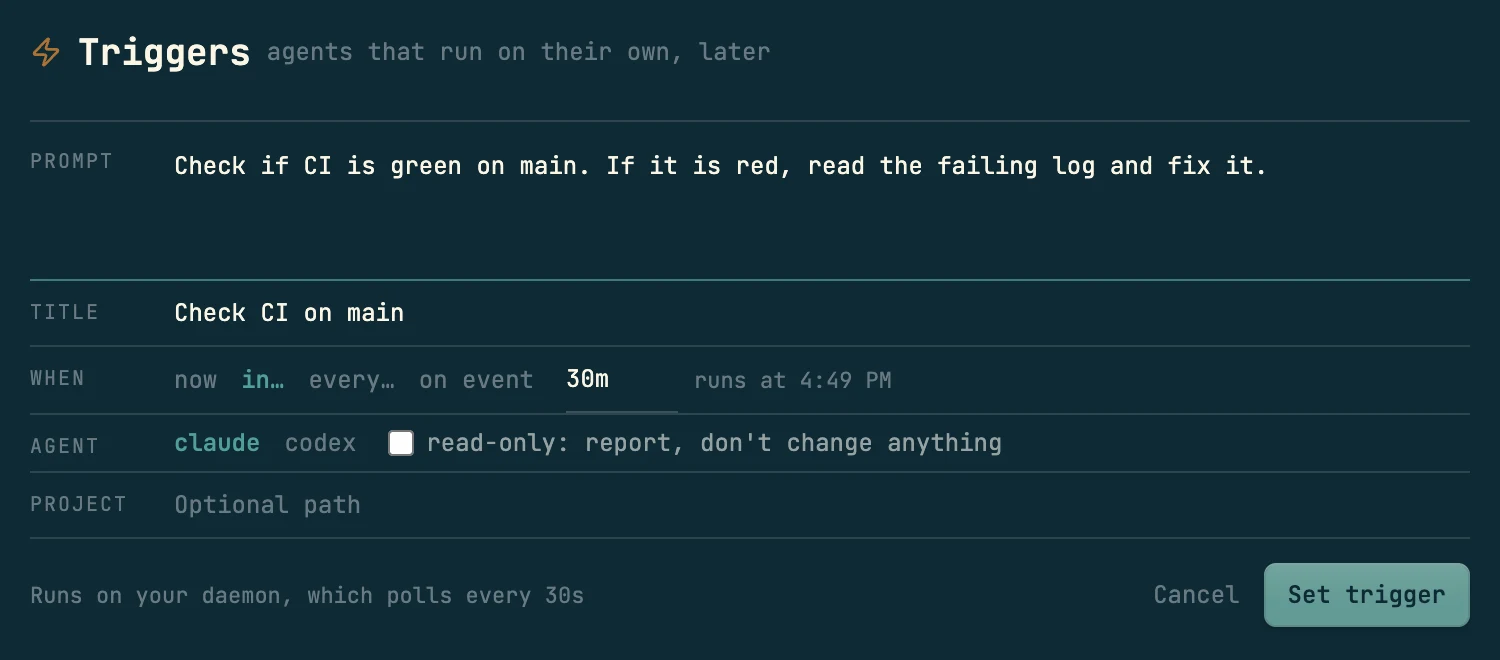
Every trigger is the same thing: a prompt, a title, a short ID like tr-42, and a When. On the Triggers page, New trigger opens the form below. The agent in a conversation sets the same thing when you ask it to follow up later.
The form: what to do, when (now, in…, every… or on event), which agent runs it, and whether it may change anything. A trigger set here runs on your machine's codecast daemon.
in…Once, after a delay
Follow-through on work that just shipped: check CI, look at a deploy again, see whether a reviewer answered. Durations read like 30m, 2h, 1d, and the form shows the clock time it will run. Set by an agent inside a session, the run comes back to that thread with everything it already knew.
Check if CI is green on main · in 30m
every…On a cadence
A standing duty: a digest, a sweep, a watcher. Each run re-arms on its slot, so a daily check never drifts later by its own runtime. The trigger's page shows the next fire and how far through the cycle it is.
Review open PRs and summarize findings · every 4h
on eventWhen something happens
An event from GitHub, Linear, or your running product, picked from a list. An agent can narrow it to one repository, pull request or source. Events that arrive while a run is working are kept for the next run.
Respond to new PR review comments · on a PR comment in #482
29 events a trigger can wait for
the same list the form's on event picker offers
Pull requests
GitHub integration. Defaults to the checkout's origin repo.
A trigger an agent sets inside a conversation runs back in that conversation by default, or the agent can give each run a fresh session instead. One made from the Triggers page starts a fresh session each time. The choice turns on two questions: does the run need what this conversation knows, and how often will it fire.
Here the default
For follow-through on this conversation's own work, firing once or a few times. The run arrives as a new turn with the full history, and its answer lands where the question was asked.
Fix flaky checkout testjx7c6zk
ship the fix, then make sure CI is actually green
Pushed a41f9e2. I set a follow-up for 30 minutes from now to check CI on main.
tr-41 fired 18:40
CI is green on main. The checkout suite passed 3 times in a row on the new runner, so the flake is gone.arrived as a new turn, with the whole thread behind it
A fresh session for standing duties
For anything that repeats: a monitor, a digest, a sweep. A fresh run carries only its prompt and the last run's summary, so write the prompt as a full brief. Runs an agent set nest under its session, never as inbox cards.
Release prepjx7dhfh
tr-43 every 4h · Review open PRs and summarize findings
run 1 · 20:00 · fresh sessionReviewed 3 open PRs. Summary filed.
run 2 · 00:00 · fresh sessionNo new PRs since the last run.
run 3 · 04:00 · fresh sessionNo change since the last run.
run 4 · 08:00 · fresh session#511 fails its migration check. Needs a decision.needs attention: wakes jx7dhfh
each run gets the prompt plus the previous run's summary
What reaches you
herefresh session
Fires onceTherunisthenextturninthethread.Theresultisrightthere.Acleanresultpostsbackasamessagewithoutwakingthethread.The agent can ask to be woken to act on the report too.
RepeatsEveryfiringreloadsthewholehistoryandgrowsthethread.Usethisonlyforafewfirings.Acleanrunpostsnothing.Itssummaryisreadunderthetrigger.Or every run's result can post into the thread, without a wake.
Fails, dies, or asksThethreadiswhereithappened,soyouseeitthere.Thearmingsessioniswoken:afailedrun,arunthatdiedwithoutreporting,oronethatflaggeditselfforattention.
A fresh run can be Claude or Codex (the form's Agent row), a pinned model, or a saved agent definition. A run that lands in an existing conversation keeps that conversation's model.
Prechecks skip runs that have nothing to do
Most repeating jobs ask a question whose usual answer is no. Has main moved? Is the queue empty? Without a gate, a whole agent run is spent finding out. A precheck asks with a shell command first.
tr-44 · every 1h · one day14 firings · 11 skipped · 3 sessions
exit 1: skip recorded exit 0: the trigger runs an agent session
The command runs in the project directory before each scheduled or repeating firing. Exit 0 runs the trigger. Any other exit, or 60 seconds without an answer, records a skipped run and re-arms on the normal cadence. A skip doesn't count as a failure, so it never uses up a retry.
The trigger's page shows the precheck in its own panel with when it last skipped, and every skip sits in the run history as a skipped row, so you can tell a gated trigger from a broken one. Event triggers and Run now bypass it.
The New trigger form has no precheck field today. An agent adds one when it sets the trigger, which is how the /cast-loop skill drains a task queue: its precheck fails when no task is ready, so an idle loop spends nothing. From a script it is one flag:
$casttriggeradd"Review what landed on main"--every1h--spawn\--precheck'test"$(git rev-parse origin/main)"!="$(cat .last-reviewed)"'
How a run reports back
A run ends by filing a summary of what it found. The summary is what you read later, so it states the outcome. The run also says whether you have to read it at all.
run of tr-47 · flagged for attention
New TypeError in checkout since last night's migration. Fix drafted, needs your call on the backfill.
The run declares itself blocked and stays in the inbox until you have read it. If its session was stashed or killed, it is pulled back into the queue. A trigger whose runs start fresh also wakes the session that set it.
Agents arm their own follow-ups
Installing codecast adds a short section to your agent instructions (CLAUDE.md, AGENTS.md). It teaches agents when a trigger earns its place: an agent that pushes a fix sets its own "check CI in 30m", and one that opens a PR watches for review comments. It also tells them to set a trigger only when there is a concrete reason for one.
What a run is told when it fires
A fired run receives your prompt, its trigger ID, and how to file its summary. If a run ends without reporting, the session that set it is told, with a link to the run's transcript.
Safeguards for runs nobody is watching
Most triggers fire when nobody is watching. These rules decide what a run may do and what happens when it goes wrong.
Usage limits pause a run
01
A run that hits a usage limit parks and resumes its own session when the window resets. It keeps its context and spends none of its retries.
02:00 fires02:25 limit03:14 resumes03:40 done
working
parked
same session
window resets 03:10
The run spends no retry and keeps its context. If the machine has a saved account with room and switching is on, the run can move there instead of waiting.
Read-only runs
02
With read-only ticked in the form, a fresh run gets its write tools removed and state-changing commands blocked. Use it for watchers that should only read and report. A run that injects into an existing session inherits that session's rules instead.
A time limit on every run
03
Every run has a kill cap, 10 minutes by default. An agent setting a trigger that waits or retries raises it past that window.
Retries and failed runs
04
A failed run is retried after a short backoff, three attempts in all, then the trigger is marked failed. A failed run stays in the inbox while its retry runs, one click from the transcript that shows what went wrong.
Repeating triggers keep their cadence
05
A repeating trigger re-arms on its slot, counted from when it was due, so a long run does not push the next one later. A run that outlasts its interval skips the slots it missed instead of firing them all at once.
A lease makes each firing run once
06
The daemon claims a due firing with a lease before it starts, so a second machine or a second daemon never runs the same firing twice.
Killing a session cancels its triggers
07
Killing a session cancels the triggers bound to it. Restoring the session re-arms them.
Runs are executed by the codecast daemon, on the machine where you armed the trigger and in that checkout. If that machine is asleep when a trigger comes due, the trigger waits and runs when it wakes. Usage limits and account switching are covered in the usage limits guide; the cast usage command shows your windows.
Every trigger has a page
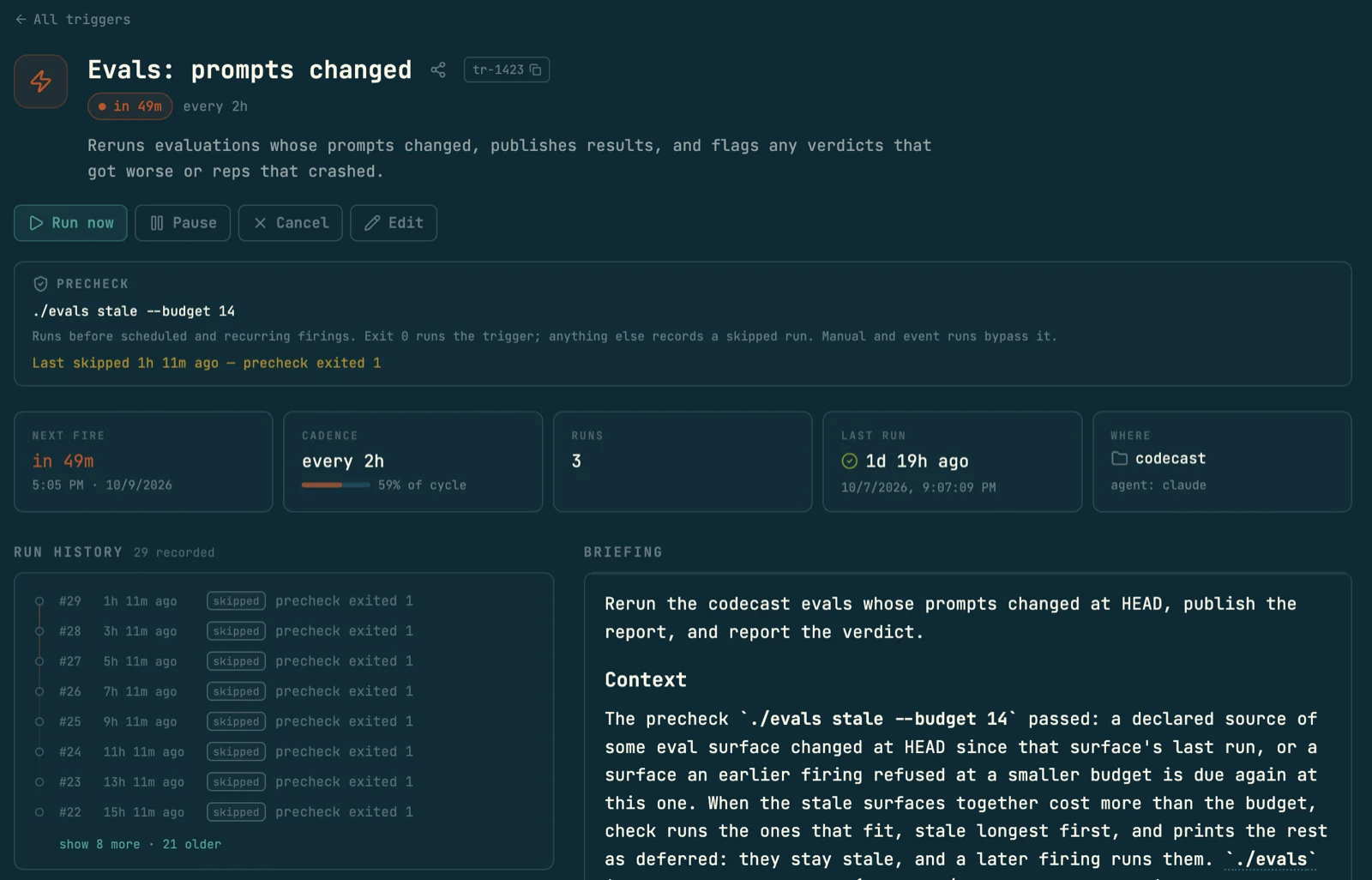
Open one from the Triggers list, or from the pill on the conversation that set it. The page holds the schedule, the controls, the precheck if there is one, every run so far, and the prompt in full.
One of codecast's own triggers. It runs every two hours, but its precheck skips the run unless a prompt changed, so most of its history reads skipped.
Run now
Queue a run immediately. The regular cadence does not shift, and a precheck does not apply.
Pause
Skip every fire until you press Resume. Nothing is lost.
Cancel
Retire it, after a confirm. The run history stays readable.
Reactivate
On a finished or cancelled trigger: arm it again, one cycle from now.
Edit
Change the prompt, title or schedule in the same form that made it.
Every edit is a saved version
A trigger that runs for weeks gets tuned. Every edit, from the page or from an agent, writes a new version and keeps the old one, so you can always see what the prompt said when a given run fired.
In the Triggers list each row carries the same controls inline (Run now, Edit), plus Duplicate and Copy prompt, and opens its run history in place.
Reading the version history is in the CLI today: casttriggerhistorytr-43 lists who changed which field, from what to what, and whether it came from the web or a session.
Workflows for work with several steps
A trigger runs one prompt. Some work has a shape: implement, verify, loop on failure, stop for a person before anything ships. A workflow writes that shape down as a DOT graph and binds it to a task or plan.
swipe for the review gate →
box agent sessionparallelogram shell commandhexagon human gatecondition routes on outcome
An agent starts a run against a task or plan, and the Workflows page lists every run. Each agent node is its own session, streamed live with the graph's progress beside it. A gate holds the run and shows its choices as buttons in the dashboard, with a push notification to your phone and desktop. Your answer goes to the next node.
A trigger decides when something runs; a workflow decides what runs in what order, with the same steps and the same gates every time. Writing the graph and starting a run happen from a session or the CLI (castworkflowrunflow.cast--taskct-4102); the app is where you watch it and answer its gates.
Examples of triggers
Each one is a prompt and a When, plus where the run happens, what it may touch, and when it bothers you.
Check CI after a push
“Check CI on the fix I just pushed; if red, read the log and fix it”
in 20m · this conversation
Once, back in the thread. The run needs this conversation's context about what was changed and why, so you ask the agent rather than the form.
Answer review comments on a pull request
“Address new review comments on #482: fix, push, reply”
on a PR comment · #482
An event, narrowed to one pull request. Shepherding a pull request goes further: one standing trigger that wakes its owning session on every review, check and conflict.
Triage production errors as they appear
“Triage the new error: find the cause, draft a fix, flag me only if it needs a decision”
on a new error · Sentry · fresh session
A fresh session per error with a full brief. It flags itself for attention only when a person has to decide something.
Watch a funnel in read-only mode
“Watch the signup funnel and report anything off”
every 4h · read-only
A standing watcher that can read and report but cannot change state. Clean runs post nothing.
Drain a task queue overnight
“Take the next ready task, verify, open a PR”
every 30m · precheck: a task is ready
The pattern behind the /cast-loop skill: the gate spends nothing when the queue is empty, and each run opens a PR without merging.
Write a weekly blog post
“Write this week's post from what shipped, following the brief”
every 7d · fresh session
Codecast's own blog runs on one. This post wrote itself shows the trigger and the run that wrote it.
Trigger commands for scripts and agents
Agents set most triggers from inside a session with these commands, and they work from any shell. Everything here is in cast trigger --help. IDs take the short form (tr-42), the full id, or its last 8 characters.
Arm
cast trigger add <prompt>
Create a trigger. - reads the prompt from stdin; --title names it.
--in <duration>
Once, after a delay. With --every, the first run.
--every <duration>
Repeat on an interval.
--on <event>
Fire on an event. Narrow with --repo, --pr, --source.
--precheck <command>
Shell gate before each scheduled or repeating firing. Non-zero exit or 60s skips the run.
Where and who
--spawn
Each run starts a fresh session nested under this one.
--for <session>
Bind runs to a specific session from any shell.
--wake
With --spawn on a one-shot: wake this session for a clean report too.
--thread
Post each run's result into this conversation, without waking it.
Claude or Codex, a pinned model, or a saved agent definition for spawned runs.
--project · --max-runtime
Working directory; kill cap (default 10m).
Manage
cast trigger ls [--all] [--json]
Active triggers; --all includes completed and failed.
cast trigger update <id>
Edit in place. Every effective edit is a new version.
cast trigger history <id>
Every version: who changed what, from where.
cast trigger log <id>
The last run's conversation and summary, and the last precheck skip.
cast trigger run | pause | resume | cancel <id>
Fire now, hold, pick back up, retire.
cast trigger complete <id> --summary
Called by the run. --needs-attention keeps it in your inbox.
cast trigger install
Teach your agents to arm their own triggers.
Limits and requirements
What a trigger does not do, and what it depends on.
Does my laptop need to be on?
Yes. A run executes through the codecast daemon on the machine where the trigger was set, in that checkout; the New trigger form says so under its fields. If the machine is asleep when a trigger comes due, the trigger waits and runs when the machine wakes. To keep things running around the clock, set them from a session on a cloud host.
What do event triggers need?
Pull request and push events need the GitHub integration; issue events need GitHub or Linear. Product events (a new error, a metric alert, a deploy and the rest) need a connected source such as Sentry or PostHog.
How exact is the schedule?
The daemon polls for due triggers, so a run starts close to its scheduled time. A repeating trigger stays on its cadence even when individual runs take a while.
What does a run cost?
A run is a normal agent session on your own Claude or Codex account, so it uses your plan like any other session. A run inside a long thread reloads that whole thread. That is why repeating work belongs in fresh sessions, and why prechecks exist.
Is read-only a sandbox?
It removes write tools and blocks state-changing commands for a fresh run. It limits what the agent may do; the run is not isolated from the machine. A run that lands in an existing conversation follows that conversation's rules instead.
Who can see my triggers?
Each trigger has a page in the web app, visible to everyone who can see the session it belongs to. The verbs follow the same access, and only the owner may delete one.