Documentation
Machines and accounts

Usage limits are a pause

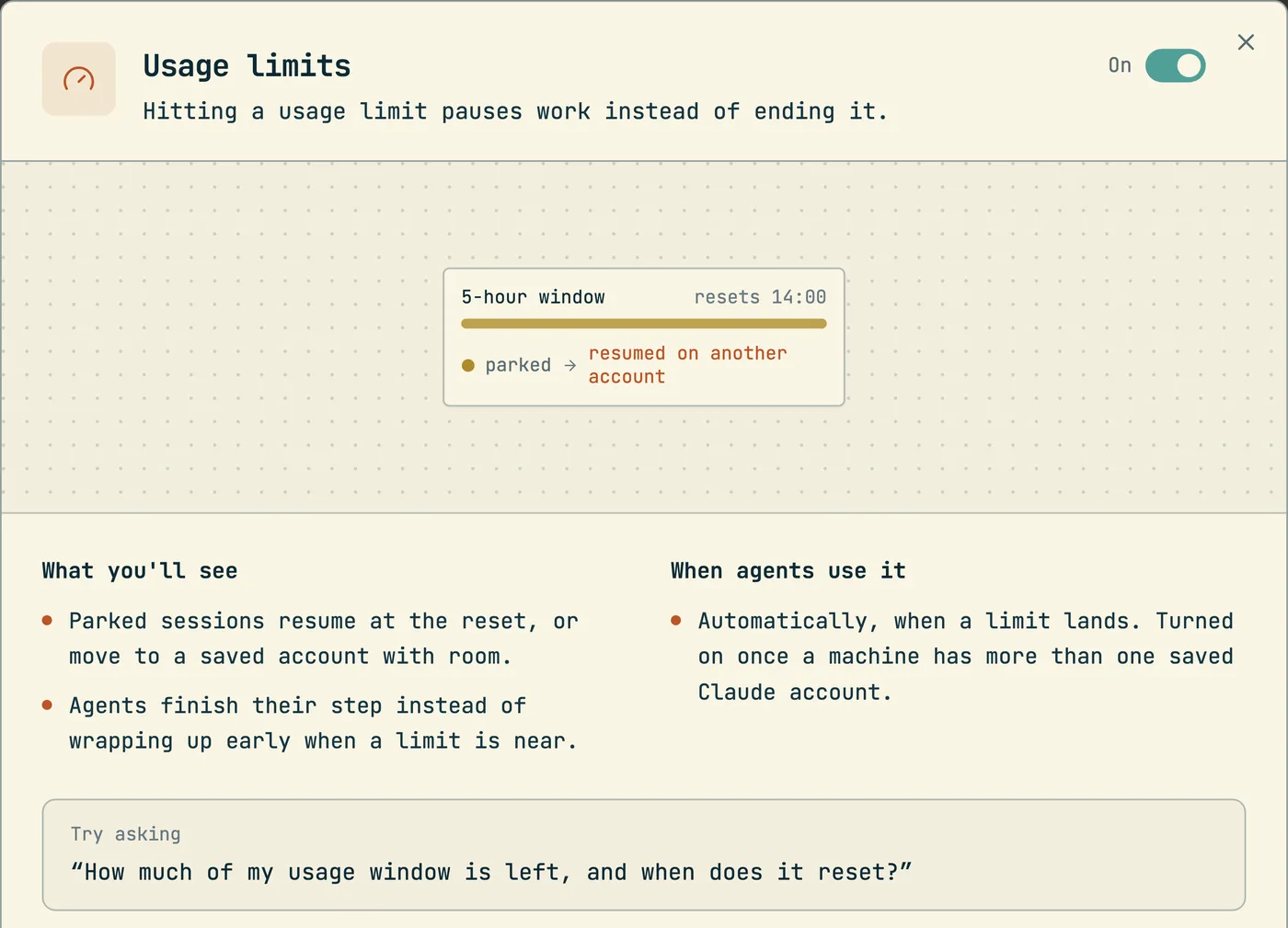
Codecast parks a session that hits a limit, then continues it at the reset or on a saved account that still has room.

$cast install limits

A usage limit stops a Claude Code session in the middle of its work. The session prints a banner such as "You've hit your session limit · resets 11:30pm" and waits for a person. On a machine that runs many sessions, one limit stops all of them, and each one stays stopped until somebody comes back and types "continue".

Codecast treats the limit as a pause with a known end. The daemon reads the banner, the server marks the session as parked on a limit, and a recovery check decides what to do: continue the sessions when the window resets, or move the machine to a saved account that still has room. Both paths end with the same act, the message continue sent to each parked session.

The agent has a part too. Claude Code warns an agent when a limit is near and asks it to checkpoint. An agent that obeys stops early and wastes the room it still has. The limits snippet tells the agent not to do that.

cast usage                        # the active account's windows, reset times, and what a limit means here
cast usage --json                 # the same report for a script or an agent
cast accounts save work           # save the account you are logged into as a profile
cast accounts ls                  # saved profiles
cast accounts use personal --continue   # switch the machine, restart the parked sessions on the new account
cast accounts continue            # send 'continue' to every parked session, no switch
cast accounts token work          # store a `claude setup-token` for a profile
cast spawn --account work "<task>"      # run one session on a saved account

What cast usage reads

The provider reports usage as percentages and reset times. It reports no tokens and no dollars for a subscription plan, and the rate limit headers carry the same two numbers. Every meter and every decision in codecast therefore works on a percent for each window: Session (5h), Week (7d), and a weekly window for one model where the plan has one.

The daemon polls the usage endpoint for each account every 5 minutes and writes the result to ~/.codecast/cc-usage.json. cast usage reads that file and never calls the provider. When a poll fails, the daemon obeys Retry-After on a 429, or else backs off from 30 seconds up to 15 minutes. The report then shows a usage poll failing line, because numbers that stopped moving would otherwise read as room.

A window whose reset time has passed shows as reset, not as its old percent. The switch decision is stricter. A window that reset after the last reading is unmeasured, not empty, so that account ranks behind every account with a known number. A window at 85% or more is coloured as a warning.

The last line of the report is one sentence on what a limit means for sessions on this machine. It names the recovery mode, the number of saved accounts with room, the best one, and the next reset. The web Settings page prints the same sentence from the same function.

Saved accounts

Log into each Claude account once with claude /login, then run cast accounts save <name>. The profile takes a copy of the credential and of the account identity. On macOS the secret goes into the keychain, and on Linux into a file with mode 0600. The index file ~/.codecast/cc-accounts.json holds names, emails and tiers, and no secret, so a listing never touches the keychain. At each switch the account that is left is saved again, because Claude Code rotates its tokens and an old copy would hold revoked ones.

cast accounts use <name> swaps the machine's Claude Code credential with no browser step. Sessions that are already running keep the old account until they restart. --continue restarts every session blocked on a limit or a login in the last 48 hours and sends each one continue.

cast accounts verify asks each stored credential which account it belongs to, and --fix removes duplicate copies and corrects the labels. cast accounts signin <name> signs into a profile again after its login expired, and leaves the machine's current login alone.

One session can run on a saved account while the machine stays on another. cast spawn --account <name> starts the session with that profile's credential. It needs cast accounts token <name>, which stores a claude setup-token: a fixed sign in that lasts one year and needs no refresh. If the token is past that year, the launch warns and names the command that removes it.

How a parked session recovers

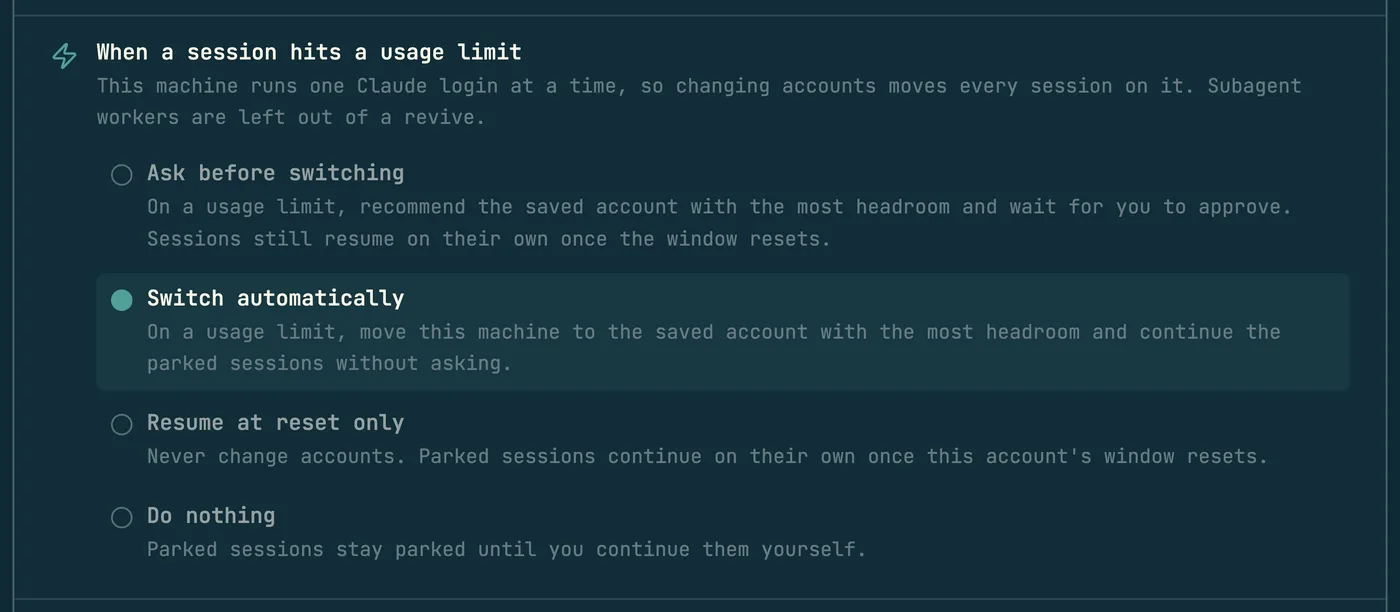
The daemon classifies the banner text. A usage limit is kind limit. A rate limit from too many requests in a minute is kind throttle and takes a separate path. The conversation row gets pending_api_error, pending_api_error_kind and pending_api_error_at, and the write schedules the recovery check. What the check does depends on the machine's recovery mode, set on the Claude accounts page in Settings:

ModeLabel in SettingsOn a limit
askAsk before switchingRecommends the saved account with the most room and waits for approval. Sessions still resume when the window resets. This is the default.
autoSwitch automaticallyMoves the machine to that account and continues the parked sessions.
resumeResume at reset onlyNever changes accounts. Continues the sessions when the window resets.
offDo nothingSessions stay parked until a person continues them.

The candidates for a switch are the saved profiles that are not the active login, have no window at 100%, and have a login that still works. They rank by the highest percent across their windows, lowest first. An account that was already tried since the newest park is left out. An account at its plan limit with usage credits on stays eligible, but ranks last.

When every saved account is spent, the check records that and runs again 2 minutes after the earliest reset. A trigger run that parks on a limit follows the same rule: it resumes its own session after the reset and spends none of its retries (triggers).

Resumes are paced. The first request of a resumed session carries its whole context, so many resumes inside a minute trip the provider's rate limit. That answer looks like a usage limit, and on 2026-09-17 one machine moved its login five times in nineteen minutes because of it. One pass now resumes at most 3 sessions, 20 seconds apart, and leaves the rest for the next pass.

The card on a parked session

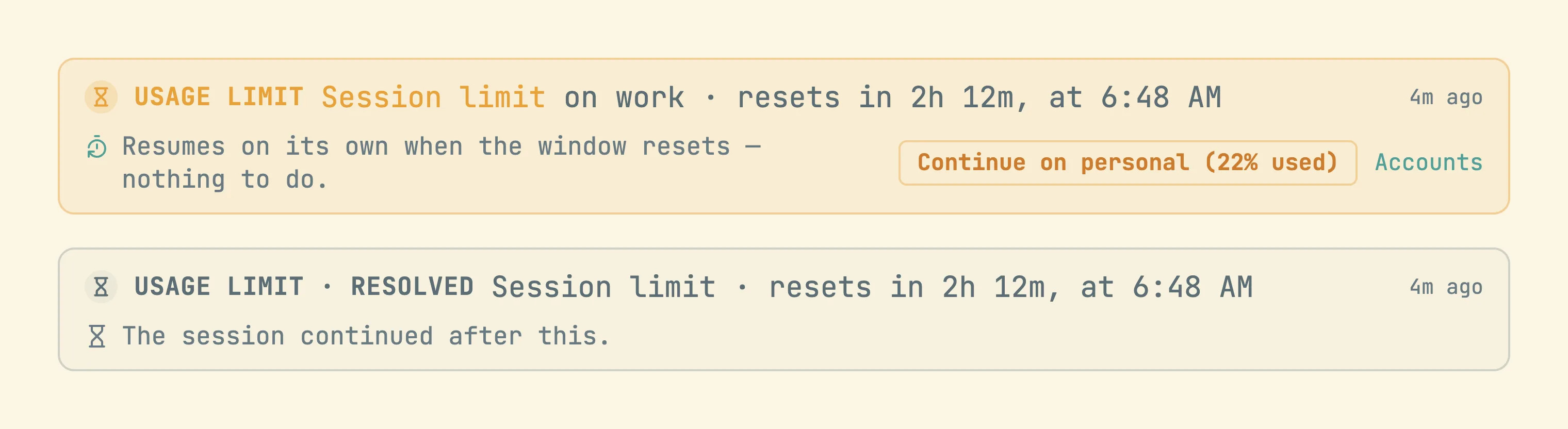
A session parked on a limit shows a card in the conversation. The card names the window that closed, the account, and the time to the reset. A second line says what happens next, from the owner machine's mode, for example "Resumes on its own when the window resets" or a proposed switch with the target account and its percent used. The card has a Continue button once the reset has passed, a button that approves a switch for this one conversation, and a link to the accounts page. After the session continues, the card reads "Usage limit · resolved".

Codex accounts

Codex profiles are kept apart from Claude profiles. Each one is a directory, ~/.codecast/codex-accounts/<name>/auth.json, used through CODEX_HOME. Usage comes from the Codex app server as a 5 hour window and a 7 day window. The error usage_limit_exceeded parks a session as a limit, and the recovery check handles Codex parks in a separate pass. cast accounts codex reset-credit spends one of the account's reset credits and clears its windows at once. Credits are finite and the act cannot be undone, so the command asks first.

What the snippet tells the agent

The limits snippet (how snippets work) writes a ## Usage limits section. It says that a limit is a pause and not the end of the task, that codecast recovers parked sessions, and that the agent must not wind down, trim scope, or stop early because a limit is near. That includes the note Claude Code itself adds when a limit approaches. The agent finishes its step and keeps working. A one line cast state is welcome (thread state). The section also points the agent at cast usage, so it can read its room before a long stretch of work.

The snippet turns itself on when a machine saves its second Claude account, because a limit is then a short pause. That happens once. cast install limits --disable is a lasting choice, and a machine with one account can run cast install limits by hand.

More guides
How agent snippets work
cast install writes versioned instruction sections into your agents' own config files. This is the mechanism every other guide builds on.
Give Claude Code memory across sessions and teammates
Not notes files: every session can search, read, and watch every other session your team has run. The commands, the scopes, and how agents use them.
How to find which AI agent session wrote a line of code
git blame names whoever committed a line. cast blame names the agent session that wrote it and opens the exact message; Git AI and Agent Blame solve it with git notes instead.
Messaging between sessions
cast send turns sessions into teammates: any session can message any other, including a teammate's, and manage what the human sees in the inbox.
Ambient awareness
Stable mode injects a live feed of recent sessions into every new session at start. Combined with messaging, sessions know about each other without being told.
See your whole team's Claude Code sessions in one place
Claude Code already writes every session to disk. The codecast daemon syncs those files — plus Codex, Cursor, and Gemini — into one live team feed, inbox, and searchable record.
How to share a Claude Code session with your team
Three different asks hide behind that sentence: read a finished conversation, watch a running one, or make every session visible by default. What Anthropic ships, what Lore does, and where codecast fits.
Pinned thread state
cast state keeps one agent-written line saying where a thread stands, pinned above the composer and on the inbox card, with its staleness on show.
Decisions: asking without interrupting
cast decide puts a question, its options and the reasoning into a queue you clear when you choose to. The answer returns to the agent as a message.
Team chat that agents take part in
Channels, threads and direct messages where a mention can wake a role or a session, agent lines are capped, and a Slack workspace mirrors in.
Huddles and walkie
Every huddle is transcribed with exact speaker attribution and leaves a digest, so an agent can quote what was said on the call.
Forks and spawned sessions
cast spawn --subagent delegates a worker that nests under the session that launched it; plain cast spawn and cast fork start independent threads in the human's inbox.
Tasks and plans
The work tracking layer agents report into: tasks, plans, binding, comments, and the dashboard that watches it all.
Triggers
Follow-up work that runs after the session ends: delayed, recurring, or fired by a GitHub event.
Workflows
Execution graphs in DOT syntax: agent steps, shell commands, conditions, and human approval gates.
Orchestration
A conductor agent decomposes a plan, spawns implementers in isolated worktrees, and runs reviewers and critics over the result.
Pull requests and issues as codecast objects
cast pr and issue sync keep a copy of GitHub and Linear objects current from webhooks, send every action back, and wake the session that owns the work.
The org: roles, scopes and the line
Route work to a standing responsibility instead of a session: roles with scopes, wakes, proposals a person accepts, and a line with independent review.
Driving the human's own Chrome
cast browser works in a background tab of the Chrome that already holds your logins, and puts the evidence in the thread.
Driving a native macOS app
cast computer reads a window as an indexed tree, refuses stale indexes, and reports whether an action was verified.
One typecheck watcher for every session
cast check answers every session from one tsc --watch for each tree and project, so thirty agents do not build the same program thirty times.
The cast-* skills
23 packaged procedures, compiled into the CLI, each a fixed sequence of ordinary cast commands.
Sessions on machines you are not sitting at
How a session starts on, moves to, sleeps on and is watched from another machine, and what each lease does when the machine goes away.
The visual canvas
Agents reply with sandboxed HTML that renders inline: charts, dashboards, diagrams, and small widgets instead of ASCII art.
Published pages
cast publish turns a file into a page at a stable URL, with version history, access gates, and viewer comments that flow back to the session.
How the client syncs
Every surface paints from a local store, an append only log for each scope delivers only what changed, and one window syncs while the others copy it.