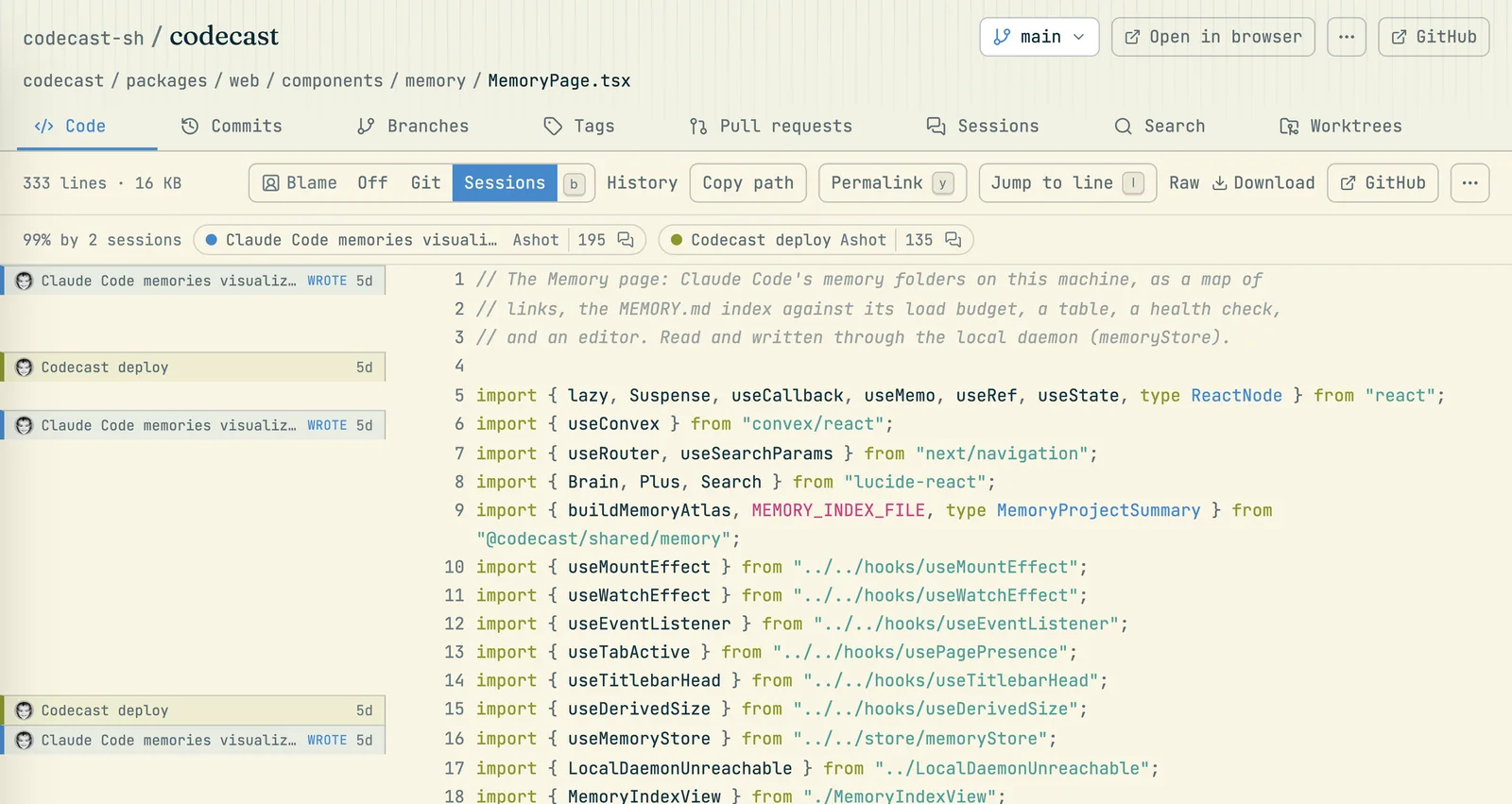
Set Blame to Sessions on any file to see the session behind each line, and open the conversation where it was decided.
·3 min read
git blame tells you who committed a line. When an agent wrote it, that is just the person who ran the agent, and the reasoning is gone: the request that asked for it, the alternatives it rejected, the test that settled it. Codecast keeps that reasoning. For any line an agent wrote while codecast was running, you can see which session wrote it and open the conversation.
Blame set to Sessions. The strip above the file lists the sessions that wrote it, with how many lines each. The gutter names the session behind each block of lines.
See it in the app
Open Code in the sidebar, then a repository and a file.
In the bar above the file, set Blame to Sessions. Press B to cycle Off, Git and Sessions.
What you get:
The gutter names the session behind each block of lines, with how long ago it was written. A block written by a person outside any session shows their git name instead, like ordinary blame. Hover a block to see who ran the session, the commit, and how codecast traced the line to it.
The strip above the file sums it up: how much of the file traces to a session ("99% by 2 sessions"), then a chip per session with its title, who ran it and how many lines it wrote. Hover a chip to light up that session's lines wherever they are; click it to jump to the first one.
Open the conversation with the speech bubble at the end of a chip. A lock in its place means that session is private to someone else: you can see it exists, not read it.
Git shows ordinary blame, with commits and authors, if that is what you need.
Ask your agent why
You don't have to open the code view. Ask an agent with Memory on:
"Why does line 42 of src/auth.ts refresh the token early?"
"Which session added the retry cap in the webhook handler, and what was the reason?"
"Who changed the session timeout last, and did they mean to?"
The agent finds the session that wrote the line, reads the part of the conversation where it was decided, and answers from the author's own reasoning, with a link to that message.
The link inside each commit
When an agent session commits, codecast adds a last line to the commit message that links back to the session, such as Codecast-Session: https://codecast.sh/conversation/jx74qbm….
Because the link is part of the commit message, it survives rebases, squash merges and any git host, and anyone reading git log can follow it. In codecast, commit pages and a pull request's commit list show it as the session's name instead of a raw link. Following the link still needs access to the session: it points at the conversation, it doesn't share it.
Codecast adds this line only for sessions shared with your team, so a private session never leaves a link in a shared history. It covers commits Claude Code makes directly; commits made by a script the agent runs, or by other agents, don't get the line, and codecast traces those from its own record of the session's edits instead.
What it covers
Work done while codecast was running, in the agents it records: Claude Code, Codex, Cursor and Gemini. Code written before you installed codecast keeps its ordinary git blame.
Only what you can see. A session shows by name only if you can open it; otherwise you see that a session wrote the line, with a lock.
Committed lines. The code view shows a branch as it is on your git host.
Other tools
Git AI and Agent Blame take a different route: they write attribution into the repository itself as git notes, captured by hooks installed before the code is written. Anyone with a clone can read it, with no account. Choose them when attribution has to live in the repository; choose codecast when you want the whole conversation behind a line, or when the code was written before anyone installed anything. They work side by side.