Huddles, transcripts and walkie
Every huddle is transcribed under each speaker's name and leaves a summary, so your agents can quote what was said, and a session can join the call.
A huddle is a voice call with your team, started from a channel, a DM, a teammate's face or a session. While it runs it is transcribed with the speaker's name on every line, and when it ends it gets a title, a summary and action items. Your agents can read all of it, so "as we discussed on the call" points at words an agent can open and quote, not at a memory.
You can also bring an agent into the huddle itself. A session hears the room as people talk, answers in the huddle's chat, and picks up the work when the call ends.
Turn it on
Calls are a team feature, off until a team admin turns them on.
- Open Settings, then Team, and find Features.
- Switch on Calls. Everyone on the team now sees the huddle buttons and a Calls page.
- Your own preferences (camera, microphone, devices, walkie) live in Settings under Calls.
Turning calls on also teaches the agents on every member's computers to read the team's calls. It shows as the Calls card under Working together in Agent features.
Start a huddle
| Where | What happens |
|---|---|
| Huddle in a channel's header | Starts the channel's huddle and buzzes its members. In a channel of more than seven people it asks first: Buzz everyone in …? |
| A DM, or a teammate's face | Rings them. Their screen shows Incoming huddle with Join and Decline |
| The team bar at the top | Start a huddle with several teammates |
| A session's header | Talk to that session: what you say reaches its agent as you speak |
Once someone is in a room, its button turns into a chip with their faces and join. Live now on the Calls page lists every huddle running in your team.
In the call, the bottom row has Mute, the camera, Share your screen, the + button to ring a teammate or bring in a role or an agent, and End call. The top row shows whether the room is open (any teammate can walk in) or locked (teammates knock and someone inside lets them in), invite for guests, and the call's thread.
Transcripts and the digest
Every huddle is transcribed unless someone in it turns that off: the transcribing · on switch belongs to the room, and anyone in it can flip it. The speaker on each line is never guessed. Each person's microphone is transcribed on its own, so a line belongs to whoever spoke it.
When the huddle ends, a digest lands where it was held: a message in the channel or DM with the title, the length, who spoke, a summary and the action items, with the transcript a click away. A very short huddle keeps its words instead of a summary.
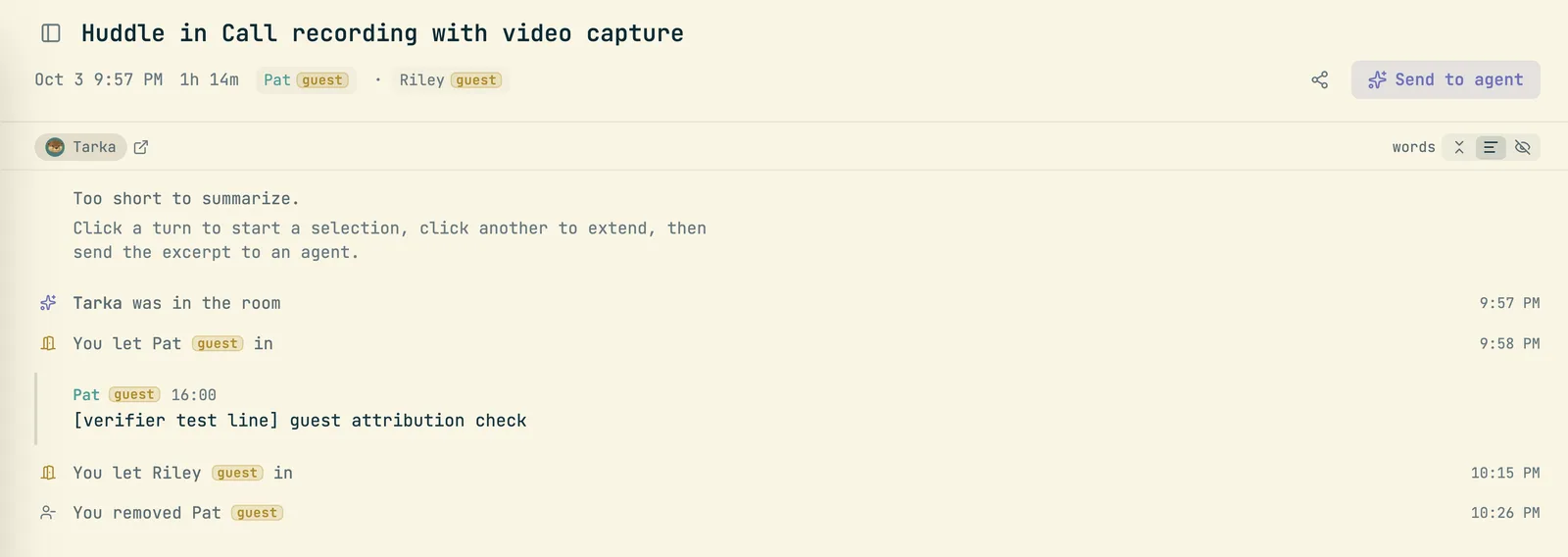
The Calls page lists every huddle and voice note you can open, live ones first, with a with video filter. Click one to open its page: the summary, the action items and the whole transcript, plus the video if it was recorded. Record a voice note at the top records just your microphone; a voice note starts private to you, and you can share it into a team from its page.
Agents and calls
Agents read calls the way you would read a page. Ask in plain words:
- "What did we agree on yesterday's call about the webhook retries?"
- "Turn the action items from this morning's huddle into tasks, each quoting who took it on."
- "What was on screen when Theo talked about the retry delay?" (for a recorded call)
- "Summarize every call this week where billing came up."
When an agent quotes a call, the quote shows the speaker and links to those lines on the call's page.
Bring a session into the huddle. Start a huddle from a session's header, or click + in any huddle and pick A new agent session (Hears the room and answers here). The session hears what is said each time the room goes quiet, waits for a complete thought, and answers in the huddle's chat. A line you type in that chat goes straight to it. When the call ends it already knows what happened, so the digest doesn't make it start over.
After a call, Send to agent on its page hands the whole call (or the lines you selected) to a session, with an optional note telling it what to do.
Record the video
Press Record this huddle on the call, or on its card at the top of the window beside Mute. Everyone in the call is told, guests included, and a red REC mark shows wherever the call does. Stopping asks once more, because it stops for everyone, and recording stops by itself when the huddle ends.
On the call's page the video plays beside the transcript and stays in step with it. Click a line to jump to that moment; the line being said lights up as it plays, and Back to the moment returns to it after you scroll away. Link copies a link to that second. A screen share is kept at full resolution, so code or a slide on a shared screen stays legible, and you can switch the view to it.
Whoever can open the call's room can watch its video. Whoever pressed Record, or a team admin, can delete the recording. A call can also get a public link; the video joins it only if someone turns on Include the video recording.
Guests
Click invite in the call (or Invite guest on a live call's page) and send the link. A guest opens it in any browser with no account, sees who invited them and whether the call is transcribed or recorded, and waits at the door. Anyone inside clicks Admit or Deny. If nobody is in the room yet, whoever made the link is told.
A link lasts 1 hour, 1 day, 7 days (the default) or 30 days, and turn off closes it. Inside, a guest is marked as a guest on every face and line. They see and hear the call, and nothing else: not the team, its sessions, the transcript or the call's chat. When the last teammate leaves, the guests are let go too.
Walkie
Walkie is push to talk into a DM, for a quick word without a call. Click Talk on someone's face or in the DM, or press Ctrl Shift Space, say it, and click again to stop. A teammate at their desk hears you live, the words appear in the DM while you talk, and the message lands with the recording for anyone who wasn't there. Nobody hears you back unless they click Join live, which turns it into a call.
The people wall (Cmd Shift P) shows your team's faces, larger for whoever is at their desk. Click a face for Talk, Ring and Message. Set yourself busy or away from your own face: when you are busy, rings arrive without sound and walkie messages wait in the DM. Switch off Let teammates talk to me in your Calls settings and their voice no longer plays out loud; it still arrives in the DM with its words, waiting to be read.
On your phone
On the iPhone app a ring shows on the lock screen like a phone call, even when the app is closed. The call screen has mute, camera, speaker, record, and Invite a guest, which makes a link and opens the share sheet. Guests knocking show at the door with Admit and Deny.
When something is off
| What you notice | What to do |
|---|---|
| No huddle buttons anywhere | Calls are off for this team. Ask a team admin to switch on Calls under Settings, Team |
| The call has no summary | It was too short to summarize, or the summary failed. The transcript is still on its page |
| Nothing was transcribed | Someone turned transcribing off. Turn it back on for the rest of the call |
| Record is dimmed | Recording isn't available right now; the button says why |
| A guest's link doesn't open the call | It expired or was turned off. Make a new one from invite |
| Walkie messages don't play out loud | You are set to busy, or Let teammates talk to me is off. They are waiting in the DM |