Documentation
Working together

Use Codecast with T3 Code

Threads you start in T3 Code appear in Codecast with no setup, so your team can read, search and share them. What you get on top, and what stays in T3 Code.

3 min read

T3 Code is an open source app for starting and steering coding agents on your own machine. Codecast is the workspace a team and its agents share. They fit together with no setup: a thread you start in T3 Code shows up in Codecast like any other session, because T3 Code drives the agents' own harnesses and those keep their transcripts on disk, where Codecast already reads them.

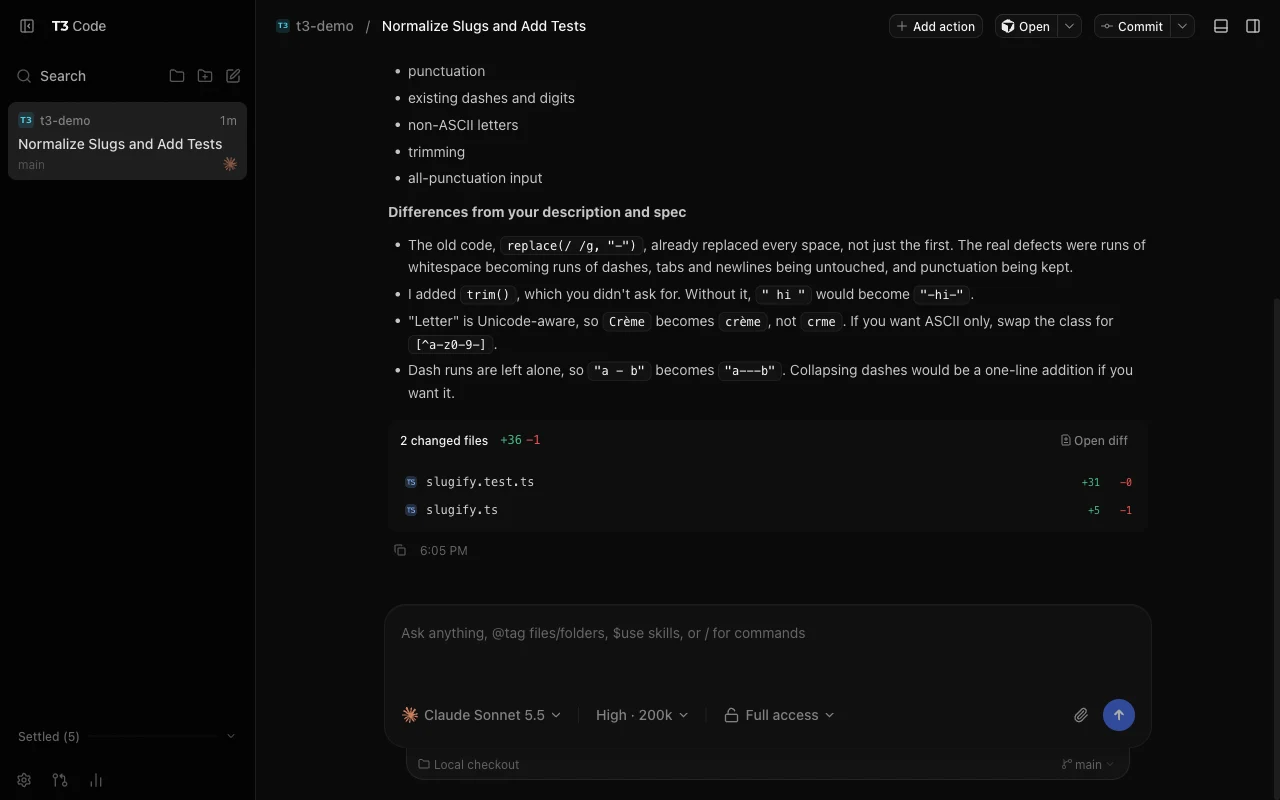
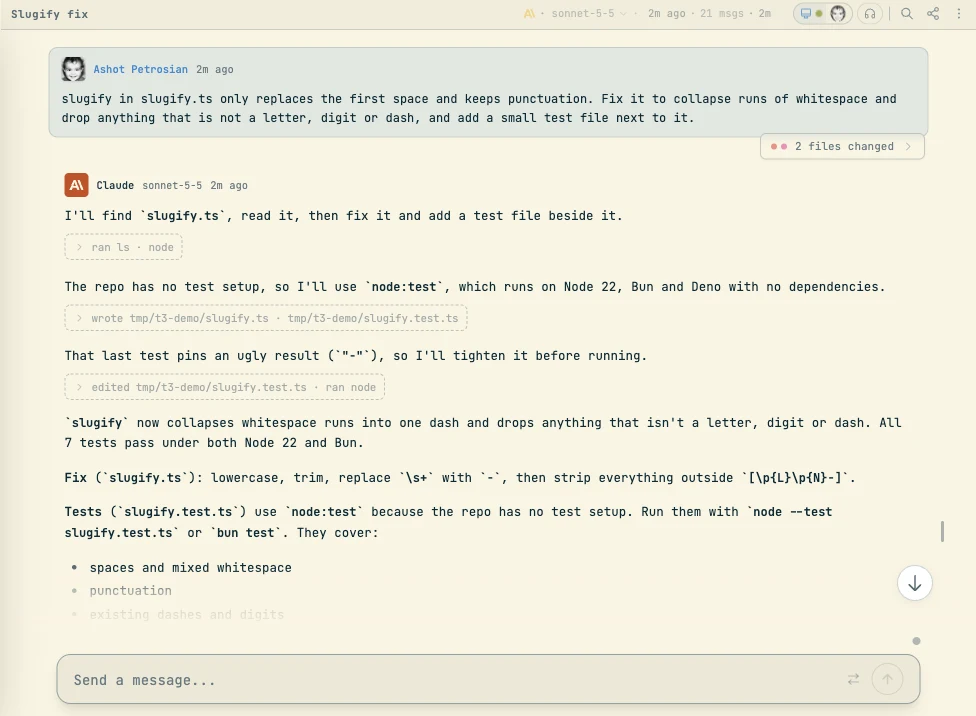
We checked this on October 12, 2026 with two threads started in the T3 Code desktop app, one on Claude and one on Codex. Both appeared in Codecast, the Claude one within about a minute.

A thread in T3 Code: a request to fix a slugify function, Claude Sonnet's answer and two changed files
A thread started in T3 Code, running Claude on a small repository.
The same session in Codecast, titled Slugify fix, with the request, Claude's steps and a 2 files changed chip
The same thread in Codecast a minute later. Nothing was installed into T3 Code to get it there.

Set it up

  1. Install Codecast on the machine where T3 Code runs its agents and sign in (Download). If you reach that machine from your phone through T3 Code's remote access, this is the host machine, not the phone.
  2. Keep using T3 Code as you do now.

That is all. There is no plugin and no setting to change in T3 Code. Threads you already ran are picked up too, since their transcripts are still on disk.

What you get on top of T3 Code

  • Your team can see the work. T3 Code shows your own machines. Put the repository in a Codecast team and teammates can read the thread, live while it runs or afterwards, at the level you choose: hidden, a summary, or the full conversation. Team sessions covers the privacy settings.
  • One search box over everything. T3 Code threads sit beside the sessions you ran in a terminal, in Cursor or on another machine. Search sessions across machines shows how.
  • Agents can read the history. An agent starting new work can look up what an earlier thread decided, whether you ran that thread in T3 Code or anywhere else. See Memory.
  • A link for any thread. Share a whole session or a few messages with someone who does not have T3 Code. See Share a session.
  • Code traced to its conversation. Find which session wrote a line, including lines a T3 Code thread wrote.

What stays in T3 Code

Keep steering the thread in T3 Code. It owns the running agent, so follow ups, approvals, the branch or worktree and the pull request button belong there. Codecast reads the thread as it is written; treat it as the record and the team's view, and send your next message from T3 Code.

Codecast picks up threads on the agents it supports: Claude Code, Codex, Cursor and Gemini. We have checked Claude and Codex threads from T3 Code. Threads on T3 Code's other providers, such as Grok Build, OpenCode and Antigravity, are not picked up today.

Which one should I use?

Both, if you like T3 Code. It is a fast window for running your own agents. Codecast answers a different question: what is everyone on the team, and every agent, doing, what did they decide, and who needs to act. Codecast vs T3 Code lays the two side by side.
More guides
Agent features: what your agents know how to do
Switch features on for each computer, and every new session there learns to remember, delegate, track work, show results and use your machine.
Memory: agents that look up past work
Your agents search every session you can see, across your machines, agents and team, and answer with the session they found it in.
Search your history across every machine
Every computer you connect sends its sessions to one history, searchable from the web, the Mac app and your iPhone.
See which agent session wrote a line
Set Blame to Sessions on any file to see the session behind each line, and open the conversation where it was decided.
Messaging between sessions
Your sessions hand each other results and answers directly, so you stop relaying text between them.
Stable context: sessions that know what's been happening
New sessions start with a short list of what you and your team worked on recently, so they pick up threads instead of starting cold.
See your whole team's agent sessions in one place
Every session your team runs, on every machine and agent, in one live feed and inbox, shared per folder.
Share a session with your team
Choose what the team sees of a session, share it by link or a few messages at a time, and how that compares to other tools.
Pinned thread state
The agent keeps one short note on each session saying where it stands, above the composer and on its inbox card.
Decisions: asking without interrupting
Agents put the calls only you can make into one queue you clear when you choose to, and each answer goes back to the session that asked.
Team chat with your agents in the room
Channels, threads and DMs where you can hand a session or a role something by mentioning it, while agents stay quiet unless they're needed.
Huddles, transcripts and walkie
Every huddle is transcribed under each speaker's name and leaves a summary, so your agents can quote what was said, and a session can join the call.
Workers, forks and switching agents
Your agent can hand work to workers that report back to it, and you can fork a conversation to try two directions from the same point.
Tasks and plans
Agents file the work they take on, post progress and close it with what they verified, and you follow it on the Tasks and Plans pages.
Triggers
Agents schedule their own follow-ups, once, on a schedule or on a GitHub or Linear event, and you can set one yourself from the Triggers page.
Workflows
A fixed sequence of agent steps, checks and approval gates that runs the same way every time and waits for you where you want a say.
Orchestration
Hand an agent a whole plan and it runs a team: implementers working in parallel, a reviewer on every task and critics on the result.
Pull requests and issues
Every pull request gets a page with its checks and threads, the session that opened it fixes what reviewers and CI flag, and Linear or GitHub issues become tasks.
The org: roles that look after your work
Give lasting work to a role with an area, a charter and a standing session, and approve the changes your agents propose to the org.
Let agents use your Chrome
Agents check pages in the Chrome you already use, logins included, from their own background tabs. Screenshots and errors come back to the conversation.
Computer use: agents in your Mac apps
Agents work in Preview, Slack, System Settings or your own desktop build, in the background, with an orange pointer that shows where they act.
Typecheck: one shared check for every agent
With Typecheck on, agents on a computer share one typecheck per project, so checks answer in seconds and a busy machine stays usable.
Skills: slash commands for the jobs you repeat
Type / in a Claude Code session to pick up work, hand it over, get a second opinion or ship a pull request, the same careful way every time.
Run sessions on other machines and in the cloud
Start a session on another computer or a cloud machine in your AWS account, move it there and back, and watch it from anywhere.
Codex Cloud tasks in codecast
Bring your Codex Cloud tasks into your inbox, start new ones with several attempts, and turn the result into a pull request or local changes.
Usage limits are a pause
When a Claude plan runs out, sessions wait for the reset or continue on another account you've saved, instead of stopping for good.
The visual canvas
Agents answer with charts, comparisons and diagrams drawn right in the conversation when a picture says it better than text.
Published pages
Agents turn reports and mockups into pages with their own link that you can share, gate, and get comments on.
Why codecast feels instant, even offline
Everything you see comes from a copy on your device that the server keeps current, so screens open at once, your edits show immediately, and nothing is lost offline.