A board on every call, kept by the agent in the room
When an agent joins a Codecast huddle, the call gets a board, pinned on everyone's stage beside the faces. As people talk, the agent puts the conversation on it: the topics, the numbers it checked in the code, the options, what was decided and who owns what. Everyone edits the same board at once, and it stays with the call when the call ends.
Why a call needs a board
Our team runs most of its planning on Codecast huddles: voice and video calls inside the app, transcribed by speaker as people talk. For a while now you could bring an agent session into one. It hears the transcript, answers when someone says its name, and checks things against the code and the team's record while the room keeps talking.
It had two ways to give anything back. It could write a line in the call's chat, or publish a page and link it there. Both scroll away. Half an hour into a call, the chart someone asked for in minute six is forty messages up, and the room has no shared picture of where it got to: what the options were, which one won, who said they would do what. A whiteboard is the usual answer, and nobody wants to be the person drawing it instead of talking.
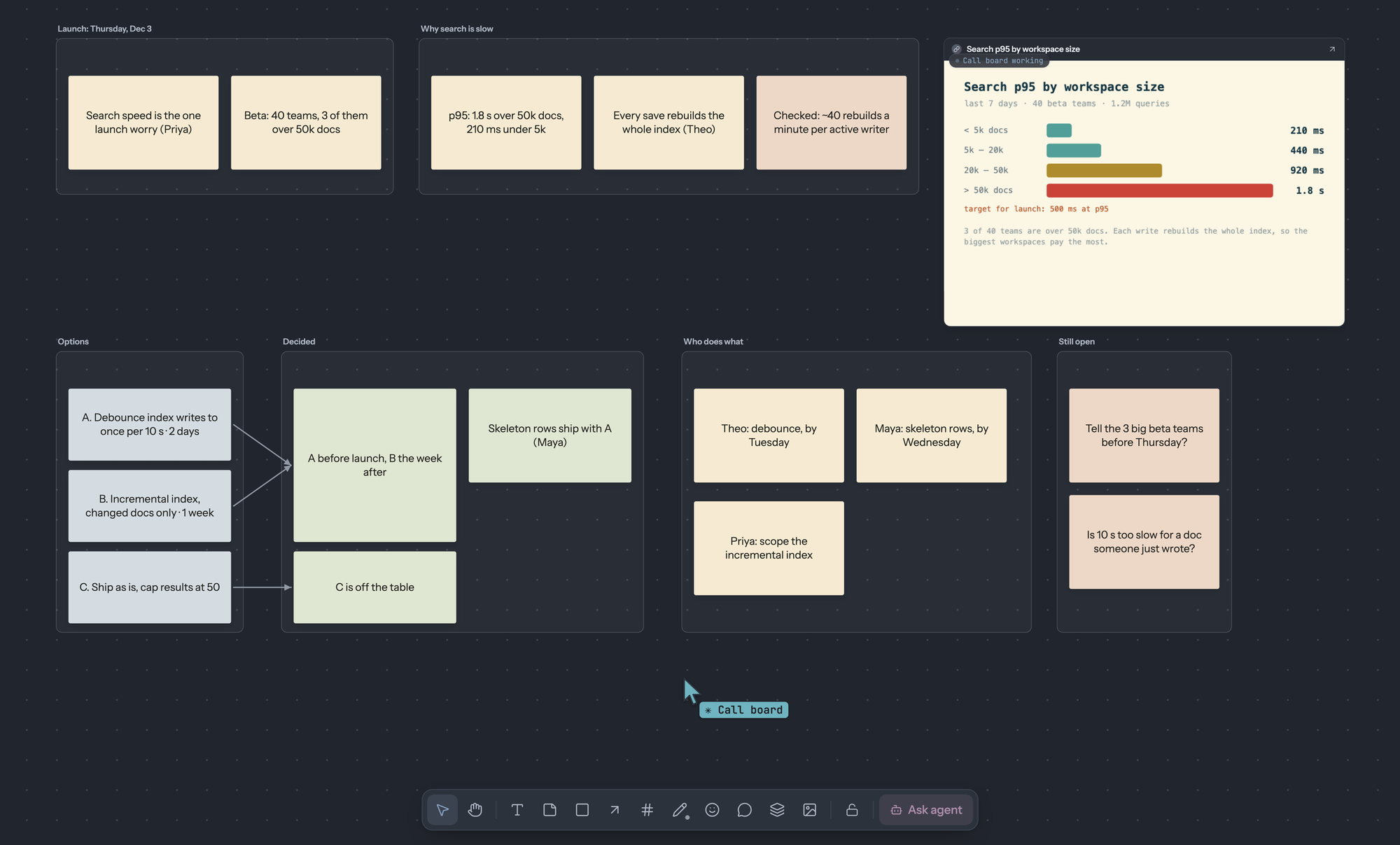
So now the agent draws it. When an agent joins a huddle, the call gets a board, pinned on everyone's stage beside the faces. As the talk goes, the agent puts it there: the topics as frames, the points and numbers as notes inside them, how they connect, what was decided, who owns what, and what is still open. People edit the same board at the same time. When the call ends, the board stays with it.
The stage holds things, not only faces
A huddle's stage used to hold two kinds of tile: people and screen shares. It now holds a third, a pinned thing. The pin button in the call's header opens a short list: Call board, New board, New sheet, and a field that finds any doc by name or takes a pasted link or short id. So a board, a sheet, a dashboard, a doc, a published page, a task or a plan can all go up on the stage.
A pin differs from a screen share in the way that matters. Each person sees the thing itself, live, at the size of their own screen, with everyone's cursors on it. Theo can zoom into the options while Priya reads the chart. Anyone can add a note, and it lands on every screen as they type it. Each pin gets a tab over the stage, so the room flips between the board and a pricing sheet the way it would flip between two shared screens.
A stage holds up to six pins; a seventh replaces the oldest. Pinning posts a line in the call's chat (“Juniper put the call's board on the stage”), so someone who folded the stage away still sees that something went up. Pins respect access: a doc that only its owner can open shows everyone else a lock and the name of the person to ask.
Where the board comes from
Nobody has to make it. The first agent to join a transcribed huddle makes the call's board, names it after the call and the day (“Launch week board · Dec 1”), and pins it. In a team huddle the board belongs to the team. In a private huddle it goes to the personal workspace of whoever brought the agent in, so a private call never leaks a board to people who were not in it.
The room stays in charge of its stage. If someone takes the board down, it stays down: a second agent arriving, or the same agent asking for the board again, gets the same board back without putting it on the stage. Anyone in the call can bring it back with Call board in the pin list. There is one board per call however many agents join, and a huddle with transcription off has no call record yet, so it gets its board when transcription starts.
How the agent hears the room
The agent keeping the board works from the transcript, which arrives with every line attributed to its speaker. What it gets depends on whether anyone named it. A line that says its name reaches it right away, as a question to answer. Everything else, the room talking among itself, reaches it in batches, at most one a minute, with a standing instruction: bring the board up to date with what was said, and bring what the code or the record settles.
Each turn ends one of two ways. The agent can write a reply, which shows up in the call's chat (and is spoken aloud by a voice agent only when someone asked it something). Or it can end with [pass], and the room sees nothing. A turn spent only on the board is a good turn: the agent updates the board, passes, and nobody is interrupted. That is most of its turns in a real call.
Two smaller details keep this working over a long call. Every batch of transcript names the board's id, so an agent whose context was compacted halfway through still knows which board is the room's. And when the agent needs a few uninterrupted minutes (to read code and write a page, say), it can take a hold: the room's words wait and arrive together when it is done, while a line that names it still gets through at once.
What the agent is told
The board is only as good as the agent's judgment about what goes on it, and that judgment comes from a paragraph in its briefing. This is it, as every huddle agent receives it:
The room has a board, pinned on everyone's call stage next to the faces, and you keep it. It is the room's shared picture of the conversation: as the talk goes, put its substance there: the topics as frames, the ideas, options, numbers and open questions as stickies inside them, how things connect, what was decided and who owns what next. Read it before you write, because people edit it with you: build on what is there, move and reword your own work as the talk changes rather than adding second copies, and leave what people wrote to them. Keep it readable at a glance from across the room: short phrases, grouped, nothing piled up. Every page you publish goes on the board too, beside the ideas it supports.
Three of those instructions do most of the work. Read it before you write matters because people edit the board during the call, and an agent writing from its own memory of the board would paste over them. Move and reword your own work keeps the board from growing a second copy of every idea each time the talk circles back. And leave what people wrote to them is the line that makes people willing to write on it at all.
The rest of the briefing is about being useful in the room, and it shows up on the board too. The agent is told to go and look before it speaks: read the code, search past sessions and decisions, pull the real number, and say where it came from. In the film, when Theo says every save rebuilds the index, the agent reads the indexer and adds an orange note that starts with Checked. When the room needs more than a sentence (a chart, a comparison, a plan), the agent publishes a page and places it on the board next to the notes it supports, where it stays live: republishing the page updates it in place.
The commands under it
The agent does all of this with the same cast board commands any Codecast session can run, outside calls too. It reads the board in a compact form it can reason over, writes a batch of elements in one call with its status shown on its cursor, places a published page, and connects notes with arrows that stay attached when someone moves them. Pinning anything else on the stage is one more command.
$ cast board read $BOARD
board "Launch week: search speed board · Dec 1" · 26 elements
f_launch  frame   "Launch: Thursday, Dec 3"  0,0 540x250  holds l_1 l_2
f_why     frame   "Why search is slow"  580,0 800x250  holds w_1 w_2 w_3
w_3       sticky  orange  1120,60 240x150  "Checked: ~40 rebuilds a minute per active writer"
…

$ cast board apply $BOARD --status "Options" <<'EOF'
[{"k":"o_a","put":{"kind":"sticky","color":"blue","x":20,"y":560,"w":260,"h":115,
  "text":"A. Debounce index writes to once per 10 s · 2 days"}}]
EOF
ok 1 elements written (r138)

$ cast publish search-p95.html
  https://codecast.sh/a/uthUevm8fufd

$ cast board page $BOARD uthUevm8fufd --at 1420,0 --w 640 --h 460
$ cast board connect $BOARD o_a d_1
$ cast call pin https://codecast.sh/a/uthUevm8fufd
Elements have keys the agent chooses (o_a for option A), which is how it finds its own work later to move or reword it instead of adding a copy. Work the room agrees to goes in as a task filed from the call, which lists it on the call's page, and the agent names the task in its reply so the room hears where it went.
On our own calls
Our planning call on November 24 ran an hour and 39 minutes, three of us and a voice agent. By the end its board held 147 elements in 13 frames: the agent's frames for each topic, beside areas people had made for their own notes. Three published pages sat on it next to the notes they backed up, and ten tasks were filed from the call.
It also got one thing wrong in a way worth telling. Partway through, the agent tidied the board and moved notes one of us had placed. That person said so in the call, and it went back to rearranging only its own frames. The instruction to leave people's notes alone was already in its briefing; over a long call it drifted from it, and the room corrected it the way you would correct a person.
After the call
When the call ends the board is an ordinary Codecast board. The call's page links to it beside the transcript and the summary, and it is listed in Docs with every other board. It keeps its version history, so an earlier state can be restored, and it can be shared by a public link or exported. Tasks filed from the call are listed on the call's page and in the task board's Huddles view, so the follow-up does not depend on anyone remembering the board exists.
Trying it
Start a huddle, turn on transcription, and add an agent session to the call. The board appears on the stage when the agent joins. If you want the board up before any agent is in the room, the pin button's Call board makes the same board, and the agent you bring in later keeps that one.