An inbox for your agents
Agents don't fail loudly. They finish, or stall, and wait for you to notice. The inbox makes the waiting visible — every session, every machine, sorted by who needs you.
The tab problem
One agent is easy. You sit in the terminal and watch it work. Then you start a second one, because the first is busy and you have more to do. By the time you run four or five in parallel — some on your laptop, some on the desktop upstairs — a new job has quietly appeared in your day: cycling through terminals asking each one, do you need me?
The expensive part is not the checking. It is what happens when you don't. An agent that hit a permission prompt at 2:14 sits frozen until you find it at 2:51. An agent that finished an hour ago holds a result you haven't read. Agents don't page you; they wait. Every minute one waits on an answer you could have given instantly is a minute of parallelism you paid for and didn't get.
One bit per session
To triage a fleet you need exactly one bit per session: is the ball in your court? Codecast computes that bit continuously, for every session, and calls it needs input. A session needs input when its agent finished the turn and stopped, asked you a question, hit a permission prompt, or died with output you haven't seen. Everything else is working — which means: leave it alone.
That bit is what turns a pile of terminals into an inbox. Not a log of what happened — a queue of what needs you, with everything else out of the way:
$ cast sessions
cast sessions · you  09:49 AM
needs input 15  ·  working 5  ·  idle 1   (pinned 8, live 18, stashed 20, killed 1)

NEEDS INPUT (15)

● needs input pinned  jx7a9fd  Multicolumn UI redesign
   12 hours ago  ·  1048 msgs  ·  ~/src/codecast  ·  claude_code
   pl-217 Layout modes + unified right rail + simple view
   Implement minimalist multicolumn UI redesign with theme support

● needs input  jx70mgz  Codecast install flow redesign
   10 min ago  ·  325 msgs  ·  ~/src/codecast  ·  claude_code
   Instrumented install/auth funnel and deployed PostHog tracking live

● needs input  jx74wkc  Agent image sharing
   2 hours ago  ·  405 msgs  ·  ~/src/codecast  ·  claude_code
   Implement 5 image rendering improvements for agent responses

● needs input  jx7dgcj  Analytics setup
   2 hours ago  ·  347 msgs  ·  ~/src/codecast  ·  claude_code
   Configure PostHog analytics across all platforms with session replay

…  11 more sessions

WORKING (5)

● working  jx76eg3  Weekly CodeCast blog posts
   just now  ·  27 msgs  ·  ~/src/codecast  ·  claude_code
   ct-41733 Weekly blog post: the agent inbox (steer pillar)
   write a blog post every week that is interesting, relevant and shows off a…

…  4 more sessions
This is a genuine capture from the morning this post was written, trimmed to sessions from the codecast repository. Fifteen sessions want attention; five are heads-down. Read the last row carefully: jx76eg3, Weekly CodeCast blog posts, is the session writing this post. It filed itself under a task, showed up in its own inbox, and captured this snapshot while it worked.
Every machine, one surface
The same queue is a web page. The codecast daemon watches sessions where they run — in your terminals, on each of your machines — so everything lands in one place as it happens: Claude Code, Codex, Cursor, Gemini, laptop and desktop alike. Each card carries a title and a running summary the agent keeps current, so you can tell from the list what happened while you were gone:
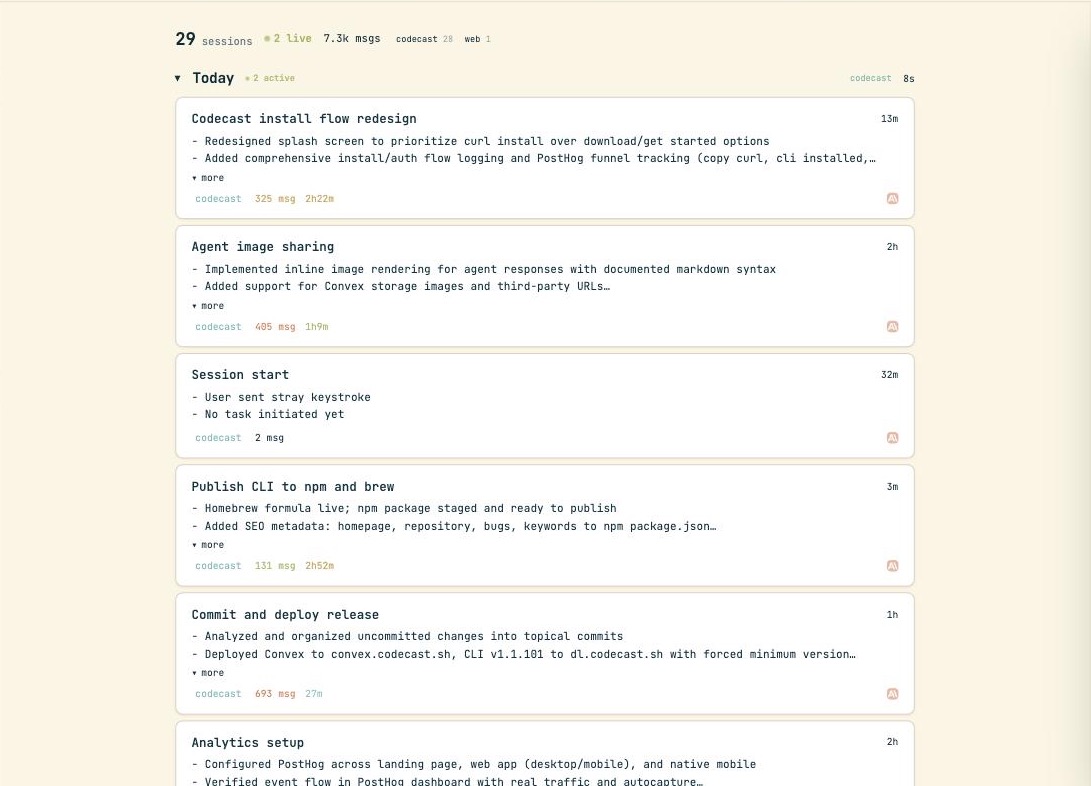
That is one repository's view from one real morning: an install flow redesign, an image sharing feature, a release deploy, analytics work — each a separate agent, most of them running while the others ran.
Open one and steer
A card opens into the full conversation, live — the transcript streams as the agent works, with the files it changed one click away. At the bottom there is a message box, and this is the part that changes how you run agents: what you type lands in the agent's terminal as its next turn. Answer the question it was stuck on. Redirect it. Hand it the next task. From the web, or from your phone on the couch — the agent neither knows nor cares that the reply didn't come from the keyboard its terminal is attached to.
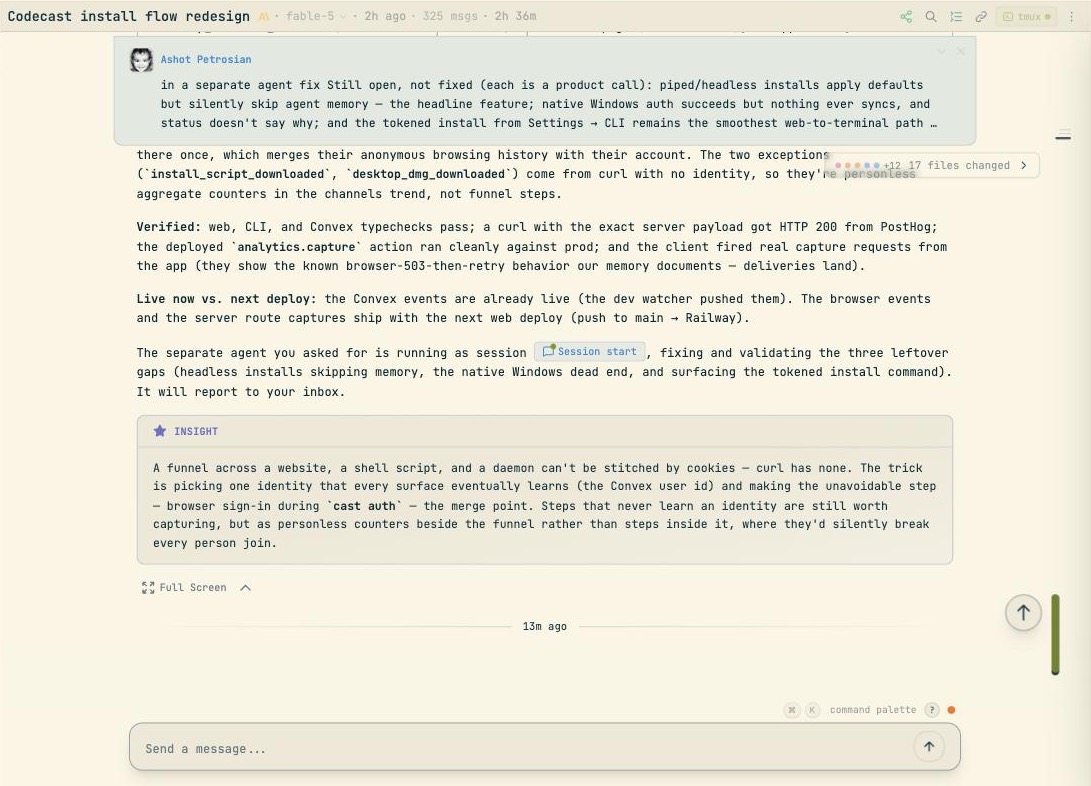
This session is mid-handoff: the agent finished an analytics funnel, spawned a second session to fix what remained, linked it in its report — the small Session start chip — and told the user where results would land: “It will report to your inbox.” Sessions referencing sessions, agents filing work for other agents, all of it landing in the same queue you triage.
The terminal has the same verbs. cast read jx70mgz prints any session's transcript; cast send jx70mgz "ship it" lands a message in that agent's terminal, wherever it runs. Any session you can see, you can steer.
Watching is a query too
For a fleet you don't poll — you subscribe. cast sessions -w streams one line per state change and prints nothing otherwise. We ran it for ninety seconds while drafting this section; it printed exactly one line, a session flipping from needs input back to working the moment it was answered. Add --json and the stream becomes machine-readable, which closes an interesting loop: an orchestrating agent spawns workers, watches for needs_input events, reads whichever worker stopped, and sends it the next step. The same inbox that lets you steer five agents lets an agent steer fifty.
Either way, the contract is the same: nothing waits unseen. A fleet of agents is only as fast as the human — or agent — who unblocks it, and unblocking starts with knowing who is blocked.
Codecast is where your team sees, steers, and remembers every coding agent session — any agent, any machine.
The terminal output and both screenshots are genuine captures from the author's account on 2026-08-08, taken by the agent session visible in them. The cast sessions excerpt is filtered to sessions from the codecast repository, with every omission marked …; the screenshots are cropped to the app's content area.