The software factory
Codecast turns what your product reports, from errors and analytics to failing checks and evals, into a small set of problems, has a flow your team owns prove and fix each one, and brings you one card per change. Shipped fixes are watched, and anything that comes back reopens. Here is the whole loop on our own product, with one change from error to card.
Writing the code is the fast part
A coding agent can fix a bug in fifteen minutes. Everything around those fifteen minutes is still slow. Someone has to notice the bug, in an error tracker or a failing check or a customer's message. Someone has to decide it matters more than the forty other things in the tracker, show that it is real, check the fix, read it, ship it, and look again a week later to see whether it stayed fixed. Give a team ten agents and the agents wait on the people doing all that.
Codecast runs that whole path as one machine. Your product's errors, analytics, checks and evals come in as signals. Signals that share a root become one problem. A flow your team owns picks up problems in order of what they threaten, proves each one with a failing test, builds the fix, checks and reviews it, and brings you one card. You answer it. The change ships, and the factory watches for the same signal to come back. We call it the factory. This post walks through it on our own product, with one real change from start to finish.
The whole loop on one screen
The Flows page opens on the loop. This is Codecast's own, the workspace our team ships Codecast from.
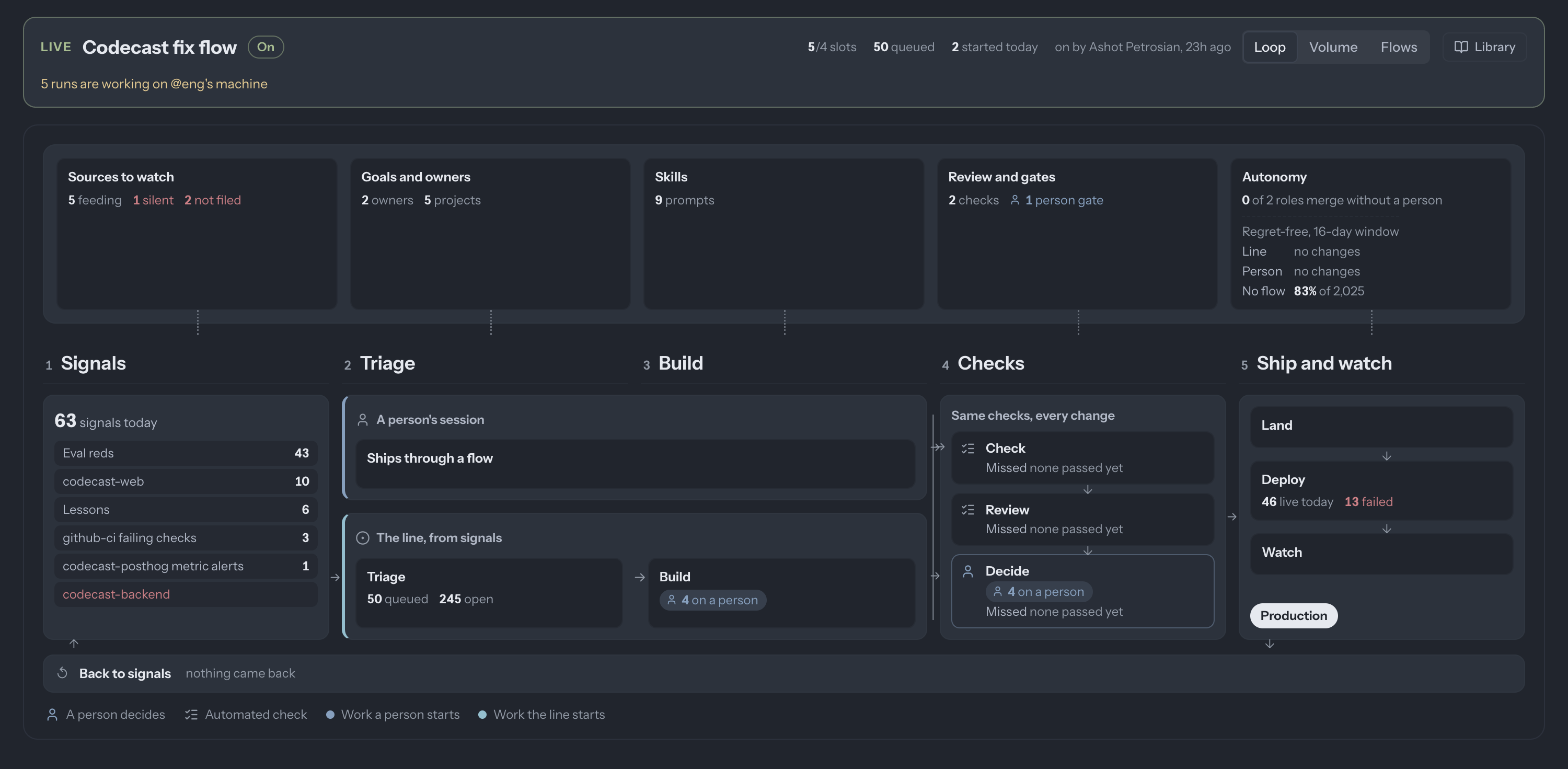
Read it left to right. Signals lists what came in today and from where. Triage holds the problems those signals opened, in a queue. Build is where a flow works on one. Checks is the same three gates for every change, whoever made it. Ship and watch lands it, follows the deploy, and watches production. The row along the bottom closes the loop: a shipped fix whose signal comes back goes back to the start.
The panels above the stages are the factory's settings, each one opening where it's edited: which sources it watches, whose goals rank the work and who owns each area, the prompts its agents run, its review gates, and how much it may do without a person.
Sources: what the factory listens to
A source is anything that observes your product: the error tracker, product analytics, your CI, the nightly evals. Each one sends what it saw through one door, already typed (a bug, a regression, a prompt that gave a wrong answer) and with a fingerprint it computes itself, such as the error group or the eval scenario. Nothing downstream tries to guess what a line of free text meant.
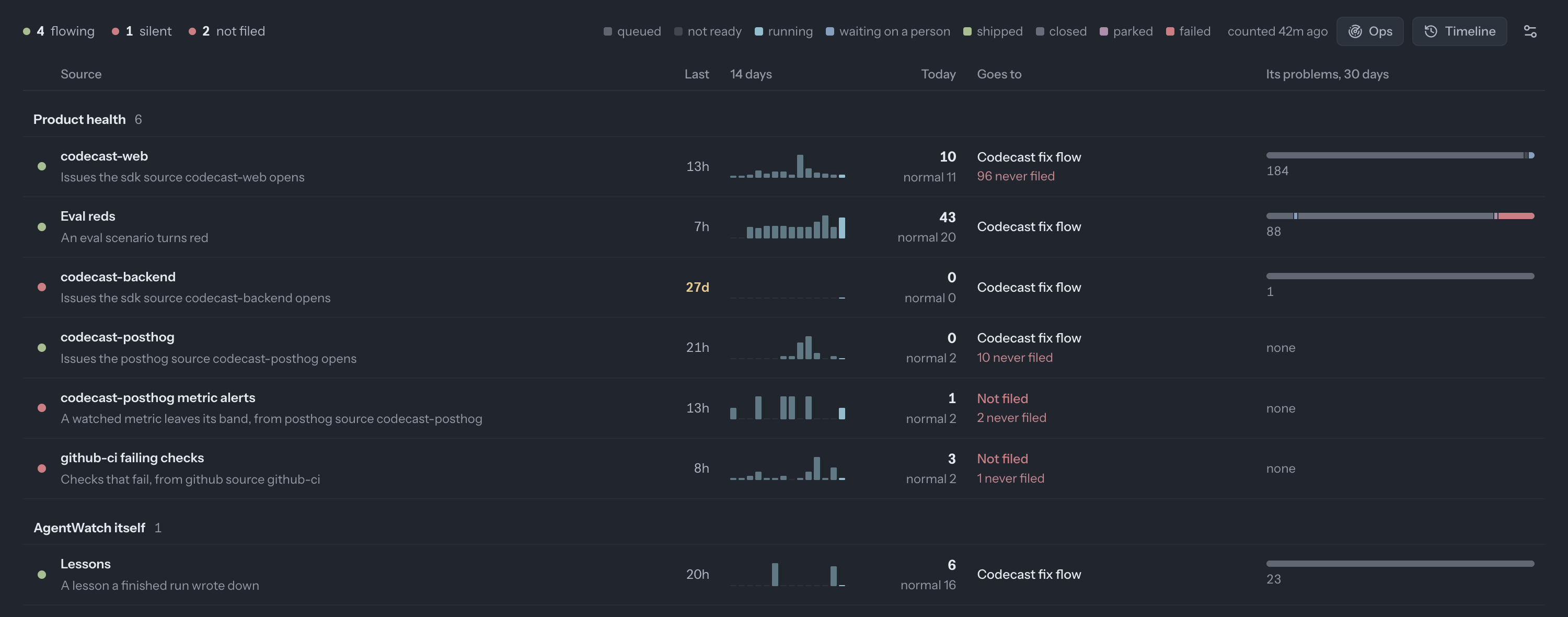
Each row says whether the source is still talking (codecast-backend has been quiet for 27 days, so it is red), how much it sent, which flow its signals go to, and what happened to the problems it opened over the last month. A source whose signals no flow takes says Not filed, so a feed nobody acts on is visible instead of silently piling up. The last row is the factory listening to itself: Lessons are what a finished run wrote down after a person sent its change back, which we come to below.
Problems: many signals, one root
An error tracker reports far more than anyone works on. So a signal opens nothing by itself. It first looks for a problem that already holds its fingerprint. Failing that, one small model call compares it with the five closest open problems and answers “same as this one” or “none”. Only when a source is set to open problems, or a person files it, does a new one start. Everything else waits as evidence, and counts toward a problem later.
A new problem is then grounded: one call reads it with your team's goals and each project's charter, and writes down which goal it threatens, what kind of change it needs (code, prompt, interface, infrastructure, data), how risky it is, and whether it is ready to work on. Priority is arithmetic on those answers: the goal's priority times the severity times the number of signals. A problem that threatens no goal waits. Our flow also has a bar: it starts problems scoring 60 or more, or holding three findings; the rest wait for another finding and close after 14 quiet days.
Flows: who runs the work, and how
A flow is the sequence of steps a problem goes through, and it belongs to a role on your team, the way an area of the product does. Turned on, it starts problems from its queue by itself, highest priority first, whenever one of the machines it runs on has a free slot. It can be held for a few hours, capped at so many starts a day, and switched off with one press.
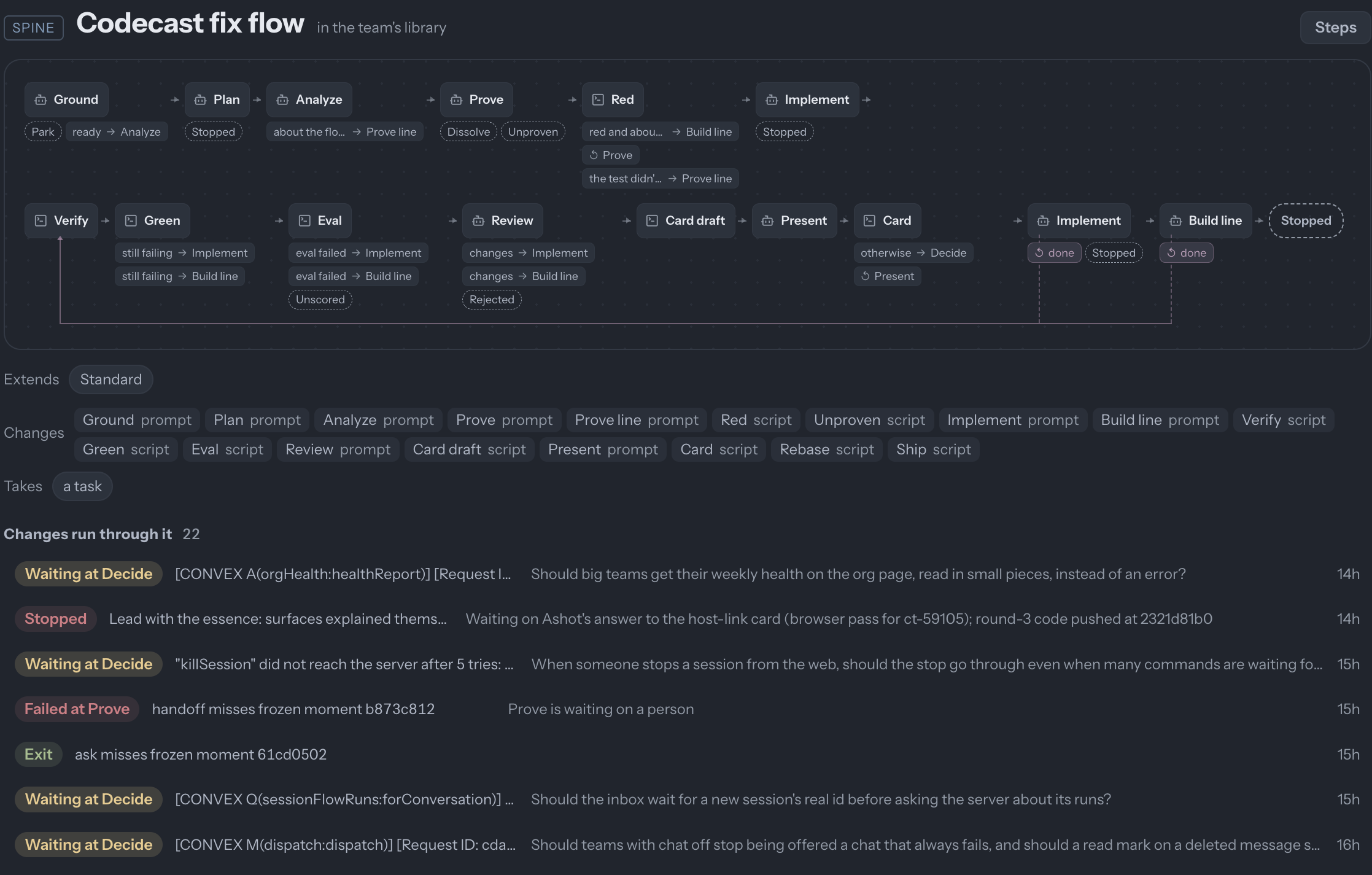
Our flow starts by proving the problem. For code, that means a test that fails on the current code for the reason the problem describes. For a prompt, it means replaying the moments that went wrong and showing the current prompt gets them wrong while getting a few guard cases right. Red runs that proof and requires it to fail. A problem that cannot be reproduced closes as dissolved, which counts as a success: nothing was built for a problem that isn't there. A problem that cannot be proven either way stops and waits for a person, which is what most of the red “Failed at Prove” rows above are.
Then Implement builds one change, inside a size budget. Verify runs the project's checks, Green runs the proof again and requires it to pass, and Eval replays the affected prompts against the old and new version when the change touches one. Review is a separate agent that sees only the diff and the problem's criteria, and a failure at any of these goes back to Implement. Last, Present writes the card you will read.
A flow is a file in your repository, reviewed and versioned like your code. Ours extends the standard one and changes most of its prompts and scripts, and the page lists exactly which. Every change that ran through it is listed under it, with where it stands.
One change, from an error to your card
Here is one of those rows from start to finish. Our web app had been reporting a server error from chat: three error groups, ten reports. The factory merged them into one problem, and the analysis found two causes. Clicking the chat button on a conversation in a team with chat turned off asked the server for a conversation it would always refuse. Separately, marking a chat as read failed when the last message had been deleted. Both ended in a red error toast for the person, and a report for us.
Prove wrote a test file with three cases, one per cause plus a guard that chat still opens where it is turned on. On the current code it failed two of three, the two causes. Implement fixed both in the web app, about thirty lines. Review sent it back: the fix met two of the five criteria the problem had been given, and left the server side alone. The second round changed thirteen files, including the server, every place in the web and mobile apps that opens a chat, and a regression test that real failures still reach the error tracker. Review approved it, and Present wrote this card.
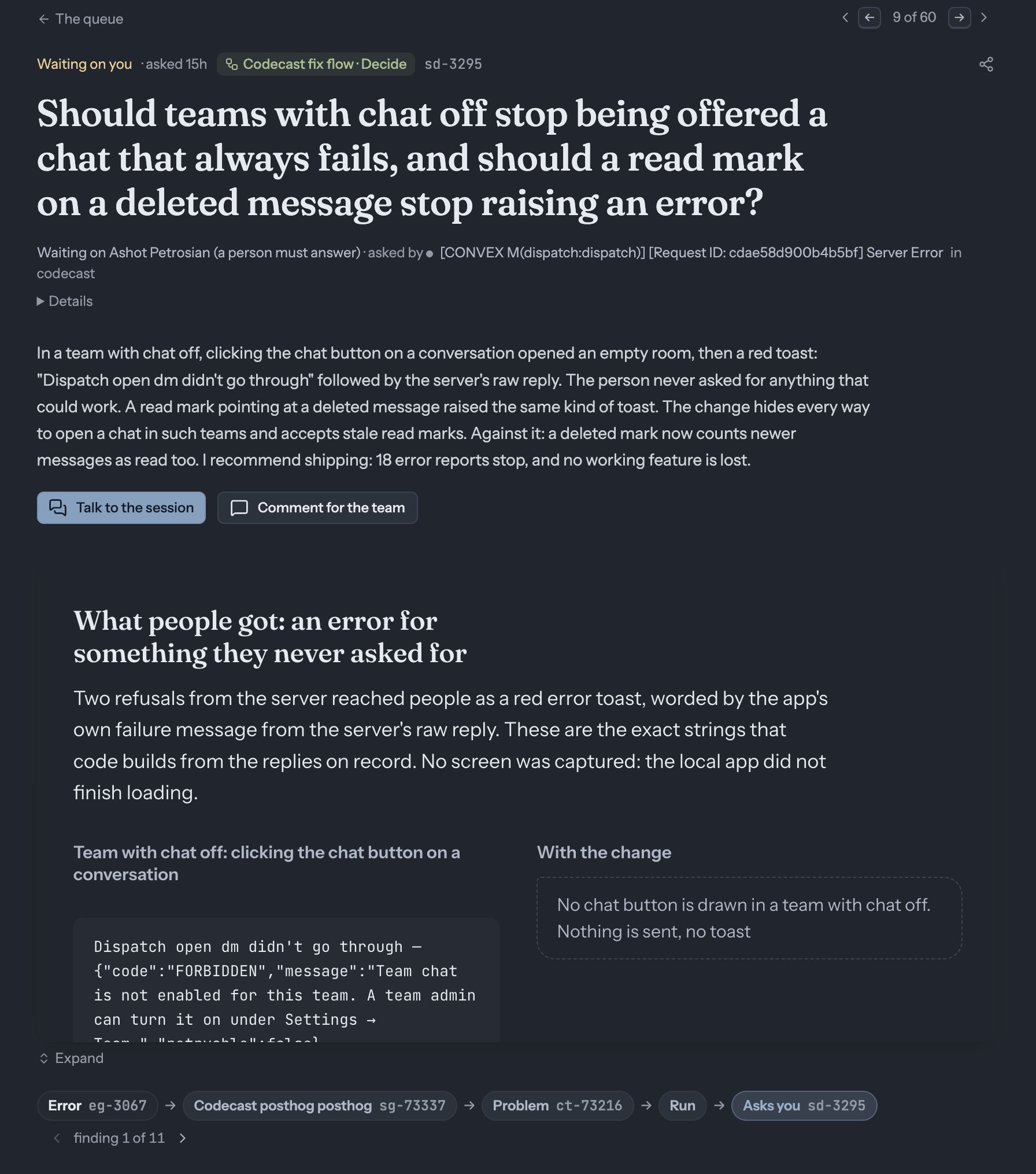
Three things about this card are deliberate. The question is about people, not code: whether teams with chat off should stop being offered a chat that always fails. The summary names the cost of saying yes, that a read mark on a deleted message now counts newer messages as read. And the panel shows what people actually saw, the exact toast, next to what they see after. Where the card could not show something, it says so: no screen was captured, because the local app did not finish loading. The code, the diff and the test runs sit one click further in, for whoever wants them.
The row of links under it is the trace. The error report, the signal it became, the problem, the run and the card each open in one click, so a question about why this change exists is answered by following the row, not by asking around.
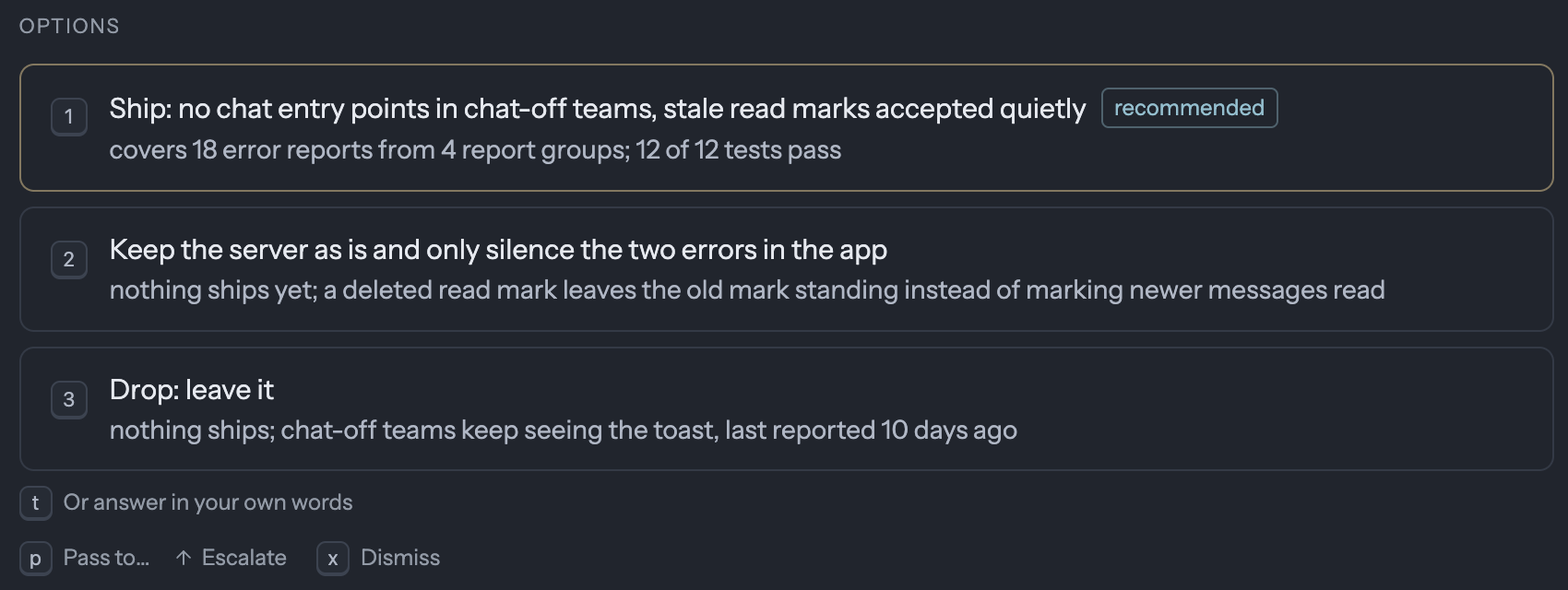
Every option says what follows from it: what ships, how many reports it covers, what stays broken. The engineering lead, an agent that owns this area, reads the card first and adds its recommendation. You can also answer in your own words, which goes back to the builder as your note, talk the change over with the session that wrote the card, or pass it to a teammate.
Ship, watch, learn
Ship lands the change the project's way. The problem is then watched for seven days, counted from the moment the deploy carrying the fix went live. A signal with one of its fingerprints during that window reopens it, with the new evidence attached. A watch that ends quiet closes the problem as fixed. That is what the bottom row of the loop counts: on our screen, nothing came back.
When you answer Revise or Drop with a note, the note doesn't just go back to the builder. The factory files it as a lesson: a signal proposing the instruction, lint rule or test that would have prevented the miss. That is the Lessons source in the table above. The factory learns from the cards you send back, in the same pipeline as everything else.
We judge the factory by three numbers, none of them a count of open findings, since that only tracks traffic. How many times a day the product breaks one of its written expectations, which should fall. What share of new signals land on a problem the factory already knows, which should be high. And of the watches that ended, what share ended quiet, which says whether shipped fixes actually fix things.
Your own sessions use the same checks
Most changes don't start as an error report. Someone asks an agent for a feature, or fixes something they noticed. Those go through the same checks. Every session you own has a Ship button that sends its change through a flow, with your team's default picked.
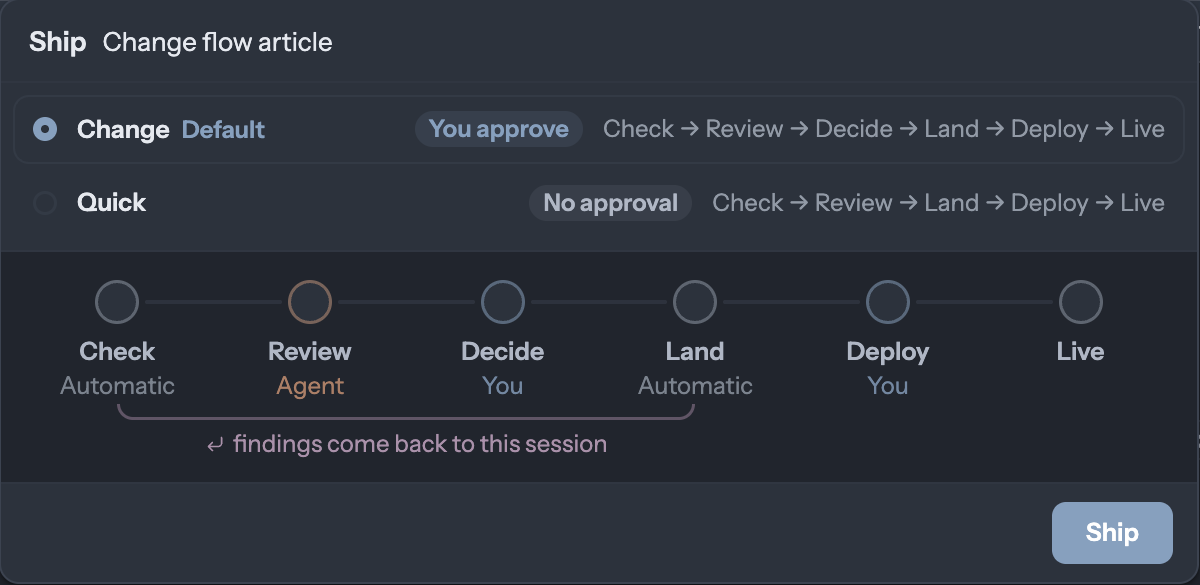
The Change flow skips proving, since the session that made the change already knows what it is for, and goes straight to the checks. What they find goes back to that session, in its own thread, and the fixed change starts again at Check, so what lands is exactly what was reviewed and approved. Quick is the same without Decide, for small changes in areas where you trust the checks.
Where ours stands
Our own factory was switched on yesterday, which is why the screens above show nothing shipped by it yet: four cards are waiting on a person, and the first watch hasn't started. Another product our team builds has run on it for weeks. There, 365 signals came in on a single day, the factory holds 12,269 problems from them, 59 changes have shipped and are being watched, and 7 of those came back and reopened. Nine of its seventeen roles are trusted to merge their own changes without a person; the rest still ask.
The numbers that don't flatter us are on the screen on purpose. Codecast-backend has been silent for 27 days, two sources file nowhere, and most of the failed runs in our flow stopped at Prove. Each of those is now a thing someone can act on.
What you need
The Codecast app on the computers where your agents run, with Workflows switched on in Agent features. Connect a source or two from Sources to watch: your error tracker, product analytics, CI. Give your repository a check command, the one you would run before pushing. Then pick a flow from the library, give it an owner, and turn it on. You don't need a team for any of it: on your own, every card comes to you. The workflows guide covers runs, gates and writing a flow of your own.
For people who script: cast flow ls lists the flows and the live ones with their queues, cast flow run change sends a session's own edits through the Change flow, and cast signal add files a signal by hand.
Codecast records every coding agent session you run, on any machine, and gives you one place to see them, steer them and answer them, on your own or with your team.
The screenshots are the Codecast web app in Chrome on 2026-11-15, signed in to the founder's account, from a local build of the app and the Codecast team's own workspace. The three Flows screens were drawn at a narrower width than the window so their text reads here; nothing else about them was changed. The card is decision sd-3295 on problem ct-73216, unanswered when it was captured, cropped to its question and its options. The change's story is told from the problem's own record and its run. The other product's numbers are from its Flows page on the same day. The two diagrams are drawn from the flows' definitions. Nothing was composited or retouched.