What your team sees
Sharing your Claude Code sessions with a team is a great idea right up to the session where you pasted a customer's data. Codecast answers with two dials, a dry run, and one command that shows the whole picture.
The question everyone asks on day one
A team that adopts codecast gets the thing it came for in an hour: everyone's agent sessions, in one inbox, searchable, steerable from a phone. Then somebody asks the question that decides whether the tool stays installed. Which of my sessions can they read? The honest answer has to be per folder, per team, and per session, because a laptop runs agents on the work repository, on a side project, and on a scratch folder full of pasted secrets, and those three should not share a rule.
This week we shipped that answer as one command. cast sharing prints everything that uploads from this machine and what each team can see of it. Here it is on the machine that writes this blog, trimmed to one team and three folders:
$ cast sharing
Sync
  Every folder on this machine uploads, new ones included.

Teams what each team sees of the sessions you share with it
  …  four other teams  …
  Codecast   Full          the whole conversation; 8 teammates

Folders 130 known, 91 deleted folders that never synced hidden (--all lists every one)
  ~/src/codecast                            Codecast, all sessions   11,315 synced, 7 shared one by one, 2 kept private, 1,565 on this machine, Dec 9, 2025 to today, codecast-sh/codecast
  ~                                         private                  24,423 synced (with 44 folders inside), 263 shared one by one, 7 kept private, 46 on this machine, May 1, 2024 to today
  ~/src/platform                            private                  15 synced, 1 kept private, 9 on this machine, Aug 26 to Sep 18
  …  36 more folders, most of them private  …

Change with cast sharing sync, unsync, share, private, lock, team or session. cast sharing --help explains each.
Two settings decide everything, and the overview shows both. Sync is whether a folder's sessions upload at all; on this machine every folder does, and they land private. Sharing is who can open what uploaded. In this excerpt one folder is shared with a team, the codecast repository itself: every session in it, from December, across every checkout and worktree, because a rule covers a repository and not a path. The rest is private, which is the default for a new folder and the state you get without doing anything.
Two dials, not one
The folder rule says which sessions a team may see. A second dial, set per team, says how much of them. Four levels, from the command's own help:
Each team also has a level for you: what teammates see of anything shared.
  hidden   Your sessions never appear to this team.
  activity Teammates see that you are working and where, with no titles or content.
  summary  Teammates see what each session was about, not the conversation itself.
  full     Teammates can open and read every session you share with this team.
The middle two are the ones a new team wants and most tools do not have. Activity is the office you can see across: your teammates know you are working and in which repository, and nothing else. Summary is the standup without the meeting: what each session was about, one line, and the transcript stays yours. A team can start at summary on its first day and move to full when it trusts the record, and raising the level applies to new sessions only unless you say otherwise.
Here are both dials in the web app, on the Sync & Privacy settings page: the team's level on the group header, and the repository's rule on the row beneath it, with the count and date span of what that rule exposes:

See before you share
The count on that row is the part that matters. A share is a decision about thousands of transcripts you did not reread, so the command tells you what a share would expose before it does anything. This is a dry run against a private folder on this machine, and it changed nothing:
$ cast sharing share ~/src/platform --team Codecast --dry-run
dry run  Codecast would see ~/src/platform: 15 sessions, Aug 26 to Sep 18. 1 session you hid by hand stay hidden.
Codecast: 8 teammates, level Full, so they see the whole conversation of what you share.
Fifteen sessions, a date range, one session that stays hidden because it was hidden by hand, and a reminder of the level the team is at. A share can also start from a date (--from today), so the past stays private while the future is shared, and it can name sessions to keep out. The dry run is the same either way.
Down to the session
Rules are about folders, and the exceptions are about sessions. Inside a shared repository, any single session can be kept private, whatever the folder's rule says. The listing for a folder shows the verdict per session:
$ cast sharing sessions ~/src/codecast
~/src/codecast  11,305 sessions on codecast, Codecast, all sessions
  2026-09-24  shared                Org review conversation prompt                                jx71bgvnytnt52bm5d0j8atn8h8f01jk
  2026-09-24  shared                Desktop link routing                                          jx7e4etshj20w91rvj307g4jch8f0c75
  2026-09-24  shared                Cast browser bookmark animation                               jx74tvj4habe5zywrcth13dm2h8f0qm0
  2026-09-24  kept private          Codecast sharing setup                                        jx72nc0jmfj592gb6bx3324z718f0fft
  2026-09-24  shared                Session profiles missing                                      jx7fw61vhjypttfkwhdnwqnvq58f1xz8
  2026-09-24  shared                Cast sharing CLI review                                       jx70yehcnr27y82pz25ngza6vs8f1fcv
  …  11,299 more rows  …
Look at the fourth row. A session titled Codecast sharing setup is kept private, in a repository whose rule shares everything else. That is the shape of the thing: a wide rule, and exact exceptions, both visible in the same list.
There is one more option for folders that must never be shared, whatever anyone does later: cast sharing lock. A locked folder cannot be shared by any rule, from any checkout of the repository, until you lift the lock yourself. It is the setting for client work.
Or let an agent decide with you
The settings page opens with an offer. An agent will read your folder names and session titles, recommend what should sync and what each team should see, and ask before it changes anything. The conversation it has with you stays private, which is the only acceptable property for a conversation about what to keep private.
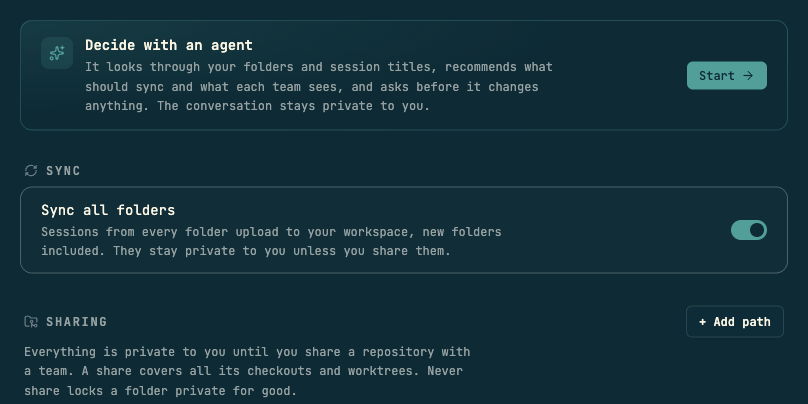
Every change, from the command or the page, prints the command that reverts it. So the first team day goes like this: install, everything uploads private, share the work repository with the team at the level the team is ready for, keep the odd session out by name, and lock the folder that should never travel. Then your teammates see your sessions, and only the ones you meant.
Codecast is where your team sees, steers, and remembers every coding agent session — any agent, any machine.
All four terminal captures are genuine cast sharing output from the author's machine on 2026-09-24, and no command shown changed a setting. The overview is trimmed to one of five teams and three of thirty-nine listed folders; the session list keeps six of its rows; each omission is marked …. The levels block is the command's own help text. Both screenshots are the Sync & Privacy settings page in the codecast web app, cropped to one team's group and to the page header; the other teams' groups and the private folder rows are outside the crops.