cast browser: your agents get a tab in the Chrome you are already signed in to
No fresh profile and no sign-in walls: each session drives a background tab in your own Chrome, and the evidence lands in the thread.
Most browser automation for agents starts a fresh, empty browser: no cookies, no SSO, no staging login. The agent then spends its effort on sign-in walls, or you paste session tokens into its context. cast browser takes the opposite route. A Chrome extension, paired once per machine, lets every agent session on that machine drive tabs in the Chrome profile you already use. If your Chrome can open a dashboard behind SSO, the agent can read it. Nothing about your profile is copied or synced anywhere.
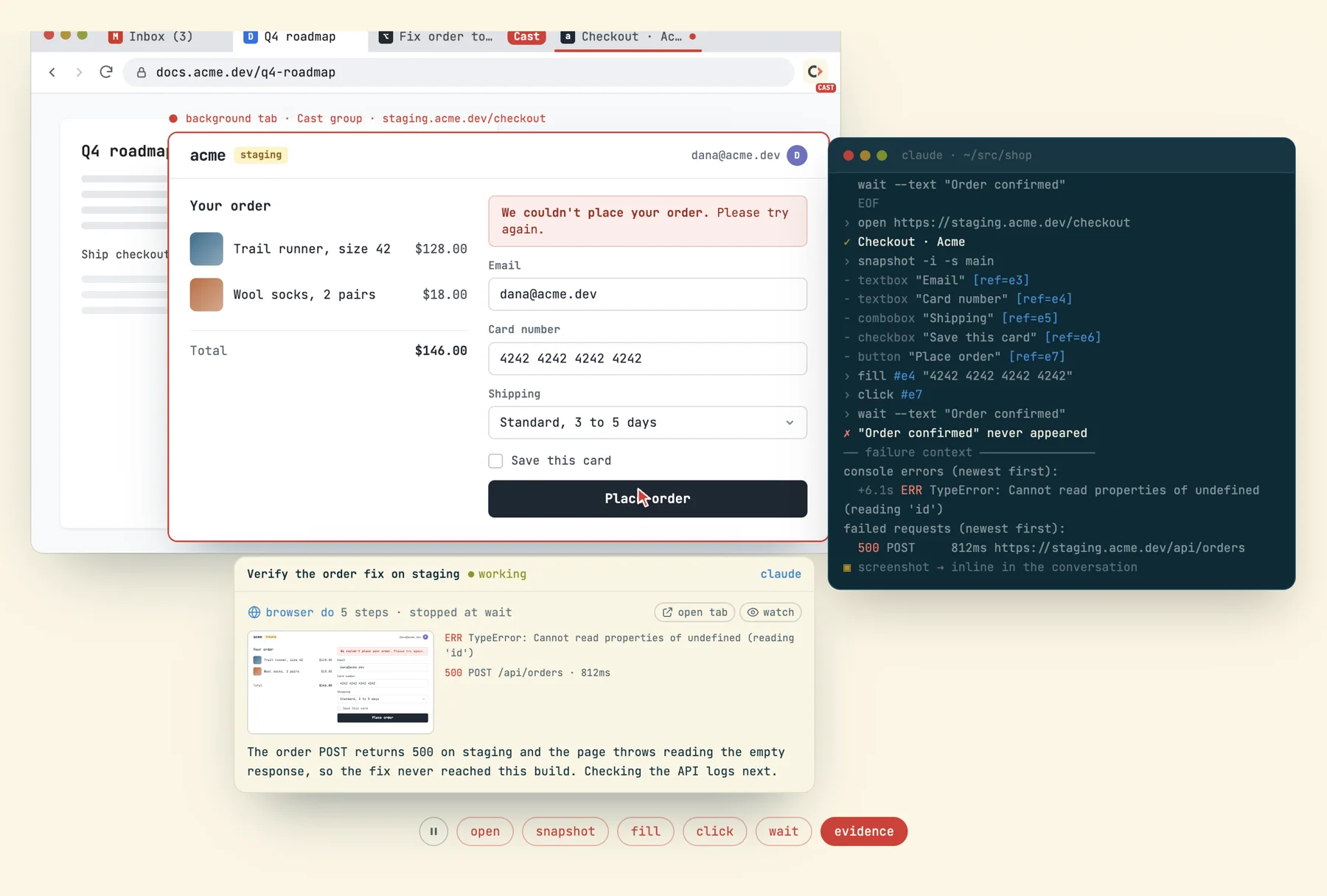
do run stops at the failing step, and the console error, failed request and screenshot land in the conversation without anyone asking for them.One background tab per session
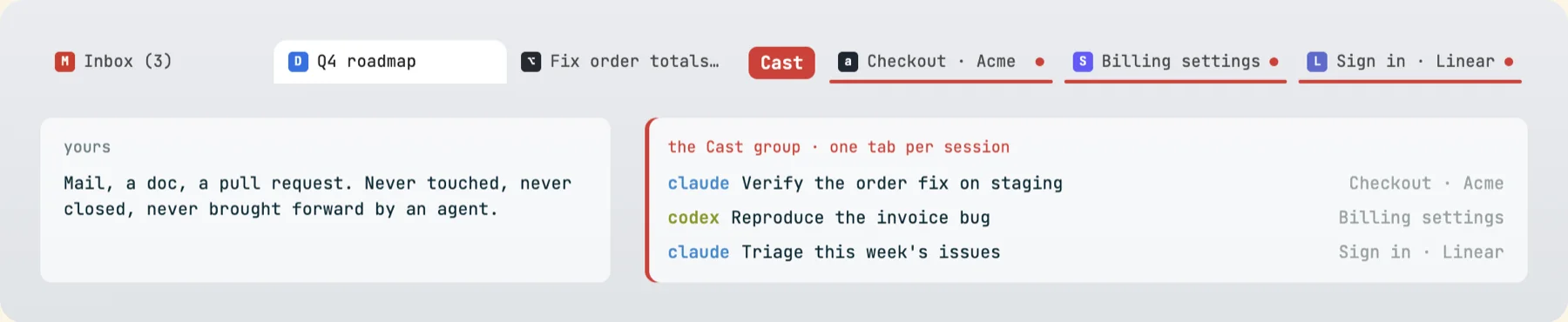
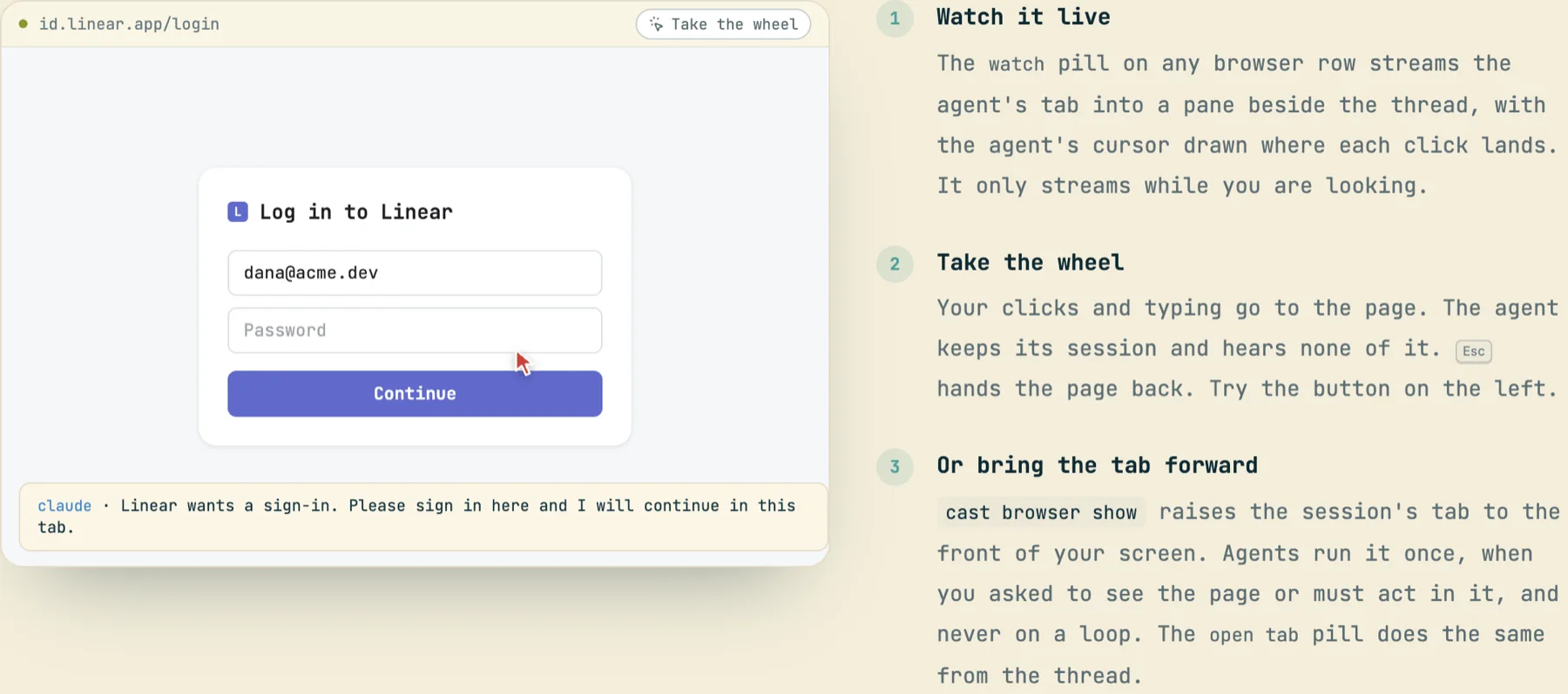
Every agent tab opens in the background, inside a red tab group named Cast. cast browser open <url> creates the tab directly at the URL; a later open reuses the same session's tab instead of piling up new ones. tabs lists this session's tabs, tabs --all every agent's, so several agents on one Chrome never step on each other or on your tabs. Your window, tabs and focus stay where you left them. The screen only changes when an agent runs cast browser show, which agents are told to do only when you asked to see the page or must act in it (a sign-in, a permission prompt), once, never on a loop.
You can always tell who is driving: a driven page wears a thin red border (hidden from screenshots), the toolbar icon carries a CAST badge, and Chrome shows its own debugging banner while a tab is attached. When the work is done the agent runs cast browser stop to close its tab.
Snapshot, then act on a ref
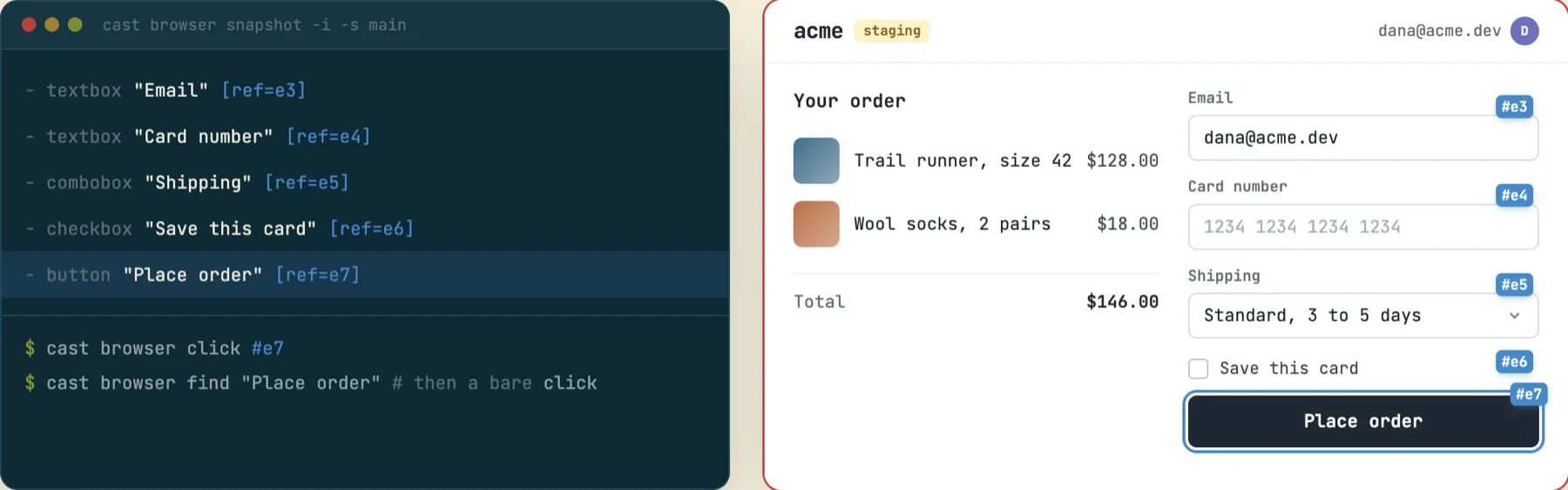
The page is read as an accessibility tree, cut down to the things an agent can act on, and every element gets a short ref like #e7. Acting verbs take a ref, so there is no pixel guessing and no brittle CSS selector. When the agent can name the target it skips the snapshot: find "Place order" followed by a bare click. Namesakes are numbered (find "Delete (3rd)"), visible elements rank first, and refs survive a re-render: each snapshot records a ref's role, name and position among its namesakes, so a stale #e5 is re-found at the same position after a refresh. diff snapshot prints only what changed since the last read, and read returns the page as clean text.
Batch with do
Each cast invocation spends one to three seconds starting the CLI for roughly 85 ms of actual browser work. cast browser do runs a whole flow in one process, one step per line. A step without a ref acts on whatever the last find matched, so the flow reads like instructions to a person. It stops at the first failing step and reports what ran and what never did (--keep-going carries on), and waits are for the state you mean (wait --text, --url, --load, --fn), never a fixed sleep.
$ cast browser do - <<'EOF'
open https://staging.acme.dev/checkout
snapshot -i -s main
fill #e4 "4242 4242 4242 4242"
click #e7
wait --text "Order confirmed"
EOF
› open https://staging.acme.dev/checkout
✓ Checkout · Acme
› snapshot -i -s main
- textbox "Email" [ref=e3]
- textbox "Card number" [ref=e4]
- combobox "Shipping" [ref=e5]
- checkbox "Save this card" [ref=e6]
- button "Place order" [ref=e7]
› fill #e4 "4242 4242 4242 4242"
› click #e7
› wait --text "Order confirmed"
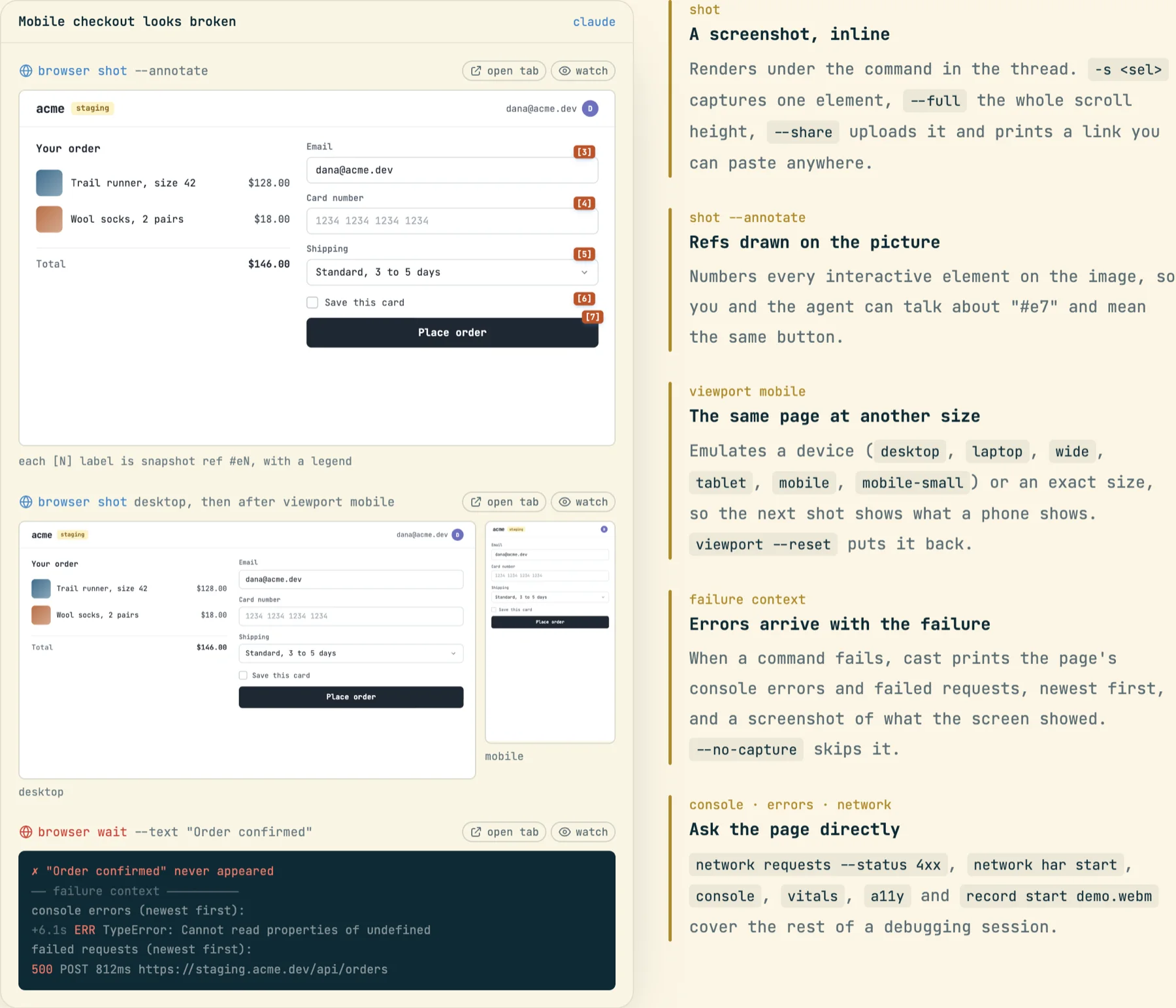
✗ "Order confirmed" never appeared
── failure context ────────────────
console errors (newest first):
  +6.1s ERR TypeError: Cannot read properties of undefined (reading 'id')
failed requests (newest first):
  500 POST 812ms https://staging.acme.dev/api/orders
▣ screenshot → inline in the conversation
(The flow and its output are the fixture shown on codecast.sh/features/browser, not a live run.)
Evidence flows into the thread
You should not have to ask an agent for proof. A screenshot renders under the command that took it; shot --annotate draws the ref numbers onto the image so you and the agent mean the same button by #e7; viewport mobile emulates a device so the next shot shows what a phone shows. When any command fails, cast attaches the page's console errors and failed requests, newest first, plus a screenshot of what the screen showed. network requests --status 4xx, network har start, console, vitals, a11y and record start demo.webm cover the rest of a debugging session.
Safety model
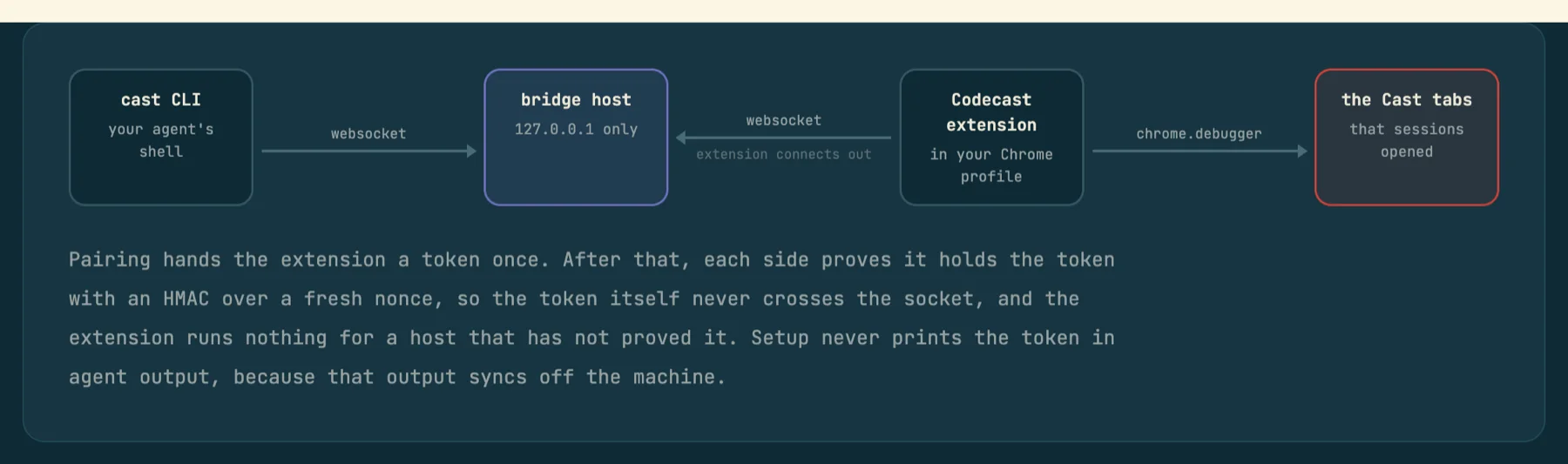
Handing an agent your signed-in browser is a real grant, so the connection never leaves the machine. The CLI talks to a bridge host bound to 127.0.0.1; the extension connects out to it and drives tabs through chrome.debugger. Pairing hands the extension a token once; after that each side proves it holds the token with an HMAC over a fresh nonce, so the token never crosses the socket, and setup never prints it into agent output (which syncs off the machine). An audit trail (cast browser audit) always records the origins agents visit, never full URLs, since paths and query strings carry tokens. An optional per-project allowlist in .codecast/workspace.toml limits where agents may browse; a click or redirect that lands off the list is flagged, not silently allowed.