Cloud hosts: start it on your laptop, let it run on your own cloud box
Send a session to your own EC2 host from the checkout you are in, uncommitted work included, mirror it back live, and move it home mid-turn.
Cloud agent products usually start from a clean clone of main in someone else's sandbox: your uncommitted change, your .env.local, your agent config and your CLI logins are not there. Codecast's cloud hosts are EC2 instances in your own AWS account (Linux, or Mac on dedicated hosts), and --cloud sends a session there from the checkout you are standing in, uncommitted and gitignored files included. Its edits mirror back to your laptop as they happen, and whole batches of sessions move between laptop and host without losing a message.
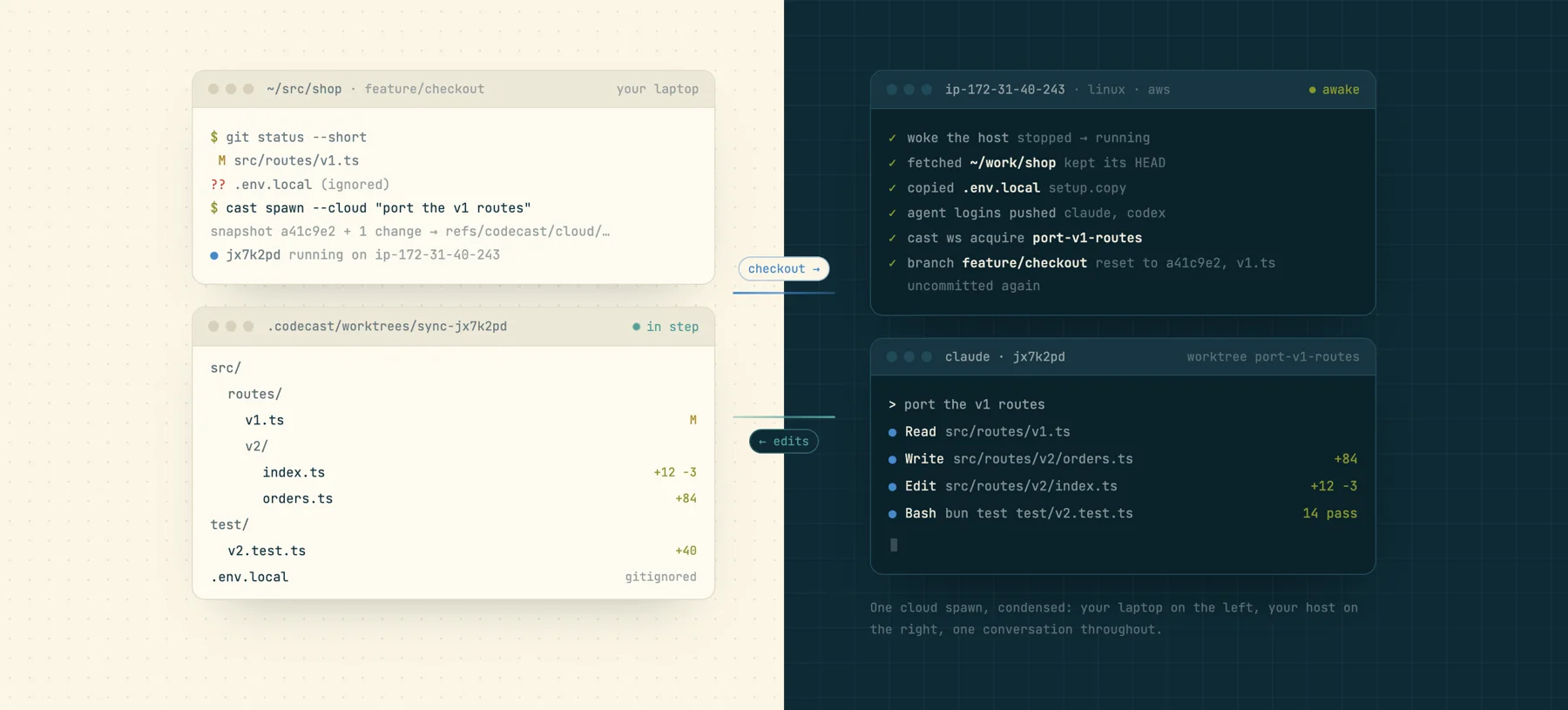
It starts from what is on your screen, not from main
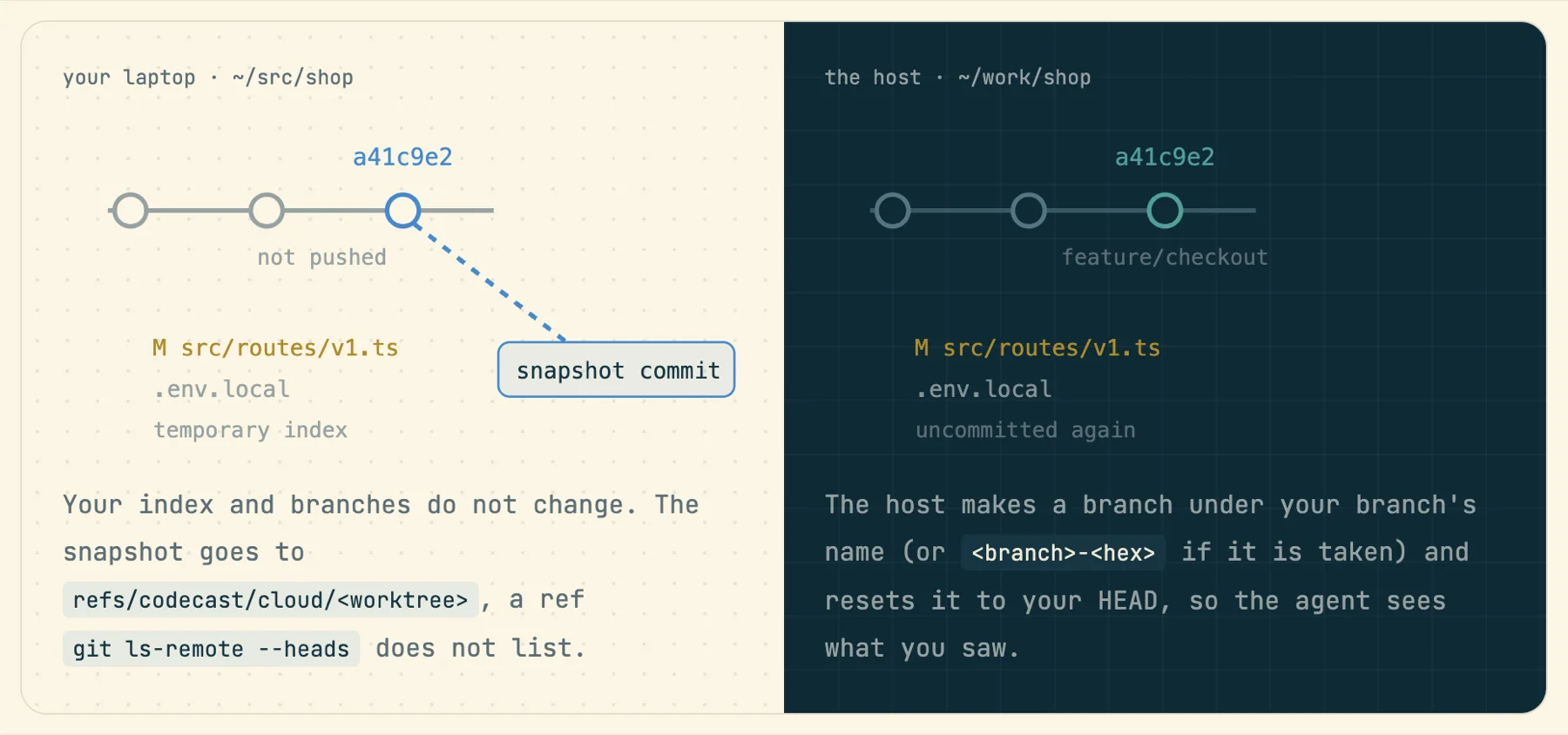
cast spawn --cloud "<task>" snapshots your branch, unpushed commits and uncommitted, untracked and gitignored files using a temporary index, so nothing in your checkout moves. The snapshot goes to a hidden ref, refs/codecast/cloud/<worktree>, which git ls-remote --heads does not list. Then, over SSH from your laptop (none of it through codecast's servers), the host is woken if stopped, the repo at ~/work/<repo> is fetched, files listed under setup.copy are rsynced, and the host runs its own cast ws acquire so each task gets its own worktree with dependencies installed and ports probed on the machine that binds them. The host branch is reset to your HEAD and your uncommitted changes are uncommitted again, so the agent sees what you saw. If the snapshot, push or reset fails, the spawn fails with git's error; it never quietly falls back to origin/main.
# one worktree per task, from this checkout
$ cast spawn --cloud "port the v1 routes" "write the migration"
# a clean start instead of your checkout
$ cast spawn --cloud --from origin-main "audit the build"
# the host's main checkout, one task, new branch
$ cast spawn --cloud --shared "run the migration"
# branch this conversation onto the host
$ cast fork --cloud "try the queue approach" "try the cron approach"
Before a session starts the host is set up like your laptop, minus the secrets it should not hold: agent config and instruction files (.claude, .codex, and so on) and your shell rc files are mirrored with mode 0600; agent and tool logins (Claude, Codex, gh, cf, AWS and others) travel as one bundle over SSH stdin, each file only while its token is live; missing CLIs are installed at your laptop's versions. ANTHROPIC_API_KEY never travels, and Google browser logins are never carried. Anything else the repo needs (Postgres, Redis, a seed script) is declared once in the [host] table of .codecast/workspace.toml and converges on every wake.
Read, run and fix the agent's edits on your laptop
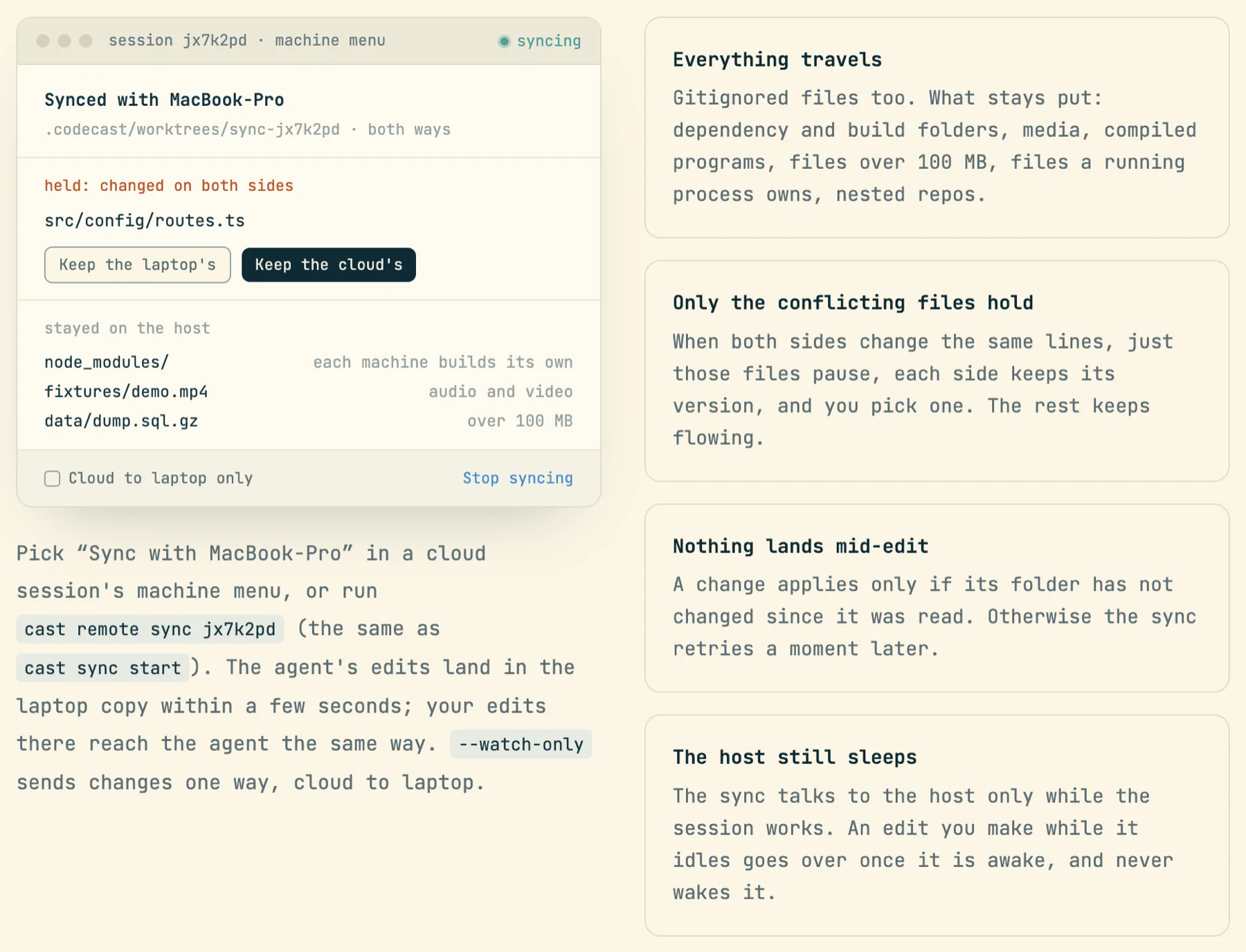
cast remote sync <session> (or "Sync with MacBook-Pro" in a cloud session's machine menu) keeps a copy of the session's folder on your laptop, both ways, a few seconds behind. Open it in your editor, run the tests locally, or fix a line yourself and the agent sees it. Gitignored files travel too; dependency and build folders, media, compiled programs, files over 100 MB and nested repos stay put. When both sides change the same lines, only those files pause and you pick a side; the rest keeps flowing. A change applies only if its folder has not changed since it was read, so nothing lands mid-edit. From the host, the agent can ask for what is missing with cast sync pull .env.local or cast sync pull --ref feature-x.
Move twenty sessions before you close the lid
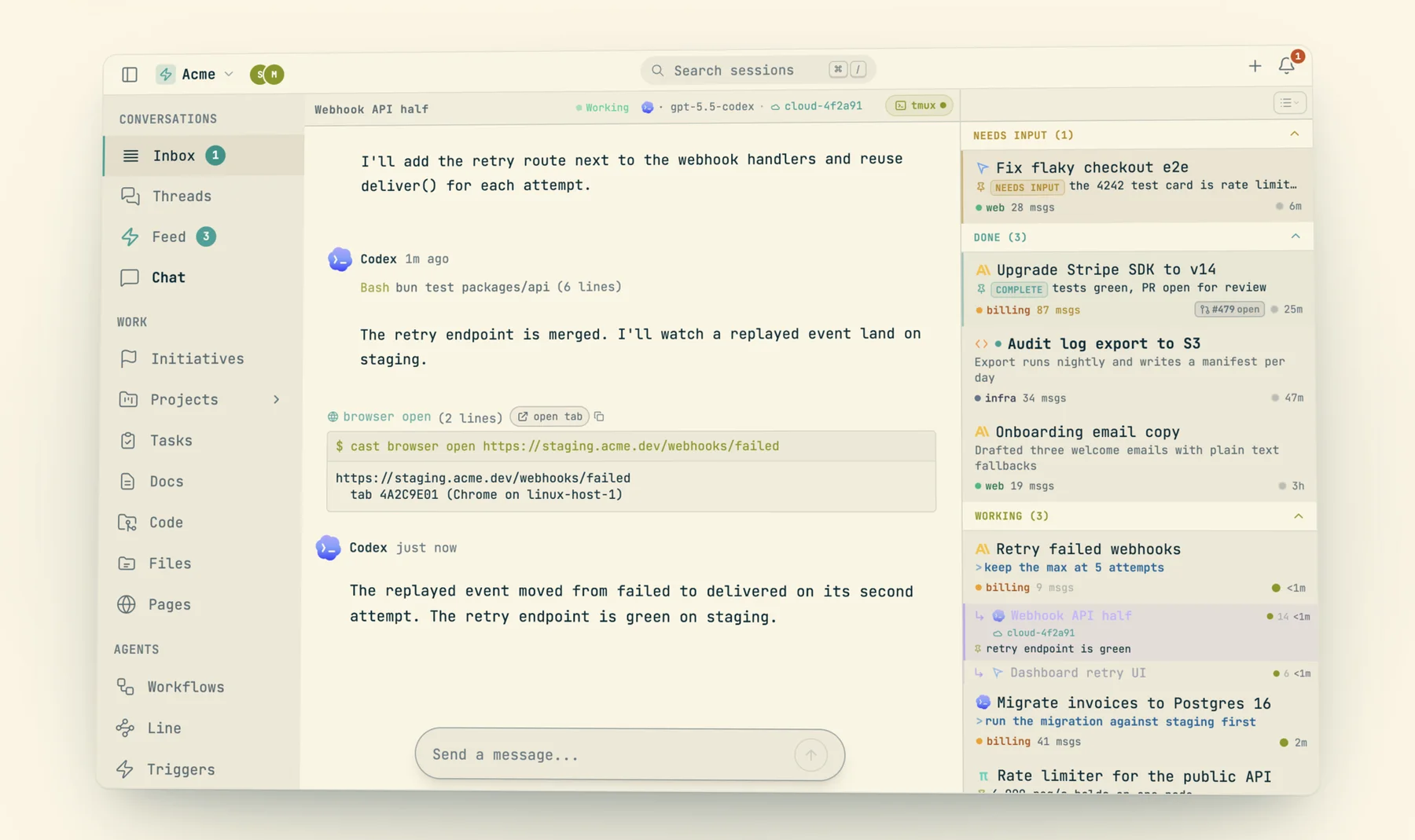
cast migrate moves many sessions between laptop and host as one batch, either direction. Each session goes through five steps: Fence (no daemon delivers into it; messages sent now are held and ride the resume), Wait (a mid-turn session finishes its turn, up to --wait minutes, 10 by default, then it is interrupted and the row says so), Quiesce (the agent stops so the transcript on disk is final), Transfer (worktree by git over SSH, gitignored files, transcript with paths rewritten) and Flip (owner and path move in one write; the destination resumes). The thread gets a divider, Now running on ip-172-31-40-243 (was MacBook-Pro), and the agent is told which machine it is on now.
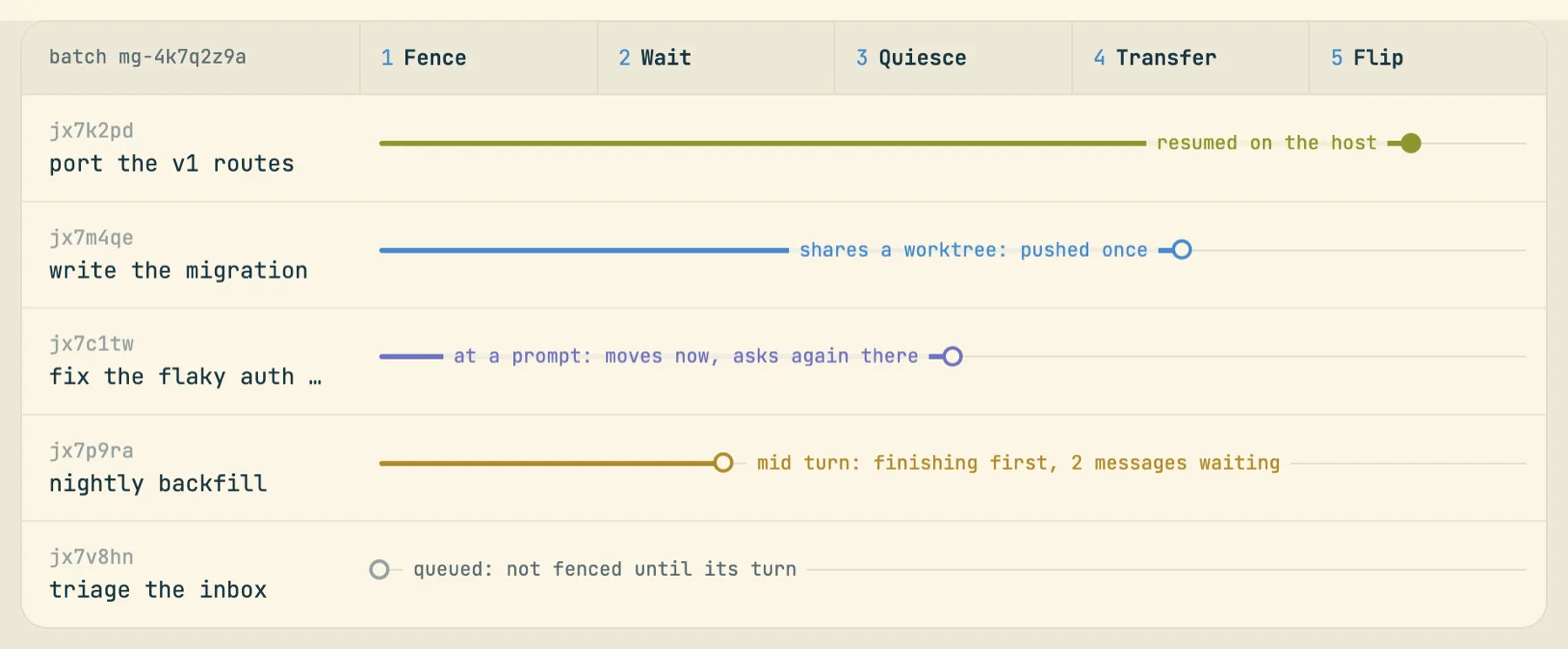
$ cast migrate start --to ip-172 --label rollout --dry-run
  would move  jx7k2pd   port the v1 routes  (MacBook-Pro → ip-172-31-40-243)
  would move  jx7m4qe   write the migration  (MacBook-Pro → ip-172-31-40-243)
  would move  jx7p9ra   nightly backfill  (MacBook-Pro → ip-172-31-40-243)
  skip       jx7q0aa   review the diff: only Claude Code sessions can be transferred
  skip       jx7r5bb   lint pass: a subagent moves with its parent
dry run: 3 would move to ip-172-31-40-243, 2 skipped
$ cast migrate start --to ip-172 --label rollout --wait 20
$ cast migrate show mg-4k7q2z9a
(Output from the feature page's fixture. Selectors are real: --label, --from, --project, --all and short ids, which combine; --concurrency sets how many transfer in parallel, 2 by default.)
Hosts cost money while they run, so a provisioned Linux host stops itself after 20 idle minutes, counting waiting work, open turns, recent subagent activity, detached tmux work and CPU as busy (an idle prompt does not count). Work queued for a sleeping host is picked up by your laptop daemon, which boots it. Limits worth knowing: only Claude Code sessions with a transcript migrate; host-to-host moves are not supported; starting and moving work needs a laptop online, though a running session keeps going with the lid closed; and the host pushes with a one-hour, one-repo GitHub App token, so opening a PR needs gh auth login there.