Mods: agents extend the codecast app itself
Panes, palette commands, new kinds of objects and rich fenced blocks, built by an agent in the thread while you watch.
Most tools let an agent change your code. Codecast also lets an agent change the tool. A mod is one small folder that adds panes, palette commands, sidebar sections, whole new kinds of objects (bug-14, inc-3) and fenced blocks that draw richly wherever markdown renders, and optionally a local half that runs on your own machines. It runs sandboxed, reads your sessions, tasks, plans and pull requests from the app's local store, and goes live in every open window seconds after a push. When someone wants a dashboard, a tracker or a control inside codecast, the agent builds it as a mod, in the conversation, with the person watching.
What a mod is
The folder holds codecast-mod.json (name, grants, and what it adds), ui.tsx (the sandboxed half), an optional local.ts, and codecast-mod.d.ts, which types the whole API, every element and every event. Both halves use one shape: on(event, matcher?, ($, e, next) => …). A hook can watch (call next(e)), rewrite (next({...e, x})) or answer (return without calling next). $ is codecast, spelled noun then method: $.data.list, $.tasks.create, $.ui.toast. Surfaces return element trees (Card, Table, Stat, Chart, Tabs, Ref pills and about thirty more) that codecast draws with its own components, so a mod looks native.
cast mod new writes a mod that already works, so the first push shows something real. This is real output, run in a scratch folder:
$ cast mod new standup-board
Created standup-board/
  codecast-mod.json
  ui.tsx
  tsconfig.json
  codecast-mod.d.ts
  .gitignore

Next: read codecast-mod.d.ts, change ui.tsx, then cd standup-board && cast mod push
It goes live at https://codecast.sh/m/standup-board/main; that link alone on a line in a reply shows it inside the conversation.

$ cd standup-board && cast mod build
  hooks: command.run{command:open}, ui.render{fence:standup-board-note}, ui.render{pane:main}
  calls: $.data.list, $.sessions.open, $.tasks.create, $.ui.open, $.ui.toast
  reads: sessions
ok standup-board: 7.9 KB, types checked

$ cast mod inspect
standup-board
  hooks:    command.run{command:open}, ui.render{fence:standup-board-note}, ui.render{pane:main}
  calls:    $.data.list, $.sessions.open, $.tasks.create, $.ui.open, $.ui.toast
  reads:    sessions
  grants:   read ["sessions"], write ["tasks"], fetch []
  panes:    main
  commands: open
  fences:   standup-board-note
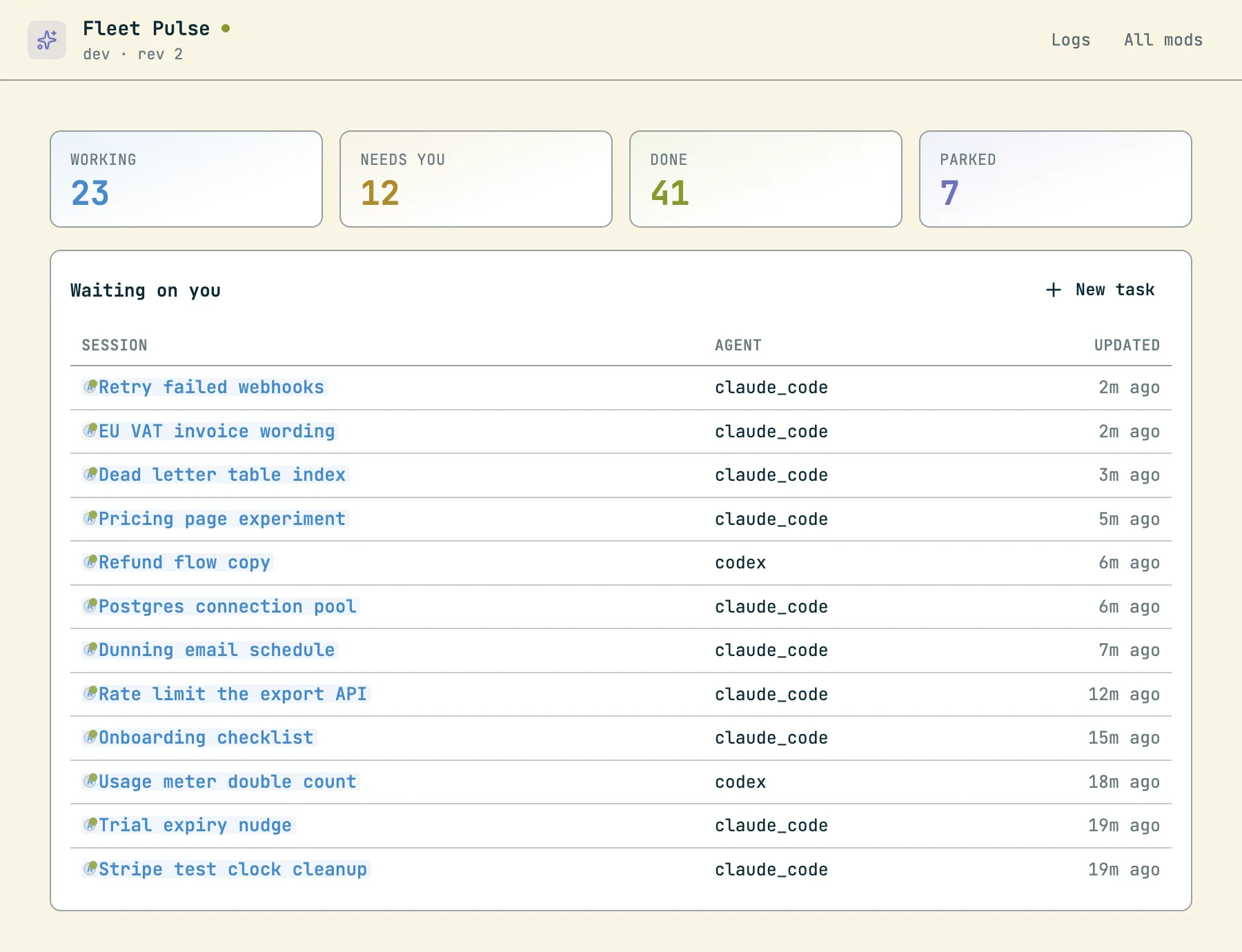
The scaffold's pane is a fleet summary: counts by work state and the sessions waiting on you. An excerpt of the generated ui.tsx:
export const register: Register = (on) => {
  on("ui.render", { pane: "main" }, async ($) => {
    const sessions = await $.data.list("sessions", {
      sort: "updated_at", order: "desc", limit: 300,
      fields: ["title", "state", "updated_at", "agent_type", "project"],
    });
    const count = (state: string) => sessions.filter((s) => s.state === state).length;
    return (
      <Grid columns={4} gap={3}>
        <Stat label="Working" value={count("working")} tone="blue" />
        <Stat label="Needs you" value={count("needs_input")} tone="yellow" />
        …
    );
  });

  on("command.run", { command: "open" }, async ($) => { await $.ui.open("main"); });

  // Any agent can now write a ```standup-board-note block and it draws like this.
  on("ui.render", { fence: "standup-board-note" }, async ($, e) => (
    <Card tone="blue"><Markdown text={e.props.code} /></Card>
  ));
};
What a mod can add
| Contribution | What it does |
|---|---|
| Panes | Pages at /m/<mod>/<pane>: open in tabs, splits, the palette, or full width. |
| Palette commands | Run the mod's code from the command palette with no page change. |
| Fences | The mod claims a block type (bug, incident, never a programming language). Every markdown pipeline, messages, docs, comments and cards, draws that block through the mod. With the mod off it renders as plain code. |
| Sidebar sections | A section under the app's nav, such as "Open bugs". |
| Object kinds | New first-class objects with per-workspace numbering, statuses and typed fields. Their short ids render as live pills anywhere prose renders; each kind gets a board at /objects/<prefix> and a page per object. Agents use cast obj. |
| Local halves | A Bun Worker the codecast daemon runs on machines where a person approved it: files, processes, network. It publishes values the UI reads and answers the UI's calls. |
| Agent guidance | A note in the manifest that cast mod guide prints for every agent, so agents learn the mod's blocks and objects from the CLI rather than from edited instruction files. |
Mods teach agents new nouns
A mod with an object kind changes what agents do. These are real reads from this workspace, where two showcase mods add bugs and incidents:
$ cast obj kinds
bug      Bug (Bugs)  from bug-desk
         statuses: triage -> open -> fixing -> fixed
         fields:   area (text), repro (markdown), session (ref), severity (enum: p0|p1|p2|p3)
inc      Incident (Incidents)  from incident-desk
         statuses: investigating -> identified -> mitigated -> resolved
         fields:   block (text), service (text), session (ref), severity (enum: sev1|sev2|sev3|sev4)

$ cast mod guide
## Bug Desk
Bugs as first-class objects: agents file them from a ```bug block, you triage them on one board.

When you find a bug you are not fixing in this session, file it instead of mentioning it in passing:
cast obj create bug "<one line>" --set severity=p0|p1|p2|p3 --set area=<where> --set session=<this session's id>.
To propose one for the person to decide on, write a ```bug block (title:, severity:, area:, then the repro)
and they file it with one click.
- ```bug blocks draw through it: A bug report an agent proposes; one click files it
- Bug objects (bug-N): cast obj create bug "<title>" [--set <field>=<value>]
…
## Repo Pulse
Every repo under ~/src at a glance: branch, uncommitted files, commits ahead, and this machine's load.
Read live from your laptop by the mod's local half.
So an agent that notices a bug it is not fixing writes a ```bug block in its reply; the person sees a rendered card with a "File it" button instead of a paragraph that scrolls away, and the result is a bug-N object that renders as a live pill everywhere it is mentioned.
Building in the thread
The authoring loop is cast mod new, then build (bundle, typecheck, and a static check of the code against the grants in the manifest), then push, which is live in every open window within seconds. The trick that makes it conversational: a mod pane link alone on its own line in a message, like https://codecast.sh/m/standup-board/main, renders the running pane inside the conversation, and every later push redraws it there. The agent pushes, puts the link in its reply, reads cast mod logs <name> for anything that threw, and asks what to change. cast mod dev pushes on every save. When it is right, cast mod publish -m "<note>" makes a numbered version with its source, which versions, pull and rollback work on.
$ cast mod ls
on  bug-desk                 dev   rev 5    Bug Desk
on  fleet-pulse              dev   rev 2    Fleet Pulse
on  incident-desk            dev   rev 3    Incident Desk
on  repo-pulse               dev   rev 2    Repo Pulse
on  task-board               dev   rev 3    My Open Tasks
on  waiting-on-me            dev   rev 6    Waiting On Me
(Real output, trimmed: each row also prints the mod's last logged error, which on this heavily loaded machine was a 20 second load timeout.)
The trust model
The sandboxed half runs in an opaque-origin iframe with scripts only: no same-origin access, no forms, no top navigation, and a content security policy that limits network calls to the origins the manifest declares. Every read checks permissions.read and every write permissions.write, and a mod writes only the object kinds it declares. The context a mod sees carries the viewer's id and name, never their email. A teammate's mod runs only once you install it, at the grants you installed it with; if a new version widens its grants it stops until reviewed. A local half runs only at a version whose code hash that machine approved, computed by the runner from the code it runs, never taken from the server, and approval is a person typing the mod's name at a terminal (! cast mod approve <name>). Agents are told they cannot approve their own.